How to Self-Host Plausible Analytics on Coolify in 2026 (Community Edition)
 Hasan Aboul Hasan
Published 2026-07-27
Hasan Aboul Hasan
Published 2026-07-27
Plausible's official compose file crashes on Coolify, so I adapted it, deployed Plausible Community Edition on a fresh VPS, and measured everything: 76 seconds to install Coolify, about 600 MB of RAM for the whole stack, and a 16-second upgrade. This guide is that exact setup, paste-ready, plus the three operational things every other tutorial skips.
- Plausible CE v3.2.1 running on your own Coolify server, HTTPS included
- An admin account only you control, with public registration disabled
- A real site sending live pageviews to your own dashboard
- The honest picture: what it costs in RAM, what bots will do to your server, and what an upgrade really takes
Plausible is the analytics tool I recommend when someone wants out of Google Analytics: one script, no cookies, a dashboard you can read in ten seconds. The company sells a hosted version from $9 a month. The same product also ships as a free Community Edition you can run on your own server.
So I did. Fresh DigitalOcean droplet, fresh Coolify, Plausible CE v3.2.1, a real site wired in, real pageviews on the dashboard. The official compose file crashed on the first deploy. I fixed it, measured the whole run, and left the server up overnight to see what the internet does to it.
This guide is that run, written down. Five steps, one paste-ready compose file, exact numbers.
Your analytics domain (optional)
Type the subdomain you'll put Plausible on. Every copyable block on this page updates to use it, so you can paste with no edits. The value stays in your browser only, nothing leaves this page.
Value stays in your browser only, nothing leaves this page.
Why I self-host my analytics
Two reasons, and only one of them is money.
The second reason is ownership. Your traffic data sits in your own Postgres and ClickHouse, on your own box, under your own domain. No third party in the middle, nothing to export later, nothing that disappears when a vendor changes plans.
Now the honest part. Self-hosting is a commitment, yes. You become the person who does upgrades and backups. Plausible themselves argue against it on their site, and their strongest points are real: you get roughly two releases a year instead of continuous updates, and nobody is on call for you. The rest of this guide takes that seriously. I measured what the commitment actually costs, and for me it is a good trade.
What Plausible CE actually is
Plausible Community Edition is the same core analytics product, packaged for your own server under the AGPL license. Three containers: the Plausible app, Postgres for accounts and site settings, ClickHouse for the events. The current version is v3.2.1.
One thing surprised me: CE versions are git branches, not GitHub releases. The repo has 15 version branches from v2.0.0 to v3.2.1 and an empty releases page. So "check the latest version" means checking the branch list. Cadence over the v3 line works out to about two tagged versions a year.
| Plausible Cloud | Community Edition | |
|---|---|---|
| Price | from $9/mo (10k pageviews), $19/mo at 100k | free software, you pay for the VPS |
| Updates | continuous, managed | ~2 releases/year, you apply them (it's a one-line change, measured below) |
| Server | theirs | yours: 2 GB+ RAM, SSE 4.2 CPU (a ClickHouse requirement) |
| Your data | on their infrastructure | in your own Postgres + ClickHouse volumes |
| Backups, uptime | included | your job |
The core dashboard, the script, the privacy model: the same product. What changes is who operates it, and a few Cloud-only extras I cover in the gotchas.
Step 1: Get a VPS with Coolify on it
You need a server with at least 2 GB RAM and a CPU with SSE 4.2 (ClickHouse refuses to run without it; every recent x86 VPS I've touched has it, and my test droplet on DigitalOcean confirmed it with one grep). A 2 GB VPS is enough for Plausible plus Coolify itself. Check the VPS directory if you're still picking a provider.
If Coolify is new to you, follow my Coolify starter guide first and come back. The short version:
curl -fsSL https://cdn.coollabs.io/coolify/install.sh | bash
On my fresh Ubuntu 24.04 droplet the install script finished in 76 seconds, then the panel was up on port 8000. Register your Coolify admin account right away. The same claim-it-first rule I'll repeat for Plausible in Step 4 applies to a fresh Coolify panel too.
Step 2: Deploy Plausible CE (the compose that works)
Here is where every existing tutorial quietly fails, so let me show you the failure first.
My first deploy used the official CE compose file straight from the repo. The Plausible container crashed on boot with this:
Config variable HTTPS_PORT must be an integer. Got
Got nothing. That empty space at the end is the whole bug. The official compose passes about 25 optional variables through to the container (HTTPS_PORT, DATABASE_URL, all the SMTP_* family). On plain Docker, an unset variable stays absent and Plausible uses its defaults. Coolify injects every variable the compose references as an empty string instead. Plausible sees HTTPS_PORT="", tries to parse an integer, and dies. I pulled the injected environment out of the container to confirm: every one of those optional vars was there, set to "".
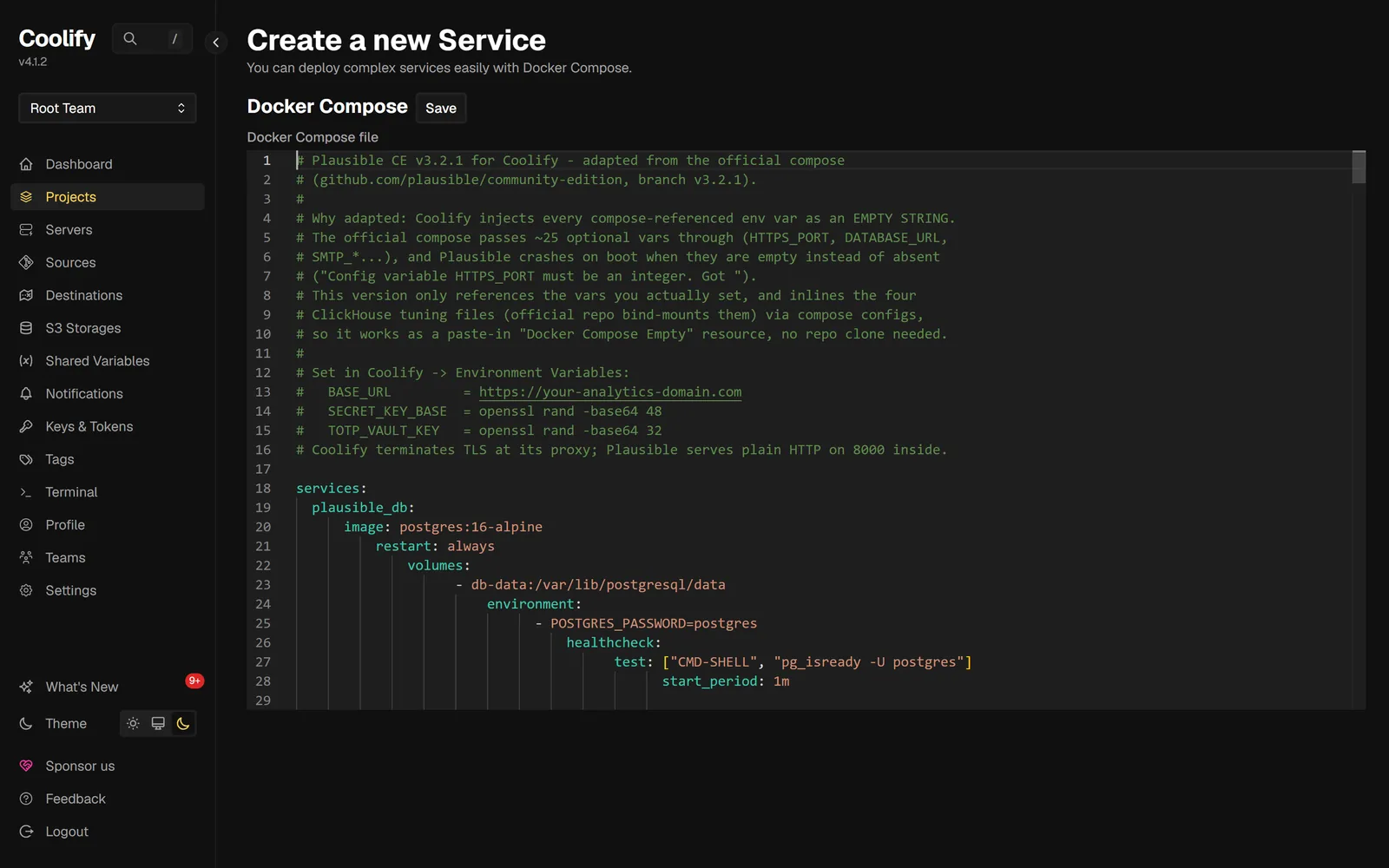
So I adapted the compose. Same three official services and images, but it only references variables you actually set, and the four ClickHouse tuning files the official repo expects you to clone are inlined as compose configs. It works as a pure paste, no repo clone, no extra files:
# Plausible CE v3.2.1 for Coolify - adapted from the official compose
# (github.com/plausible/community-edition, branch v3.2.1).
#
# Why adapted: Coolify injects every compose-referenced env var as an EMPTY STRING.
# The official compose passes ~25 optional vars through (HTTPS_PORT, DATABASE_URL,
# SMTP_*...), and Plausible crashes on boot when they are empty instead of absent
# ("Config variable HTTPS_PORT must be an integer. Got ").
# This version only references the vars you actually set, and inlines the four
# ClickHouse tuning files (official repo bind-mounts them) via compose configs,
# so it works as a paste-in "Docker Compose Empty" resource, no repo clone needed.
#
# Set in Coolify -> Environment Variables:
#   BASE_URL         = https://your-analytics-domain.com
#   SECRET_KEY_BASE  = openssl rand -base64 48
#   TOTP_VAULT_KEY   = openssl rand -base64 32
# Coolify terminates TLS at its proxy; Plausible serves plain HTTP on 8000 inside.

services:
  plausible_db:
    image: postgres:16-alpine
    restart: always
    volumes:
      - db-data:/var/lib/postgresql/data
    environment:
      - POSTGRES_PASSWORD=postgres
    healthcheck:
      test: ["CMD-SHELL", "pg_isready -U postgres"]
      start_period: 1m

  plausible_events_db:
    image: clickhouse/clickhouse-server:24.12-alpine
    restart: always
    volumes:
      - event-data:/var/lib/clickhouse
      - event-logs:/var/log/clickhouse-server
    configs:
      - source: ch-logs
        target: /etc/clickhouse-server/config.d/logs.xml
      - source: ch-ipv4-only
        target: /etc/clickhouse-server/config.d/ipv4-only.xml
      - source: ch-low-resources
        target: /etc/clickhouse-server/config.d/low-resources.xml
      - source: ch-profile-low-resources
        target: /etc/clickhouse-server/users.d/default-profile-low-resources-overrides.xml
    ulimits:
      nofile:
        soft: 262144
        hard: 262144
    environment:
      - CLICKHOUSE_SKIP_USER_SETUP=1
    healthcheck:
      test:
        [
          "CMD-SHELL",
          "wget --no-verbose --tries=1 -O - http://127.0.0.1:8123/ping || exit 1",
        ]
      start_period: 1m

  plausible:
    image: ghcr.io/plausible/community-edition:v3.2.1
    restart: always
    command: sh -c "/entrypoint.sh db createdb && /entrypoint.sh db migrate && /entrypoint.sh run"
    depends_on:
      plausible_db:
        condition: service_healthy
      plausible_events_db:
        condition: service_healthy
    volumes:
      - plausible-data:/var/lib/plausible
    ulimits:
      nofile:
        soft: 65535
        hard: 65535
    environment:
      # Coolify magic var: tells the proxy this service serves HTTP on port 8000
      # and surfaces a Domains field for it in the UI.
      - SERVICE_FQDN_PLAUSIBLE_8000
      - TMPDIR=/var/lib/plausible/tmp
      - BASE_URL=${BASE_URL}
      - SECRET_KEY_BASE=${SECRET_KEY_BASE}
      - TOTP_VAULT_KEY=${TOTP_VAULT_KEY}
      - HTTP_PORT=8000
      - DISABLE_REGISTRATION=${DISABLE_REGISTRATION:-false}

volumes:
  db-data:
  event-data:
  event-logs:
  plausible-data:

configs:
  ch-logs:
    content: |
      <clickhouse>
          <logger>
              <level>warning</level>
              <console>true</console>
          </logger>
          <query_log replace="1">
              <database>system</database>
              <table>query_log</table>
              <flush_interval_milliseconds>7500</flush_interval_milliseconds>
              <engine>
                  ENGINE = MergeTree
                  PARTITION BY event_date
                  ORDER BY (event_time)
                  TTL event_date + interval 30 day
                  SETTINGS ttl_only_drop_parts=1
              </engine>
          </query_log>
          <metric_log remove="remove" />
          <asynchronous_metric_log remove="remove" />
          <query_thread_log remove="remove" />
          <text_log remove="remove" />
          <trace_log remove="remove" />
          <session_log remove="remove" />
          <part_log remove="remove" />
      </clickhouse>
  ch-ipv4-only:
    content: |
      <clickhouse>
          <listen_host>0.0.0.0</listen_host>
      </clickhouse>
  ch-low-resources:
    content: |
      <clickhouse>
          <mark_cache_size>524288000</mark_cache_size>
      </clickhouse>
  ch-profile-low-resources:
    content: |
      <clickhouse>
          <profiles>
              <default>
                  <max_threads>1</max_threads>
                  <max_block_size>8192</max_block_size>
                  <max_download_threads>1</max_download_threads>
                  <input_format_parallel_parsing>0</input_format_parallel_parsing>
                  <output_format_parallel_formatting>0</output_format_parallel_formatting>
              </default>
          </profiles>
      </clickhouse>
In Coolify: open your project, click + New, choose Docker Compose Empty, paste the file above, hit Save.
⚠ Heads up: don't use the "Public Repository" path with the CE repo. Coolify defaults its compose location to /docker-compose.yaml, the CE repo names it compose.yml, the branch has to be part of the repo URL, and after you fix all that you still hit the empty-string crash above. The paste-in service skips the whole maze.
Before deploying, open the service's Environment Variables tab, switch to Developer view, and set the three real ones (Coolify will have pre-created empty stubs from the compose):
BASE_URL=https://plausible.example.com
SECRET_KEY_BASE=  # paste the output of: openssl rand -base64 48
TOTP_VAULT_KEY=   # paste the output of: openssl rand -base64 32
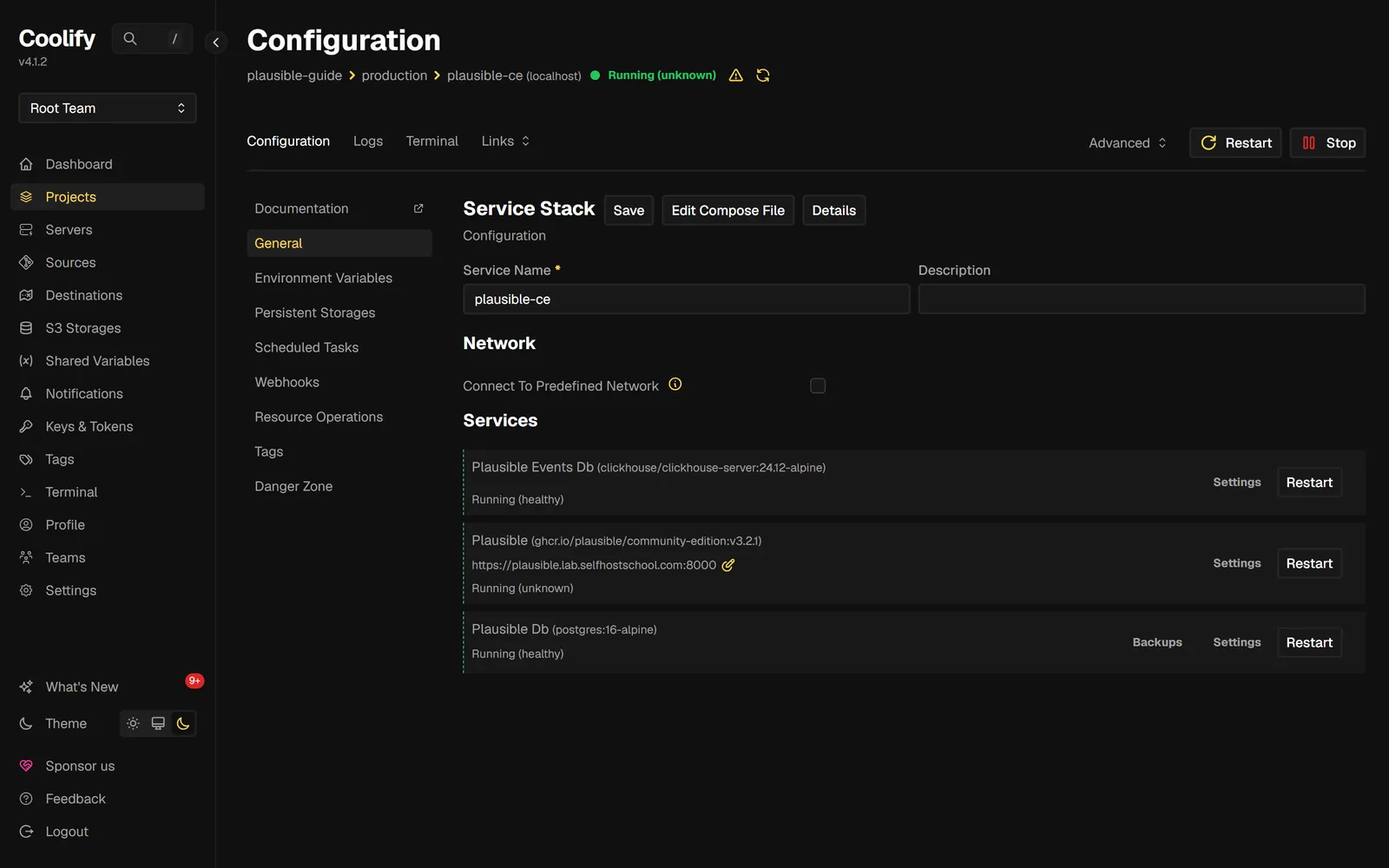
Generate both secrets on your own machine. SECRET_KEY_BASE signs sessions; TOTP_VAULT_KEY encrypts two-factor secrets. Then hit Deploy. On my droplet the three containers were up and healthy in under a minute; a cold start of the same stack from pulled images served the login page in 42 seconds.
Step 3: Domain + SSL
Point a DNS A record at your server's IP. Give it a minute to propagate.
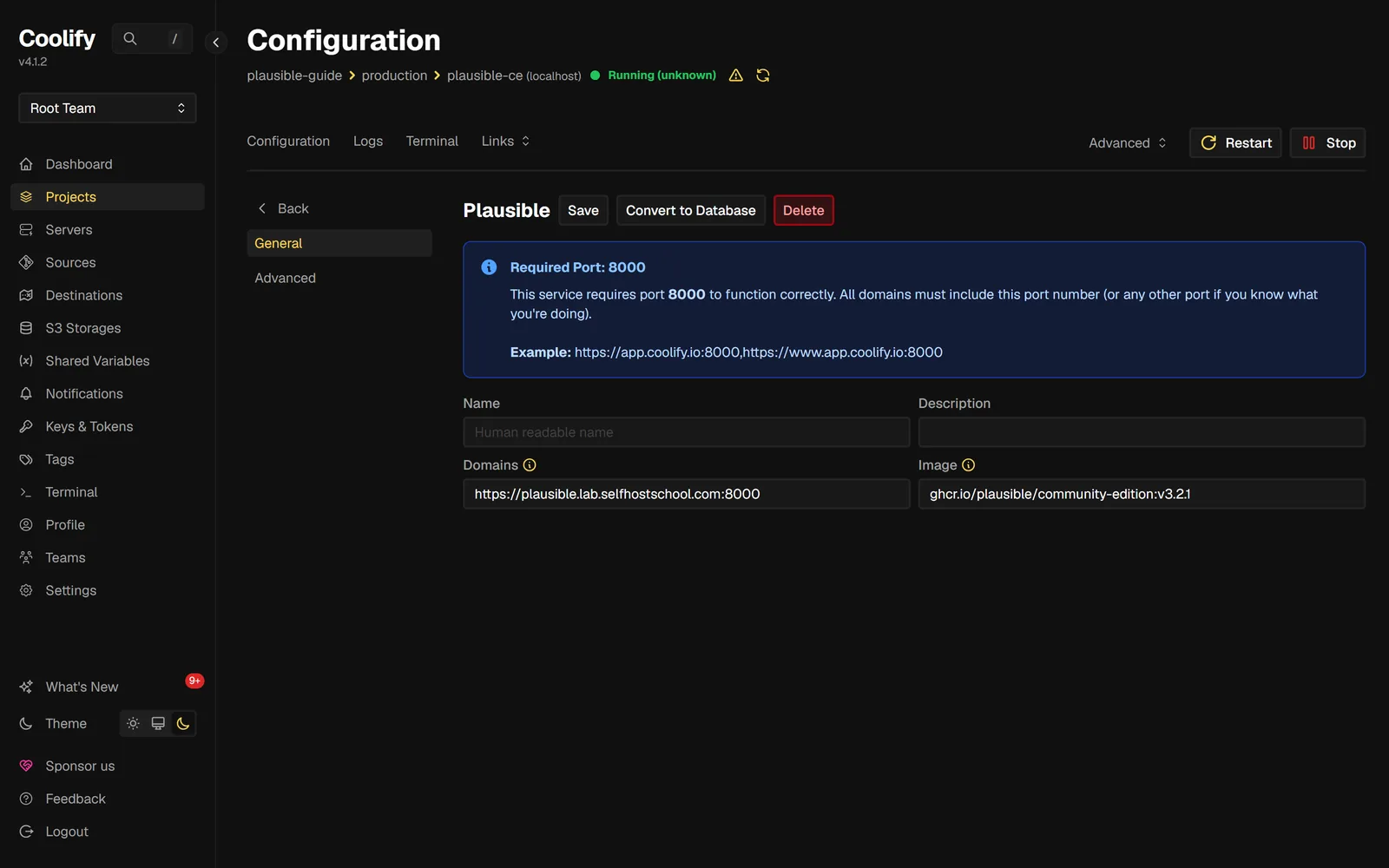
In the service, open the Plausible sub-app (the one showing the community-edition image) and set its Domains field to your subdomain with the port hint:
https://plausible.example.com:8000
The :8000 trips people up, so to be clear about what it does: Plausible listens on plain HTTP port 8000 inside the Docker network. The port in the Domains field tells Coolify's proxy where to forward traffic. Your visitors still hit normal HTTPS on 443; port 8000 is never exposed to the internet. Coolify shows a blue "Required Port: 8000" box on that page saying exactly this.
Save and redeploy the service. Coolify's proxy (Traefik) requests a Let's Encrypt certificate on the first request; mine was valid HTTPS on the first page load.
⚠ If the domain doesn't stick: I hit one save on this page that silently did nothing (the field looked saved, the proxy never picked it up). If your domain won't take effect, do a full Stop then Start of the service, not just Restart. Stop/Start regenerates the proxy routing labels; Restart does not.
Step 4: Claim your admin account NOW
Open https://plausible.example.com. You get a five-step first-run wizard: Register, Activate, Add site info, Install, Verify.
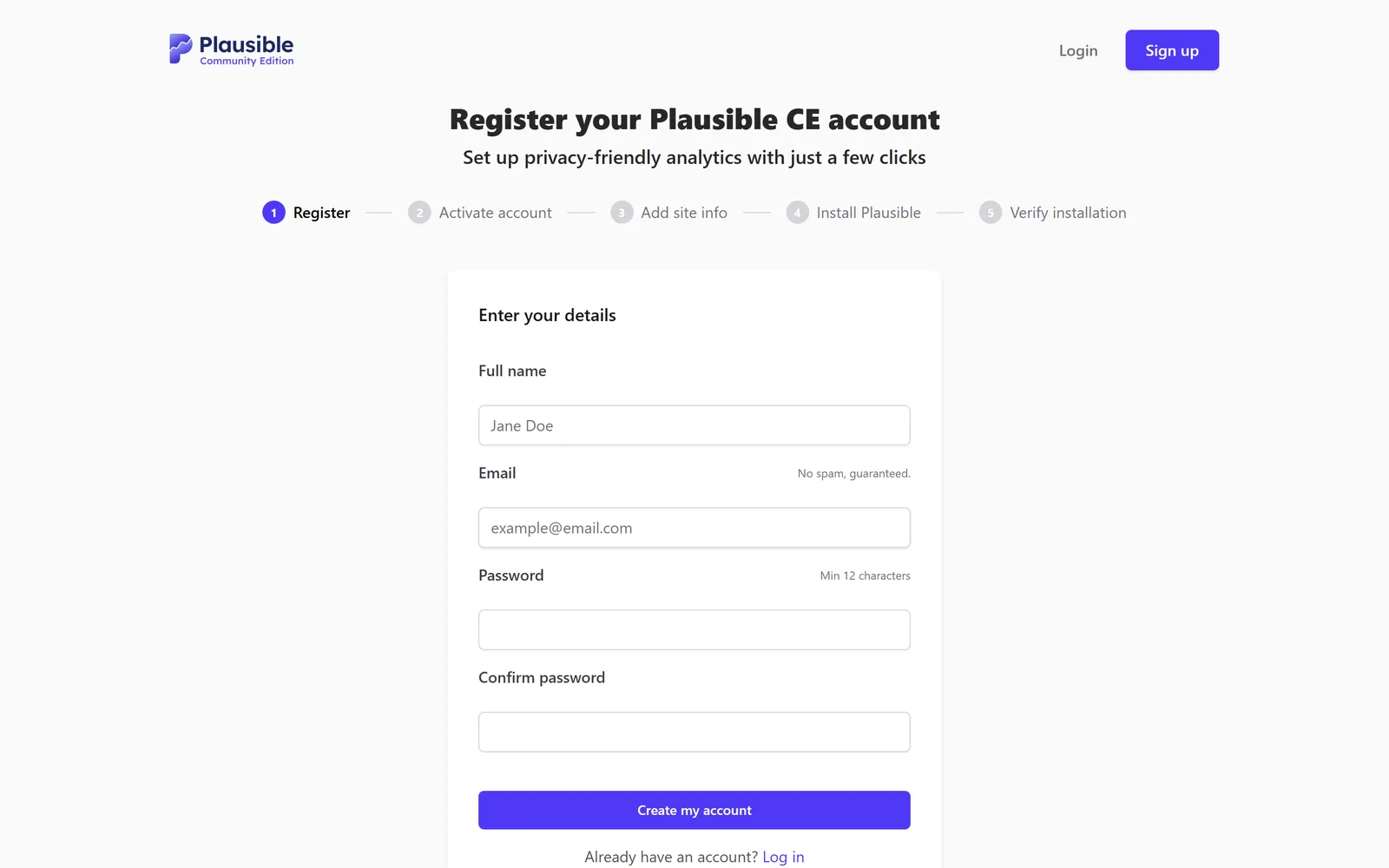
Do the registration immediately, before you share the URL anywhere, before you take a break. A fresh Plausible instance hands the first registered account the keys. This is not paranoia: in the next section you'll see how fast unknown visitors found my brand-new server. A login page on a public domain gets discovered, and on an unclaimed instance "discovered" means "owned".
Once your account exists, lock the door behind you. Back in Coolify's Environment Variables for the service, set:
DISABLE_REGISTRATION=true
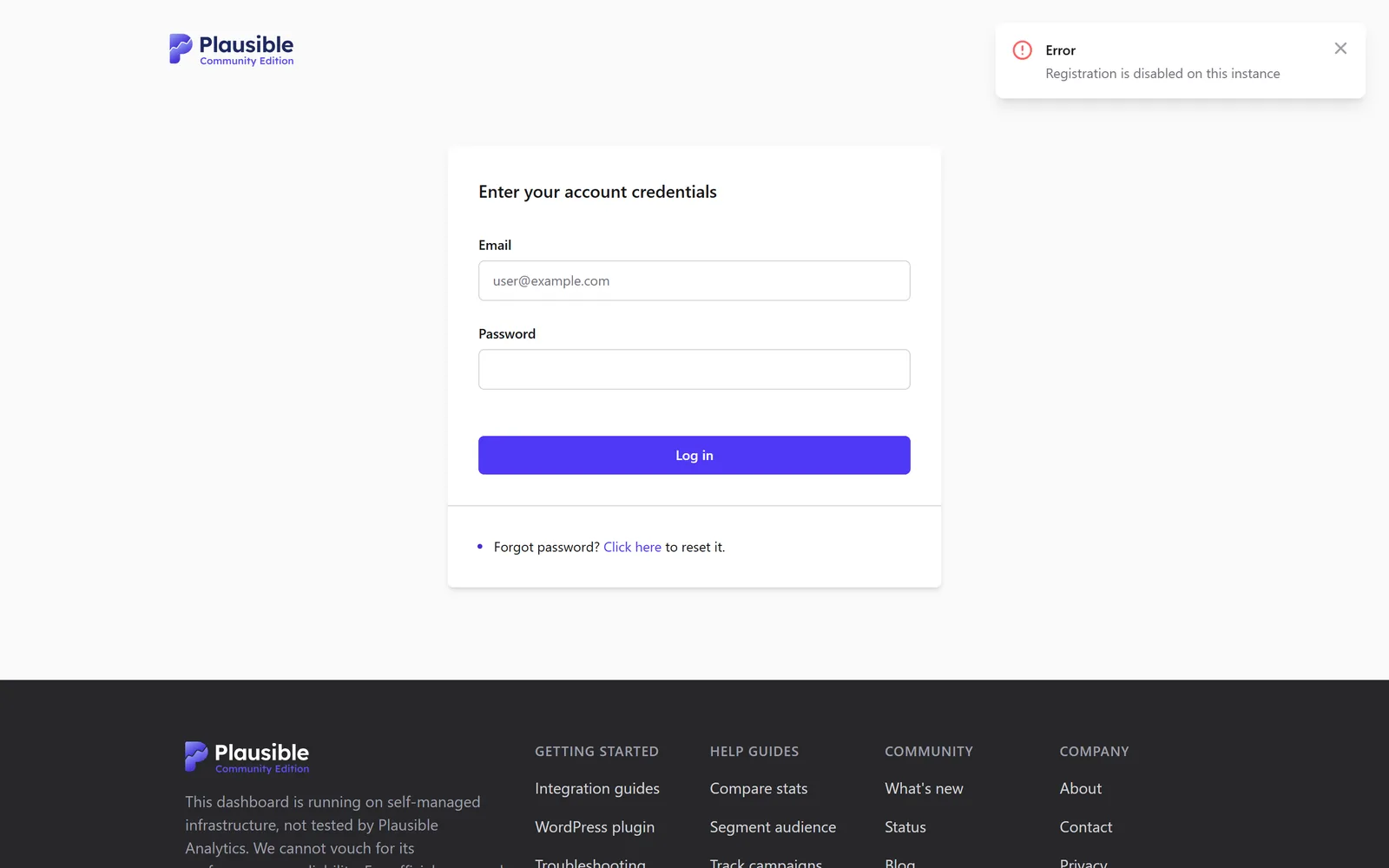
Redeploy, then confirm: open /register in a private window. You should land on the login page with a red "Registration is disabled on this instance" error.
Step 5: Tracking script + real data
The wizard's "Add site info" step asks for the domain you want to track (that's your website, not the analytics domain). The next screen generates your tracking snippet, a small script tag served from your own instance, with optional toggles for outbound links, file downloads, and form submissions.
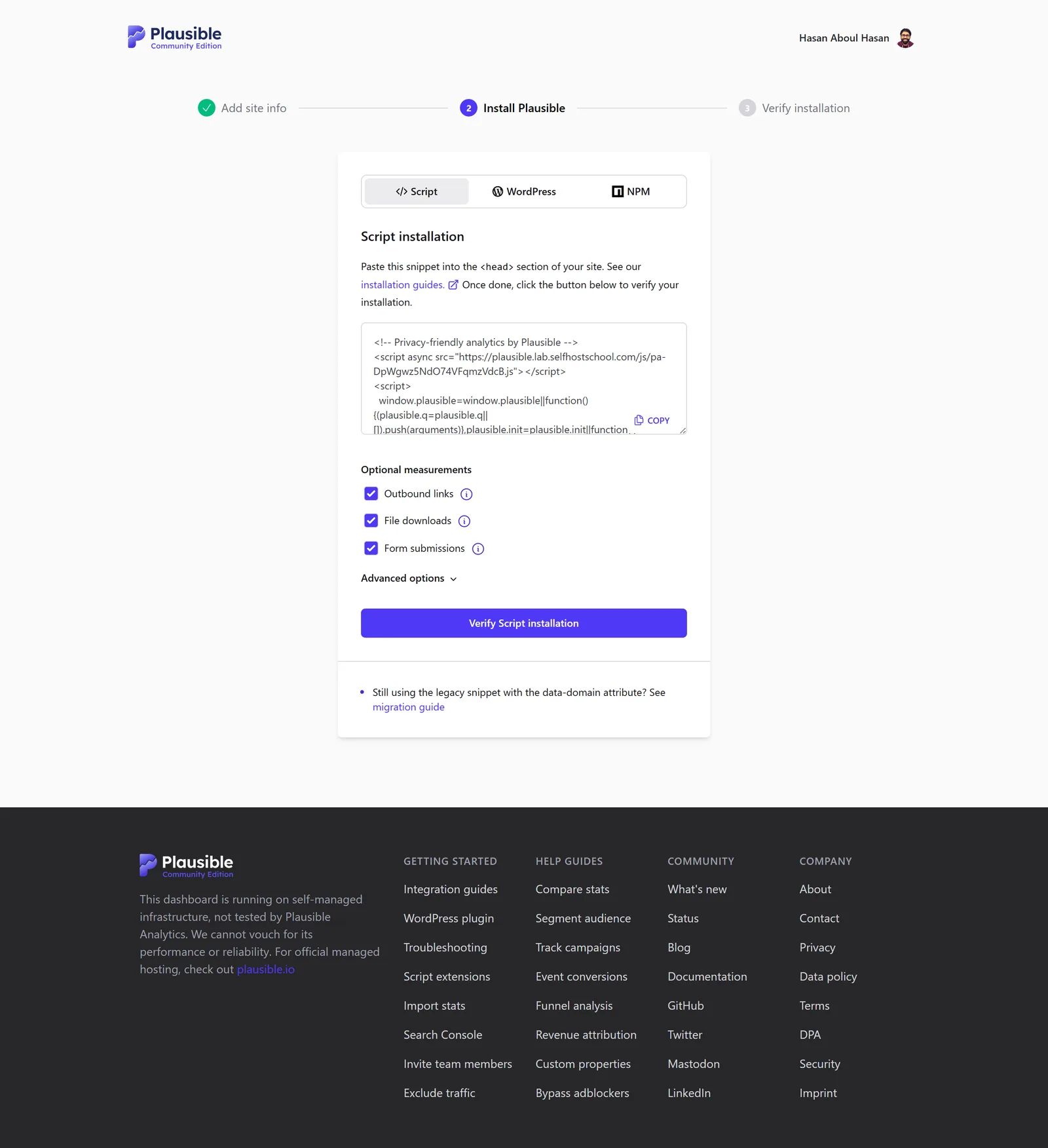
Paste the snippet into your site's <head>, deploy your site, click Verify Script installation. Then open your site in a normal browser and watch the dashboard:
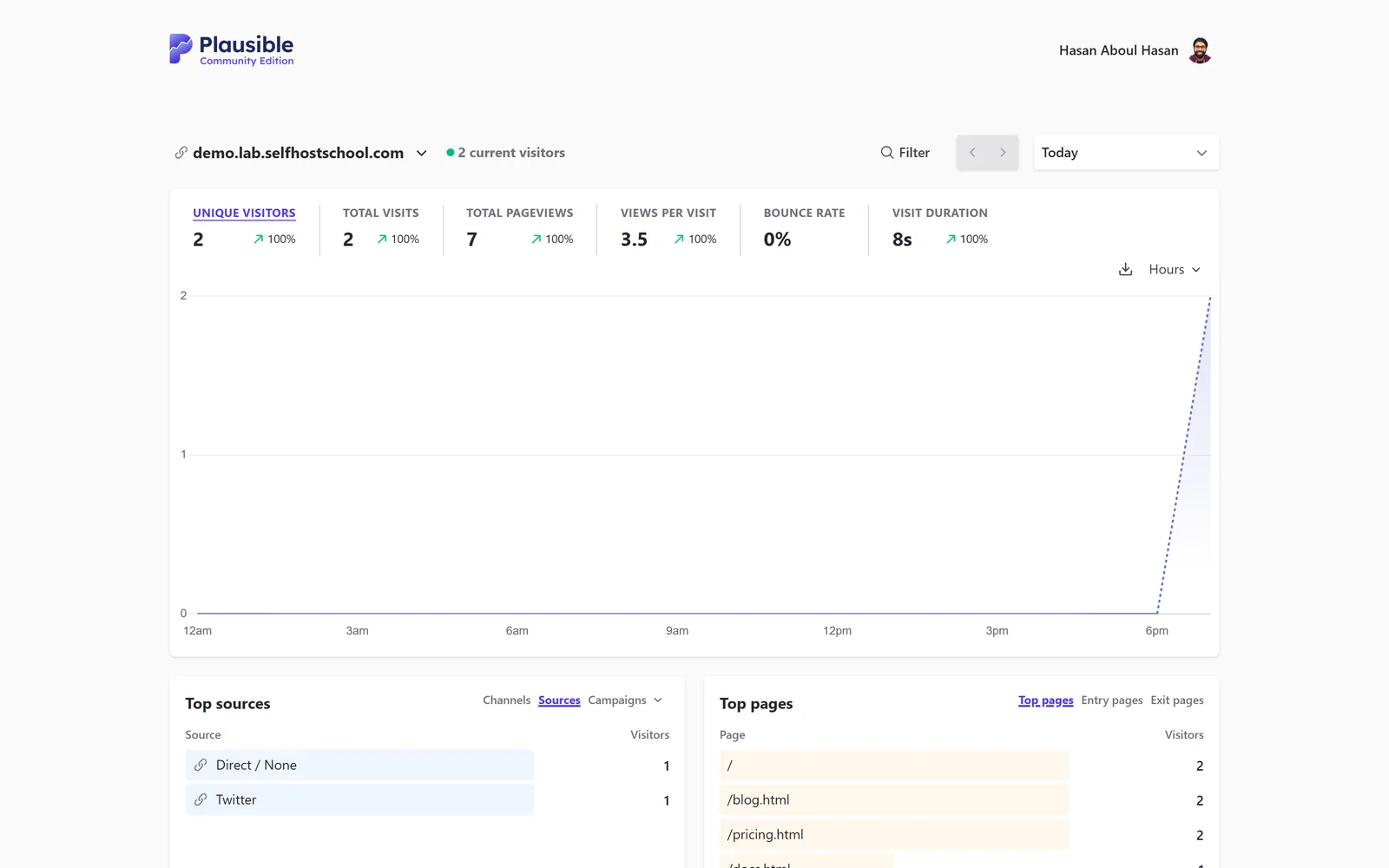
That screenshot is from my lab run: a demo site on the same droplet, visited from three separate browser profiles, one of them arriving through a Twitter redirect. Visitors, pageviews, sources, top pages: all flowing into a database I own.
💡 Tip: if you test with any kind of automated browser and see nothing, that's Plausible working, not breaking. The script drops events when the browser announces itself as automated (navigator.webdriver). Test with a real browser.
The 3 gotchas nobody tells you
Everything above gets you a working instance. These three are the difference between a demo and something you run for years. No setup tutorial I found covers them; this is why I left the server up and kept measuring.
1. Your server gets attacked from minute three. Literally.
My droplet booted at 15:32:16 UTC on a fresh IP address that had never hosted anything. The first uninvited SSH login attempt (Invalid user alex) arrived at 15:34:51. 2 minutes and 35 seconds after boot. Nobody knew this server existed; bots scan the whole IPv4 space continuously, no announcement needed.
Here is that first probe, straight from the auth log:
2026-07-26T15:34:51.278653+00:00 cf-plausible sshd[5868]: Invalid user alex from 160.119.251.76 port 54938
It never stopped. In the 16 hours I measured, 50 different IP addresses sent 1,820 SSH login attempts and tried 675 different usernames: admin, ubuntu, deploy, user, test, postgres, on and on. The busiest single hour logged 533 attempts. On the web side, HTTPS went live in the evening and the proxy logged 1,083 scanner requests from 169 addresses in under 12 hours: /.env hunted at 138 different paths (/laravel/.env, /backend/.env, /.env.backup...), plus /wp-config.php, /.git/config, and /.aws/credentials, all fishing for leaked secrets. Some even probed /api/event and /js/script.js: Plausible-shaped requests aimed at instances exactly like yours.
What to actually do about it: nothing exotic. SSH by key only with passwords off (my droplet image ships that way, which is why every one of those attempts achieved nothing). Don't publish container ports you don't need; the compose in this guide publishes none, Coolify's proxy is the only thing facing the internet. And know that DISABLE_REGISTRATION=true from Step 4 is what stands between those scanners and your login page. The attacks are background radiation on every public server; a locked instance shrugs them off.
2. Bots can pollute your stats, and CE filters less than Cloud
Separate problem from the scanners: ordinary bots loading your actual website inflate your pageview numbers. Plausible's script filters the obvious cases (I verified the automated-browser drop first-hand in testing). But Cloud's server-side bot detection, which covers user-agent filtering, referrer spam, around 32,000 data-center IP ranges, and behavior analysis, does not ship with CE. CE keeps only the basic user-agent and referrer filtering.
Does it matter? Depends on your site. One self-hoster documented a site that gets about 200 real visitors a day showing 5,000+ after moving to CE, which makes the numbers meaningless. His fix was Cloudflare's free security rules in front of the site. The same write-up also notes funnels and revenue tracking stay Cloud-only.
My take: for a typical builder site, start without the extra layer and watch. If a spike looks too good to be true, check the Sources report before you celebrate: bot waves usually arrive with no referrer, one page, zero visit duration. Plausible's Shields (Site Settings) can block specific IPs and whole countries when a pest shows up, and Cloudflare is the bigger hammer if it gets bad.
3. Upgrades are genuinely trivial (I timed one)
The scariest-sounding part of self-hosting turns out to be the easiest. CE ships about two releases a year, and applying one is a one-line change: edit the image tag in your compose from v3.2.0 to v3.2.1, redeploy, done. I ran that exact upgrade with a probe hitting the login page every second:
- Pulling the new image: 2 seconds (it's a 62 MB download)
docker compose up -dreturned in: 3 seconds- Dashboard serving again: 14 seconds later
- Total measured downtime: 16 seconds, migrations ran themselves
Sixteen seconds of downtime, twice a year, for analytics. That is the whole "you have to maintain it yourself" horror story. Back up your two database volumes before each upgrade (Coolify's backup tab does Postgres on a schedule) and this stops being a reason to pay $228 a year.
FAQ
Is self-hosting Plausible worth it versus paying $9 a month?
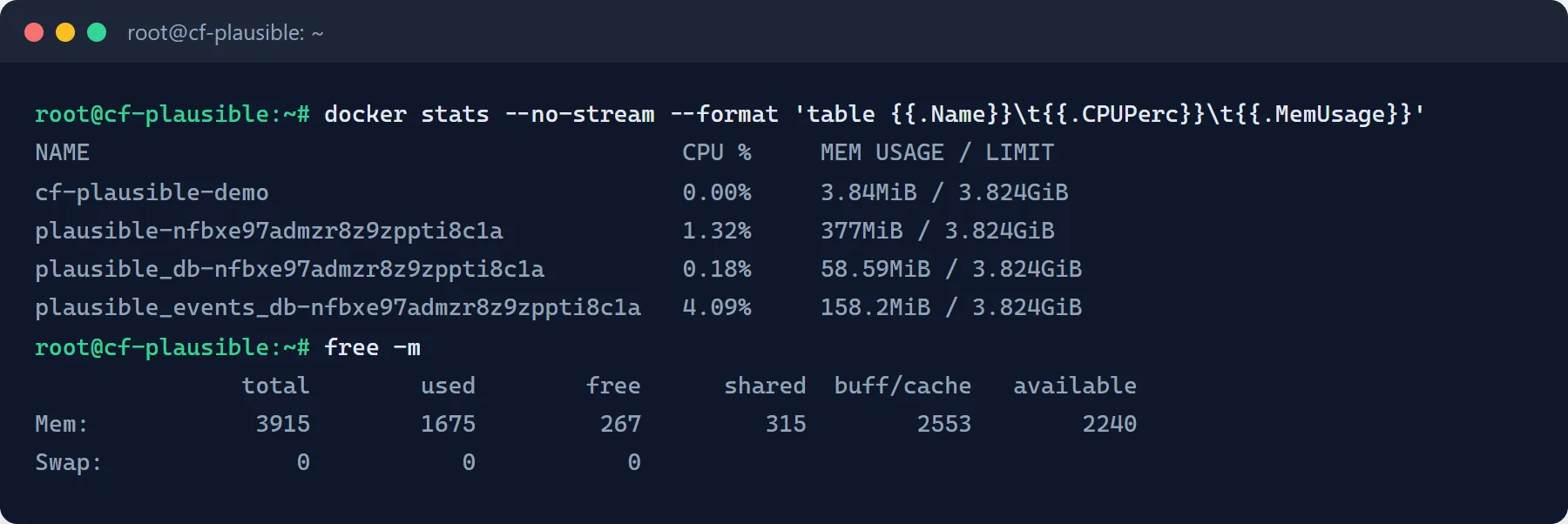
It depends on whether you already run a server. Plausible Cloud starts at $9/month for 10k pageviews and $19/month at 100k. The CE stack I measured uses about 600 MB of RAM, so it fits in the corner of a VPS you already pay for; at that point the analytics are effectively free. If you'd be renting a VPS only for analytics, the savings are small, and Cloud also funds the project's development. I self-host because the server was already there.
What do I give up compared to Plausible Cloud?
Four things. You run the upgrades and backups yourself. CE ships about two tagged releases a year while Cloud updates continuously. Cloud's advanced server-side bot detection (data-center IP ranges, behavior analysis) is not in CE, only basic user-agent and referrer filtering. And funnels plus revenue tracking stay Cloud-only. The core dashboard and the tracking script are the same.
How much server does Plausible CE actually need?
The official requirement is 2 GB RAM and a CPU with SSE 4.2 (ClickHouse needs it). On my droplet the full stack idled at about 600 MB: 377 MB for the app, 158 MB for ClickHouse, 59 MB for Postgres. The app image is 265 MB on disk and fresh data volumes are under 100 MB. A 2 GB VPS runs it with room to spare.
How do I update a self-hosted Plausible?
Change the version in the image tag and redeploy. I timed v3.2.0 to v3.2.1: 2 seconds to pull, 3 for the restart command, dashboard back 14 seconds later, 16 seconds of measured downtime total. Database migrations run automatically on boot; that's what the db migrate in the container's command line is for.
Can I import my Google Analytics data?
CE supports Google integrations, but you create your own Google OAuth credentials and set GOOGLE_CLIENT_ID and GOOGLE_CLIENT_SECRET in the environment; the configuration wiki documents it. Plan it as its own session, not a checkbox during setup.
Do I have to open port 8000 on my server?
No. Plausible serves plain HTTP on 8000 inside the Docker network only. Coolify's proxy terminates HTTPS on 443 and forwards internally. The :8000 in the Domains field is a routing hint for the proxy, not a public port.
What this is part of
Analytics is one service. The droplet in this guide had 2.2 GB of RAM still free with Plausible and Coolify running: room for your app, your email tool, your database backups. Running several services on one VPS without them stepping on each other, backing all of it up, and surviving upstream surprises is the actual skill.
That's what I teach in Self Hosting 2.0: 34 lessons from a blank server to a full stack you own, including the backup and hardening playbook this guide only points at.
Course
Want the full system?
Related


Get the free Vibe Engineering Blocks guide
The exact building blocks I use to ship real products with AI — yours as a free PDF.
Questions & Discussion
Ask a question about this guide →Have a question? Ask it in the community — it's tagged #guide and linked back here. Reading is open to everyone; posting needs a free account.
Loading questions…