How to Self-Host n8n on a $12 VPS (Full Setup + Real Cost Math)
 Hasan Aboul Hasan
Published 2026-08-11
Hasan Aboul Hasan
Published 2026-08-11
I deployed n8n on a fresh $12 DigitalOcean droplet and measured everything: 2 minutes 48 seconds from stock Ubuntu to a live editor over HTTPS, 487 MB of RAM for the whole stack, 3,000 webhook executions with zero failures, and a 31-second upgrade. This guide is that exact setup, paste-ready, plus the cost math against Zapier, Make, and n8n Cloud that made me run automations on my own servers in the first place.
- n8n running on your own VPS with Postgres and automatic HTTPS
- An owner account only you control
- A real webhook workflow, tested from the outside with curl
- The honest numbers: what it costs in RAM and dollars, what an upgrade takes, and when Zapier or Make is actually the better deal
n8n is the workflow automation tool people reach for when they outgrow Zapier's pricing: a visual editor, hundreds of integrations, and a version you can run on your own server without paying per task. The company sells a hosted Cloud version from €20 a month. The same product ships as a free Community Edition you can self-host.
So I did, with a stopwatch running. Fresh DigitalOcean droplet, stock Ubuntu 24.04, Docker Compose, a real domain with HTTPS, and then 3,000 webhook executions fired at it to see if a $12 box actually holds up. It does. I also ran the same stack on the $6 droplet to find the honest floor.
This guide is that run, written down. Six steps, one paste-ready compose file, exact numbers.
This guide deploys n8n with plain Docker Compose on a bare VPS: no panel, nothing between you and the stack. If you already run Coolify, n8n is also in its one-click service catalog, and a dedicated Coolify guide is coming. The compose file below works either way; the bare-VPS route is the one I measured here.
Your n8n domain (optional)
Type the subdomain you'll put n8n on. Every copyable block on this page updates to use it, so you can paste with no edits. The value stays in your browser only, nothing leaves this page.
Value stays in your browser only, nothing leaves this page.
Why self-host n8n at all
Two reasons. The first one is the bill.
Automation platforms meter you by units that grow faster than your usage feels like it grows. Zapier bills per task: every step of every run. Make bills per credit: every module action. So a 5-step workflow that runs 10,000 times a month is not 10,000 of anything, it is 50,000 tasks. Same workflow, same server work, five times the meter.
The second reason is ownership. Your workflows, credentials, and execution history sit in your own Postgres on your own box. No plan limits deciding when your automations stop running, no vendor deciding which features your tier deserves. I care about this more than the bill, honestly. It is the same reason I moved my whole stack to one self-hosted server and stopped renting managed everything.
Now the honest part. Self-hosting n8n makes you the operator: updates, backups, and OAuth app setup for services like Google become your job. This guide measures what that actually costs instead of hand-waving it. Spoiler: the upgrade I timed took 31 seconds.
What "self-hosted n8n" actually means
n8n ships two ways. n8n Cloud is the hosted product: they run it, you pay per plan, and each plan caps your executions per month. Self-hosted n8n (the Community Edition) is the same core product as a Docker image you run yourself, free, with unlimited workflows and unlimited executions.
One honest nuance: n8n is not open source in the strict sense. It ships under the Sustainable Use License, called fair-code: the source is public and self-hosting for your own business is free, but you can't resell n8n itself as a hosted service. For running your own automations, nothing in that license touches you. A few enterprise features (SSO, environments, log streaming) are paid add-ons; none of them block a normal setup.
| n8n Cloud | Self-hosted (this guide) | |
|---|---|---|
| Price | from €20/mo (2,500 executions), €50/mo at 10,000 | free software, you pay for the VPS ($6–12/mo measured) |
| Executions | capped per plan | unlimited; my $12 box did 1,000 in 100 seconds |
| Updates | managed | you apply them (measured: 31 seconds of downtime) |
| OAuth logins (Google etc.) | one-click, preconfigured | you create your own OAuth app per provider |
| Your data | on their infrastructure | in your own Postgres volume |
| Backups, uptime | included | your job |
The editor, the hundreds of integration nodes, the webhook engine: the same product either way. What changes is who operates it and how the meter works. The math section puts real numbers on that difference.
Step 1: Get a small VPS
You need a Linux server with at least 1 GB of RAM. I tested this guide on DigitalOcean Basic droplets, Ubuntu 24.04, in two sizes:
- $12/mo, 2 GB RAM: the comfortable choice. Under my 3,000-execution load test the whole box never passed 1.1 GB used.
- $6/mo, 1 GB RAM: it works. Same stack, 200 webhook executions, no out-of-memory kills, about 200 MB of headroom. Tight, but real. Pick it if n8n is the only thing the box will run.
Any provider works; the VPS directory compares the ones I track. The rest of this guide assumes a fresh Ubuntu 24.04 server you can SSH into as root.
Step 2: Install Docker
One command, from Docker's official install script:
curl -fsSL https://get.docker.com | sh
On my fresh droplet this took 45 seconds and includes the compose plugin. Verify both:
docker --version && docker compose version
Step 3: Point a subdomain at the server
Go to your DNS provider and add one A record: n8n.example.com → your droplet's IP address.
Do this before starting the stack. The proxy in Step 4 requests a free Let's Encrypt certificate the moment it boots, and it can only do that if the domain already resolves to your server. DNS usually propagates in a minute or two on a fresh record.
Webhooks. The whole point of n8n is that outside services call into it, and they need a stable HTTPS URL to call. A domain plus automatic TLS gives you that for the cost of one DNS record. n8n also refuses secure cookies over plain HTTP, so you'd be fighting it anyway.
Step 4: The compose file (paste and start)
Three containers: n8n itself, Postgres 16 for its data, and Caddy as the HTTPS proxy. Caddy is the smallest honest way to get automatic TLS on a bare VPS: two lines of config, certificates renew themselves.
Create the folder and the environment file:
mkdir -p /opt/n8n && cd /opt/n8n
Write your .env (the two secrets are generated, not invented; run the openssl commands):
cat > .env <<EOF
N8N_DOMAIN=n8n.example.com
POSTGRES_PASSWORD=$(openssl rand -hex 16)
N8N_ENCRYPTION_KEY=$(openssl rand -hex 16)
EOF
N8N_ENCRYPTION_KEY encrypts every credential you store in n8n. If you lose it, a restored backup cannot decrypt your saved logins and API keys. Copy the generated .env into your password manager now, before you forget it exists.
Now the compose file, with the n8n version pinned to the release I tested:
services:
  postgres:
    image: postgres:16-alpine
    restart: unless-stopped
    environment:
      POSTGRES_USER: n8n
      POSTGRES_PASSWORD: ${POSTGRES_PASSWORD}
      POSTGRES_DB: n8n
    volumes:
      - postgres_data:/var/lib/postgresql/data
    healthcheck:
      test: ["CMD-SHELL", "pg_isready -U n8n -d n8n"]
      interval: 5s
      timeout: 5s
      retries: 10

  n8n:
    image: docker.n8n.io/n8nio/n8n:2.34.4
    restart: unless-stopped
    environment:
      DB_TYPE: postgresdb
      DB_POSTGRESDB_HOST: postgres
      DB_POSTGRESDB_PORT: "5432"
      DB_POSTGRESDB_DATABASE: n8n
      DB_POSTGRESDB_USER: n8n
      DB_POSTGRESDB_PASSWORD: ${POSTGRES_PASSWORD}
      N8N_HOST: ${N8N_DOMAIN}
      N8N_PROTOCOL: https
      WEBHOOK_URL: https://${N8N_DOMAIN}/
      N8N_PROXY_HOPS: "1"
      N8N_ENCRYPTION_KEY: ${N8N_ENCRYPTION_KEY}
      N8N_DIAGNOSTICS_ENABLED: "false"
      GENERIC_TIMEZONE: UTC
    volumes:
      - n8n_data:/home/node/.n8n
    depends_on:
      postgres:
        condition: service_healthy

  caddy:
    image: caddy:2-alpine
    restart: unless-stopped
    ports:
      - "80:80"
      - "443:443"
    environment:
      N8N_DOMAIN: ${N8N_DOMAIN}
    volumes:
      - ./Caddyfile:/etc/caddy/Caddyfile:ro
      - caddy_data:/data
      - caddy_config:/config

volumes:
  postgres_data:
  n8n_data:
  caddy_data:
  caddy_config:
Save that as compose.yaml. It is the file from my measured run, minus one variable (N8N_RUNNERS_ENABLED, a 1.x-era opt-in that n8n 2.x deprecates because task runners are now on by default; it no-ops on this version). A few lines worth understanding before you start it:
WEBHOOK_URLandN8N_HOSTtell n8n its public address, so the webhook URLs it shows you are the real, callable ones.N8N_PROXY_HOPS: "1"tells n8n it sits behind exactly one proxy (Caddy), so it trusts the forwarded client IPs.N8N_DIAGNOSTICS_ENABLED: "false"turns off telemetry. Your server, your call; I turn it off.- The n8n version is pinned, not
latest. n8n releases roughly weekly. Pinning means an upgrade is a decision you make (and can roll back), not a surprise on your next restart.
And the two-line Caddyfile (this is the entire proxy config):
cat > Caddyfile <<'EOF'
{$N8N_DOMAIN} {
	reverse_proxy n8n:5678
}
EOF
Start it:
docker compose up -d
Here is my complete timed run, from touching a stock Ubuntu server to a live editor over valid HTTPS:
$ bash e1_deploy.sh   # every phase timestamped
box: 1 vCPU / 1967 MB RAM · Ubuntu 24.04.4 LTS (stock image)
apt-get update ............................. 10.8s
install Docker (get.docker.com) ............ 44.8s
write compose + Caddyfile + .env ...........  0.1s
docker compose pull ........................ 88.8s
docker compose up -d .......................  7.4s
first HTTPS 200 from https://n8n.lab... .... 15s later
total: stock server -> live n8n editor in 2m 48s
Step 5: Claim the owner account NOW
Open https://n8n.example.com. You get this screen:
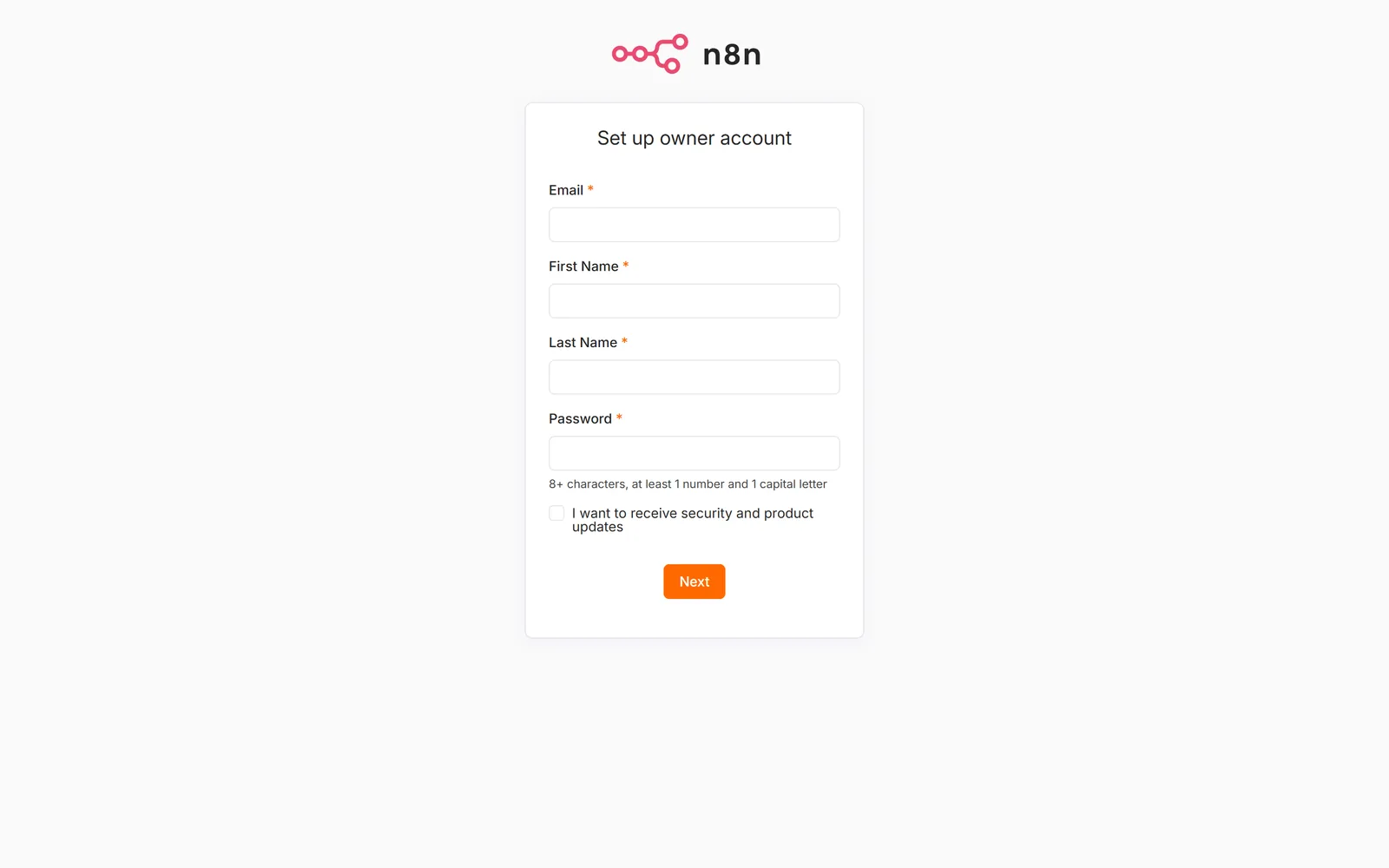
Fill it in immediately. The first account on a fresh n8n becomes the owner, and the form is public until someone submits it. Bots find new HTTPS hosts fast (certificate transparency logs announce your new subdomain the moment Caddy gets its certificate), so do this right after the stack comes up, not tomorrow. Same claim-it-first rule I keep repeating for every self-hosted panel.
After the owner exists, n8n's signup is closed: new users can only be invited by you.
Step 6: Prove it with a real webhook
Don't stop at the login screen and call it done. The reason n8n needs a public HTTPS address is webhooks, so prove yours work end to end.
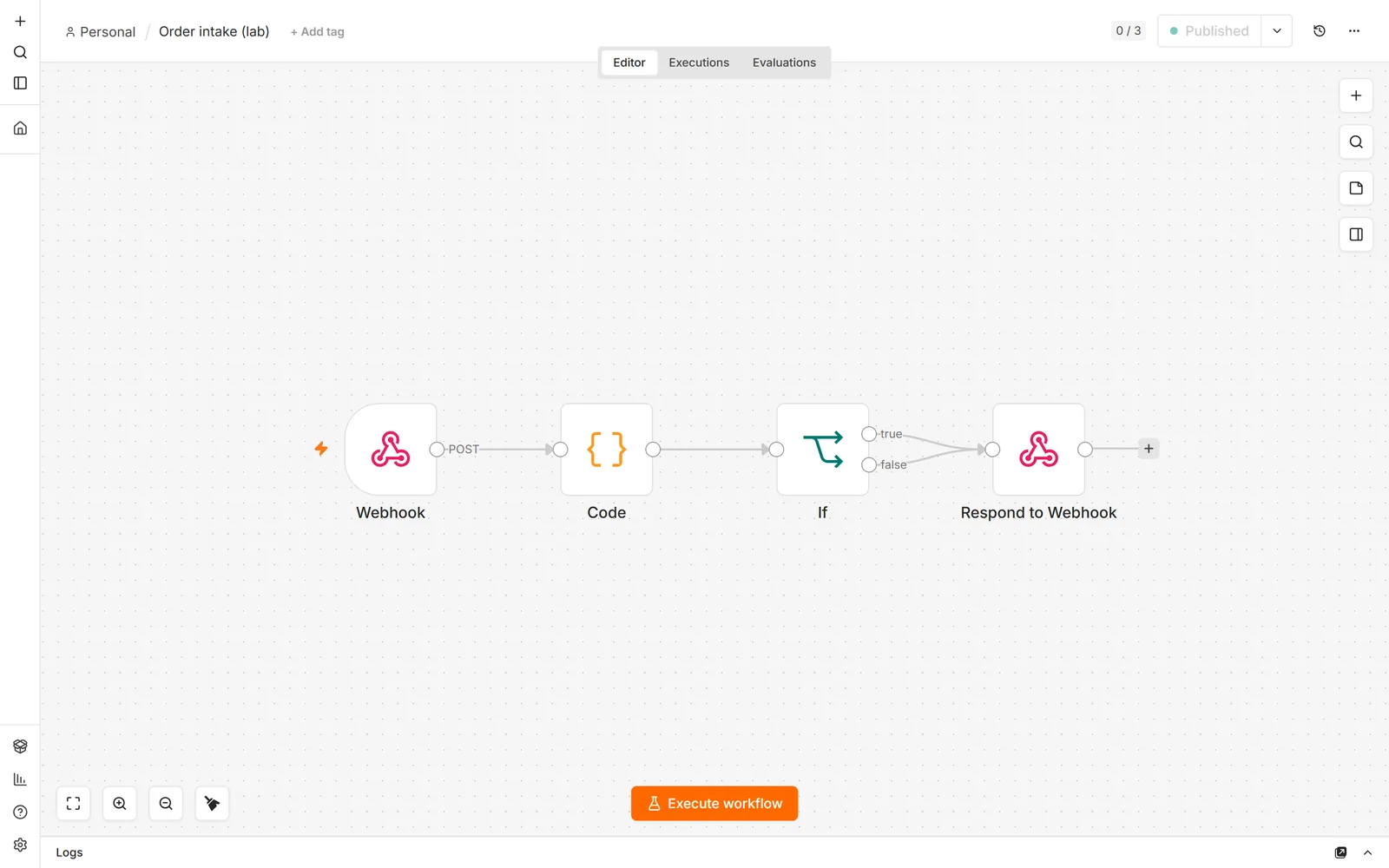
In the editor, build a small workflow: Webhook (POST, path order-intake, respond with a Respond to Webhook node) → Code (compute something from the body) → If → Respond to Webhook. Mine computes an order total and flags big orders:
Activate it, then call the production URL from your laptop:
curl -X POST https://n8n.example.com/webhook/order-intake \
  -H 'Content-Type: application/json' \
  -d '{"id":"order-1","qty":7,"price":12.0}'
My instance answered with the computed body, through Caddy, over TLS:
{"ok":true,"total":9.5}
That response is the whole system working: DNS, TLS, proxy, n8n, the workflow, Postgres. If you get a 404 saying the webhook is not registered, the workflow isn't activated: flip the toggle in the top bar.
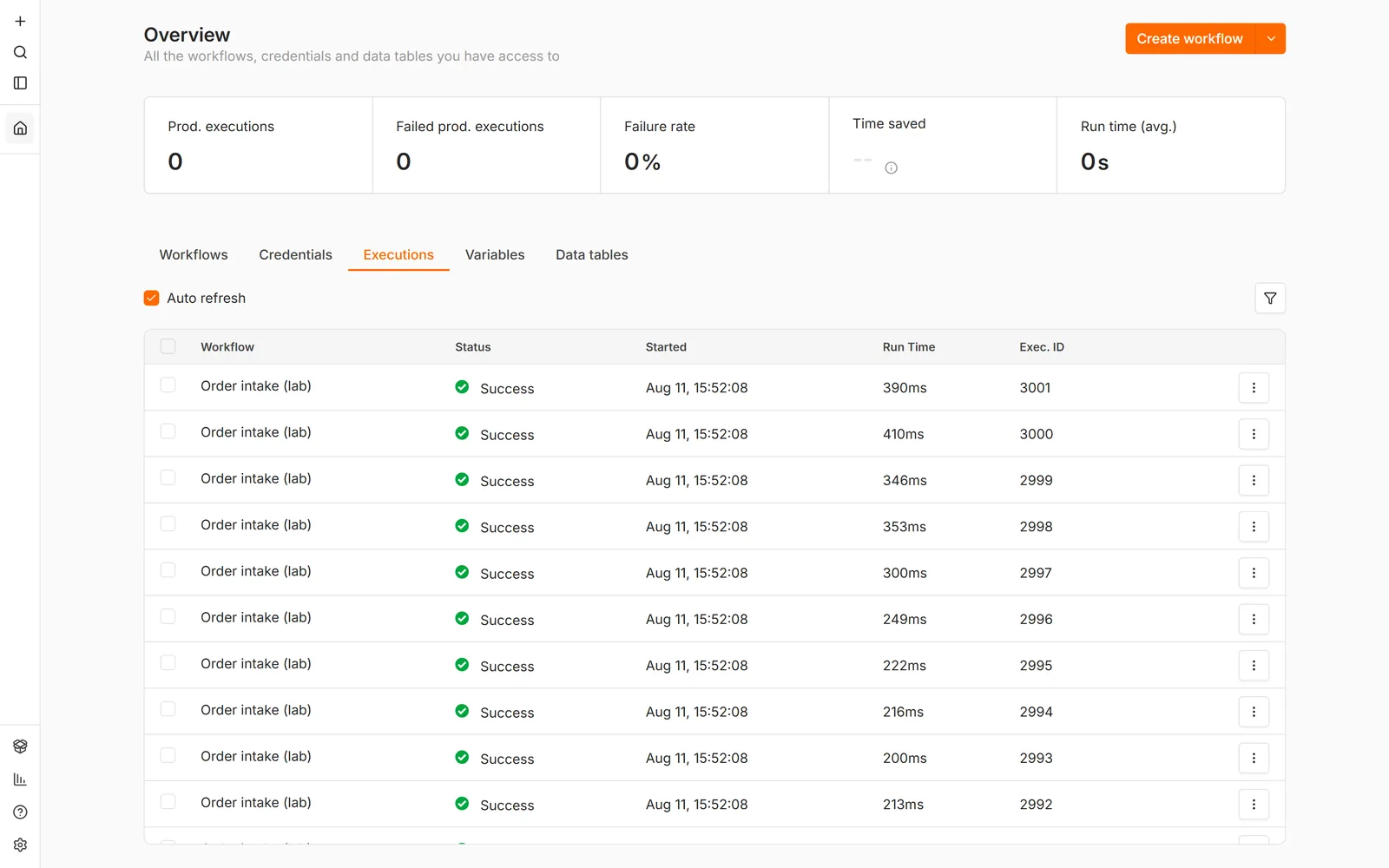
Then I got curious how far the box goes and fired 1,000 webhook calls at it, three times, 10 at a time. All 3,000 executed successfully:
What it actually costs (measured)
Numbers from my run, not from a pricing page:
$ docker stats --no-stream   # idle, just booted
NAME             MEM USAGE
n8n-n8n-1        364.4MiB / 1.922GiB
n8n-postgres-1    69.0MiB / 1.922GiB
n8n-caddy-1       54.2MiB / 1.922GiB

$ docker stats --no-stream   # during run 3 of the load test
NAME             MEM USAGE
n8n-n8n-1        638.4MiB / 1.922GiB
n8n-postgres-1    88.0MiB / 1.922GiB
n8n-caddy-1       52.7MiB / 1.922GiB
box total under load: 1.06 GB used of 1.92 GB · disk: 5.0 GB (2.7 GB is images)
- Idle: the three containers together use about 487 MB. On the 2 GB droplet that leaves more than a gigabyte free.
- Under load: pushing 1,000 webhook executions per run, n8n peaked at 638 MB and the box at 1.06 GB. Throughput was 10–13 executions per second sustained, median response 712–947 ms across three runs.
- Scale check: at that rate, the "automation-heavy" scenario below (10,000 runs a month) is about 17 minutes of actual work for this box. Per month.
- The $6 floor: the same stack minus Caddy ran on the 1 GB droplet: n8n at 338–403 MB, 200 executions, no OOM kills, ~200 MB headroom. Workable if n8n is alone on the box; I'd still spend the extra $6.
So the real bill is $12 a month ($6 if you're frugal), plus a domain if you don't own one. Nothing in it is metered.
The math vs Zapier, Make, and n8n Cloud
The comparison only makes sense once you see that the three products bill different units for the same work:
- Zapier bills per task: each successfully completed action step. Triggers are free, every step after that counts.
- Make bills per credit: each module action. Same shape as Zapier.
- n8n Cloud bills per execution: one workflow run, no matter how many steps.
- Self-hosted n8n bills nothing. The meter doesn't exist.
That per-step versus per-run difference is the entire story. A workflow with 5 billable steps multiplies your Zapier and Make usage by five while n8n counts one. Here's what that does at three realistic volumes (all prices are the cheaper annual-billing rates, checked August 2026):
What the same automation volume costs per month
Assuming 5 billable steps per workflow run. USD plans only; n8n Cloud prices in euros, table below.
Zapier: $49 = 2,000-task Professional tier, $129 = 10,000, $289 = 50,000 (annual billing; monthly billing is roughly 50% higher). Make's public page stops at its 10,000-credit tier ($9/mo Core); larger volumes sit behind a login slider, so that cell is honestly "not published". Self-hosted n8n is the $12 DigitalOcean droplet measured in this guide, which handled this whole monthly volume in minutes.
And n8n Cloud itself, in euros (annual billing):
| Scenario | Executions/mo | n8n Cloud plan that fits | Self-hosted |
|---|---|---|---|
| Solo starter | 400 | Starter, €20/mo (2,500 included) | $12/mo |
| Growing | 2,000 | Starter, €20/mo | $12/mo |
| Automation-heavy | 10,000 | Pro, €50/mo (10,000 included); the next tier up, Business, is €667/mo at 40,000 | $12/mo |
Three honest readings of this data, because it is not a one-sided story:
- Zapier is the expensive one at volume. $289/month versus $12 for work my small droplet did in 17 minutes. If you run serious volume through Zapier, the per-step meter is what you're paying for, not the servers.
- Make's base tier is genuinely cheap. $9/month for 10,000 credits undercuts even the VPS at low volume. If your automations are few and short, Make is a fair deal and self-hosting won't save you money; you'd do it for the ownership, not the bill.
- n8n Cloud's Starter is reasonable, but the ceiling is hard. €20 covers a lot of solo use. Past 10,000 executions the next public tier is €667/month, a 13x jump. Self-hosting is how you keep n8n's per-run counting without ever meeting that cliff.
Keeping it alive: updates, backups, security
Updates: I timed one
n8n releases roughly weekly (the week I built this, four stable releases landed). You do not chase every release. Pin a version, and upgrade when a release note gives you a reason, monthly is plenty. The upgrade itself, measured on this stack from 2.33.7 to 2.34.4 with a probe hitting the login page every second:
$ sed -i 's/n8n:2.33.7/n8n:2.34.4/' compose.yaml
$ docker compose pull n8n   # 3s, old version still serving
$ docker compose up -d n8n
probe: 200 200 200 [container recreated] ERR ×31 200 200 200
downtime: ~31 seconds · DB migrations ran themselves on boot
Half a minute of downtime, once a month, on your schedule. That's the maintenance burden everyone warns you about. To roll back, change the tag back and up -d again (roll back before new workflows touch migrated tables, or restore the database backup from before the upgrade).
Backups: two things, not one
Everything that matters lives in two places, so back up both. First the database, which holds your workflows, credentials, and execution history:
docker compose exec -T postgres pg_dump -U n8n n8n | gzip > n8n-db-$(date +%F).sql.gz
Then the n8n data volume, which holds instance config and any binary data:
docker run --rm -v n8n_n8n_data:/data -v $(pwd):/backup alpine \
  tar czf /backup/n8n-data-$(date +%F).tar.gz -C /data .
And the third thing that is not a file: the N8N_ENCRYPTION_KEY from Step 4. A database dump without that key restores workflows whose saved credentials cannot be decrypted. Key in the password manager, dumps shipped off the box (cron + any object storage), and you can rebuild this whole server from nothing.
Security: what a public n8n actually faces
The moment your server has a public IP, bots are probing it. That's background radiation on every public host, not a sign you've been targeted. On a fresh droplet I measured for my Plausible guide, the first uninvited SSH attempt arrived 2 minutes 35 seconds after boot, and scanners hunted /.env at 138 different paths within hours. A locked instance shrugs all of it off. The lockdown for this stack:
- Claim the owner account immediately (Step 5). After that, n8n has no public signup.
- SSH: keys only. Disable password login. Every one of those bot attempts needs a password to guess; give them nothing to guess at.
- Publish only 80 and 443. In this compose, Postgres and n8n have no public ports at all; only Caddy touches the internet, and it speaks TLS.
- Webhook URLs are unguessable paths, and you can add header auth on any Webhook node if a workflow does something sensitive.
My take
I should be honest about where I personally land, because it is not "n8n everything".
I made a whole video about replacing n8n, Zapier, and Make for my own automations. My brand tracking, rank tracking, and YouTube comment management run as plain Python scripts on PyRunner, scheduled on the same kind of $5 server, written for me by AI from a plain-English description. For my use cases, a script beats an afternoon of dragging nodes.
But the deeper point applies to both paths, and it is why this guide exists: own the box the automation runs on. Whether the thing executing your workflows is n8n or a Python script, when it runs on your $12 server there is no per-task meter, no plan ceiling waiting at 10,001 executions, and no vendor between you and your own data. Tools come and go. The skill that compounds is being able to take any of them and run it yourself. n8n's visual editor is genuinely good, its self-hosted edition is genuinely free, and now you know exactly what running it costs.
What this is part of
n8n is one service. The droplet in this guide still had 900 MB free under load: room for your analytics, your email tool, your database backups. Running several services on one VPS without them stepping on each other, backing all of it up, and surviving upstream surprises is the actual skill.
That's what I teach in Self Hosting 2.0: 34 lessons from a blank server to a full stack you own, including the backup and hardening playbook this guide only points at.
Course
Want the full system?
FAQ
Is self-hosted n8n free?
The software is free to self-host under n8n's Sustainable Use License (fair-code, not OSI open source). Unlimited workflows, unlimited executions; you pay only for the server. Enterprise features like SSO and environments are paid add-ons, and none of them block a normal automation setup.
How much does it cost to self-host n8n?
Measured on this guide's stack: a $12/month 2 GB DigitalOcean droplet runs n8n, Postgres, and the HTTPS proxy with over 900 MB spare under load. The $6 1 GB droplet also ran it with about 200 MB of headroom. Add a domain (~$10–12 a year) if you don't have one; TLS certificates are free.
Can n8n run on a 1 GB VPS?
Yes. On the $6 droplet the n8n container idled at 338 MB and peaked at 403 MB while processing 200 webhook executions, all successful at 17.7 requests per second, with no out-of-memory kills. It's tight: about 200 MB free, so keep n8n alone on a box that size.
Is self-hosted n8n cheaper than Zapier?
At real volume, always, because Zapier bills every step and self-hosted n8n bills nothing. 10,000 runs of a 5-step workflow is 50,000 Zapier tasks, $289/month on the annual Professional tier I checked, versus a flat $12 VPS. At very low volume the gap shrinks and Make's $9 base tier can even be cheaper than the VPS.
What do I give up compared to n8n Cloud?
Managed updates and hosted uptime, one-click OAuth (self-hosted, you create your own OAuth app for each provider like Google, which is a real 20-minute chore per provider), and someone else's backups. You gain unlimited executions and your data on your own box.
How do I update a self-hosted n8n?
Change the pinned image tag, docker compose pull while the old version keeps serving, then docker compose up -d. Measured on this stack: about 31 seconds of downtime, migrations automatic. Take a database dump first and you can roll back by restoring it with the old tag.
Is it safe to expose n8n on a public server?
Yes, with the basics done: owner account claimed immediately, SSH key-only, nothing published but 80/443. Bot scans hit every public IP within minutes (I measured 2m 35s to the first SSH attempt on a fresh droplet), and a locked instance shrugs them off.
Do I need Postgres, or is SQLite enough?
n8n defaults to SQLite and that works for light personal use. I deploy Postgres from day one: one extra compose service, better with concurrent executions, and it gives you a clean pg_dump story for backups. The 3,000-execution test in this guide ran against Postgres.
Related


Get the free Vibe Engineering Blocks guide
The exact building blocks I use to ship real products with AI — yours as a free PDF.
Questions & Discussion
Ask a question about this guide →Have a question? Ask it in the community — it's tagged #guide and linked back here. Reading is open to everyone; posting needs a free account.
Loading questions…