You'll build a real endpoint: text in, QR code image out. When you finish, it will be a REST API, an MCP tool, and a documented page with a Try-it button, all from one class.
You are not going to type it. You are going to describe it, then check four things. Everything below was run exactly this way before it was published.
One sentence of background, because the four checks depend on it: CLAUDE.md tells your agent exactly where an endpoint's files go and what they are called, which is why those checks are checks rather than guesses. The rest of the explanation is at the bottom of this page, once you have something running.
1. Give your agent this prompt
In the Claude Code session you opened in Open It in Claude Code:
Read CLAUDE.md first, then add a new endpoint to this project.
Slug: qr-code. It turns text into a QR code image.
Input: text, required, 1 to 1000 characters. And size, optional, default 8, between 2 and 20, the pixel size of each QR square.
Output: image_data_uri, the PNG as a base64 data URI, and encoded_text, the text that was encoded.
Follow the endpoint authoring recipe in CLAUDE.md exactly: the app directory layout, the Endpoint class with its Input, Output and run, registering the app in config/settings/base.py, and at least one test. The qrcode library is already installed. Do not charge credits yet.
When you are done, tell me which files you created and which one line I need to check myself.
That last line is the one people leave out. It turns a wall of output into a short list you can actually check.
Here is the real reply from the run that produced this page:
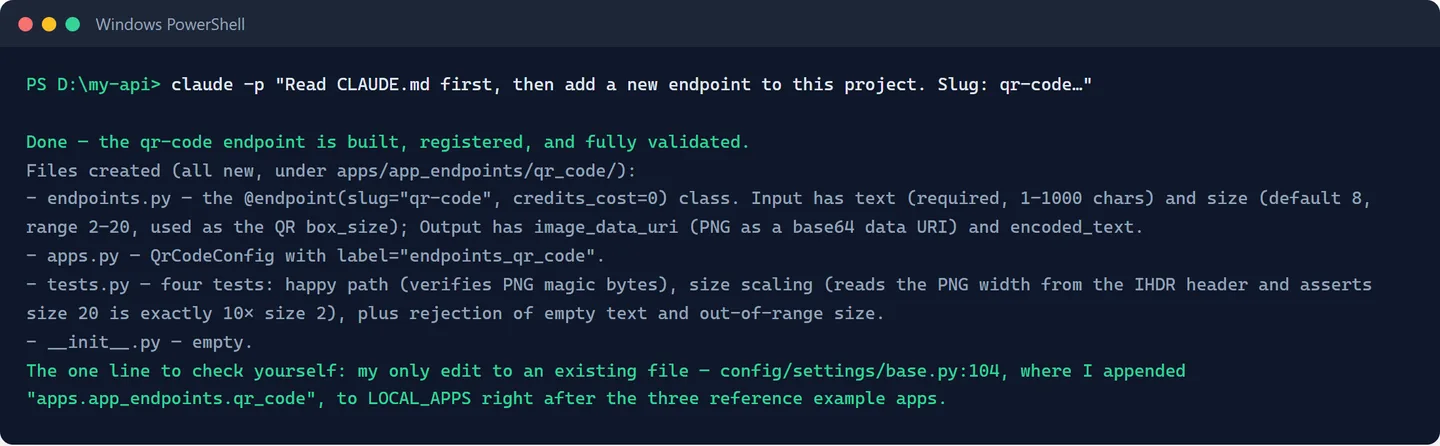
2. Check four things
Not the whole diff. These four:
| Check | Why it matters |
|---|---|
A folder at apps/app_endpoints/qr_code/ with endpoints.py, apps.py, tests.py, __init__.py |
That's the layout CLAUDE.md prescribes. A different shape means it improvised. |
One new line in config/settings/base.py: "apps.app_endpoints.qr_code", |
This is the registration. Miss it and the endpoint simply won't exist. |
endpoints.py has Input, Output, and async def run |
The three-part shape is what mounts it on all three surfaces. |
A tests.py that isn't empty |
Ours wrote four tests unprompted. If yours wrote none, ask for them. |
That doesn't match the endpoint authoring recipe in CLAUDE.md. Re-read it, then fix the layout, register the app in config/settings/base.py, and add a test that asserts the returned data URI really starts with data:image/png;base64,.
Prefer to type it yourself? The four files, in full
Create the folder `apps/app_endpoints/qr_code/`, then these 4 files. First, an empty file named `__init__.py` (yes, empty; it marks the folder as Python code). Second, `apps.py`:from django.apps import AppConfig
class QrCodeConfig(AppConfig):
default_auto_field = "django.db.models.BigAutoField"
name = "apps.app_endpoints.qr_code"
label = "endpoints_qr_code"from __future__ import annotations
import base64
import io
import qrcode
from pydantic import BaseModel, Field
from apps.core.ctx import Ctx
from apps.core.registry import Endpoint, endpoint
@endpoint(slug="qr-code", description="Turn any text or link into a QR code image.")
class QrCode(Endpoint):
class Input(BaseModel):
text: str = Field(
description="The text or link to encode.",
min_length=1,
max_length=1000,
)
size: int = Field(
default=8,
description="Pixel size of each QR square (2-20).",
ge=2,
le=20,
)
class Output(BaseModel):
image_data_uri: str
encoded_text: str
async def run(self, inp: Input, ctx: Ctx) -> Output:
image = qrcode.make(inp.text, box_size=inp.size)
buffer = io.BytesIO()
image.save(buffer, format="PNG")
encoded = base64.b64encode(buffer.getvalue()).decode("ascii")
return self.Output(
image_data_uri=f"data:image/png;base64,{encoded}",
encoded_text=inp.text,
)from __future__ import annotations
import asyncio
import base64
from apps.app_endpoints.qr_code.endpoints import QrCode
from apps.core.testing import call_endpoint
def test_qr_returns_png_data_uri() -> None:
out = asyncio.run(call_endpoint(QrCode, {"text": "https://learnwithhasan.com"}))
assert out.image_data_uri.startswith("data:image/png;base64,")
png = base64.b64decode(out.image_data_uri.split(",", 1)[1])
assert png[:8] == b"\x89PNG\r\n\x1a\n" "apps.app_endpoints.qr_code",The code above is not what your assistant will produce, word for word
It won't match character for character, and that's fine. Ours reached for qrcode.QRCode(box_size=...) where the hand-written version used qrcode.make(...), and it added a tags=("examples",) argument nobody asked for, which is how the endpoint gets grouped on the docs page. Judge it against the four checks above, not against this listing.
3. Reload the stack
.\scripts\stack-up.ps1 -Reload(macOS / Linux: ./scripts/stack-up.sh --reload.) This rebuilds just the app services and takes about a minute; our measured run was 58 seconds.
This step is not optional, and it is the one people skip
The Docker image is built from your files, it does not read them live. Your assistant edited files on your computer; until you reload, the running stack still has the old code and your endpoint will not appear. If /docs/qr-code/ 404s, this is almost always why.
4. Use it
Open http://localhost:8000/docs/ in your browser. Your qr-code endpoint is now in the catalog, with a full page of its own at /docs/qr-code/.
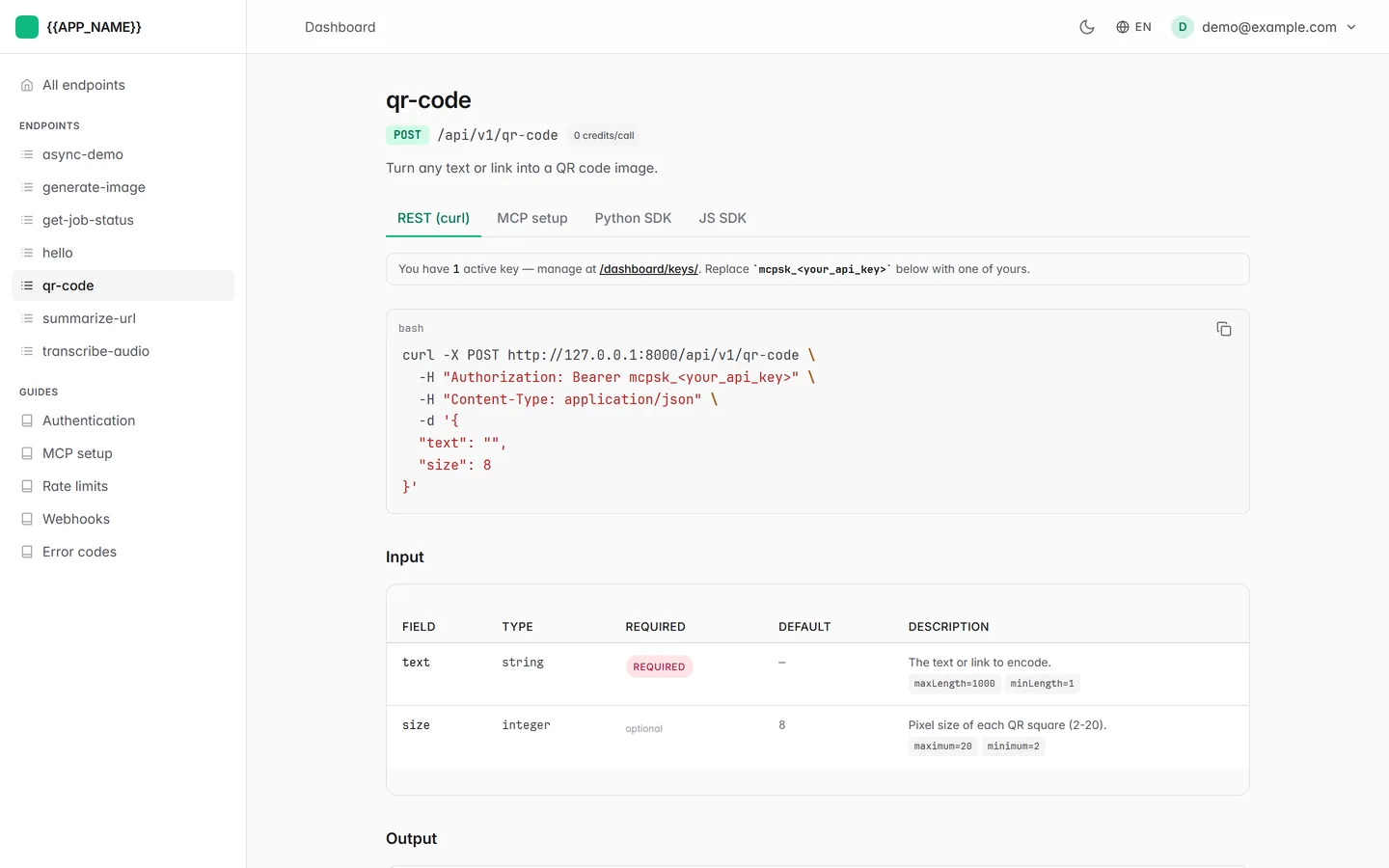
Scroll down to the Try it panel. Paste your mcpsk_... key into the API key box, put https://learnwithhasan.com in the text field, and press Send request.
The Send button looks broken until you paste a key
Send request stays greyed out until the API key box has something in it. That's the panel firing a real authenticated call rather than a fake preview, but it does look like a dead button. The key is the mcpsk_... one seed_demo printed in Run It on Your Computer; mint a fresh one under API keys in the dashboard if you lost it.
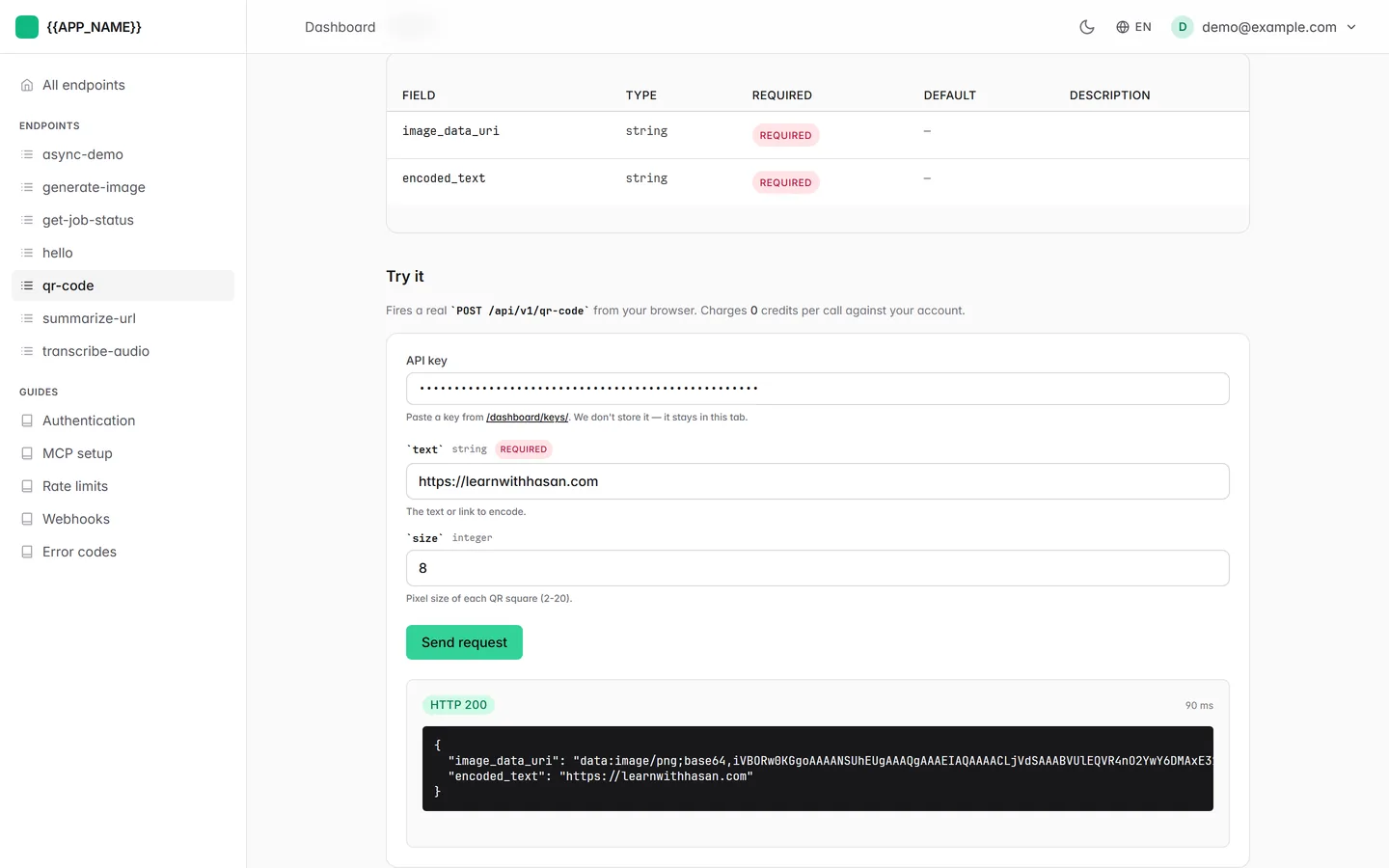
The response contains image_data_uri, a string starting with data:image/png;base64,. Paste that whole string into your browser's address bar: there's your QR code. Scan it with your phone.
Or from the terminal:
Invoke-RestMethod -Uri http://127.0.0.1:8000/api/v1/qr-code -Method Post -ContentType 'application/json' -Body '{"text":"https://learnwithhasan.com"}'For developers: run the tests
The Docker path doesn't need Python on your machine, so the test suite is optional here. If you have Python 3.11+ and want it: make setup once, then .venv/Scripts/python -m pytest apps/app_endpoints/qr_code/ -q. The four tests our assistant wrote all passed.
Why that worked
Now that it's running, the two-sentence version of what just happened.
Your agent did not invent the shape; it looked it up. CLAUDE.md carries a 6-step endpoint authoring recipe with the file names spelled out, five worked endpoints under apps/app_endpoints/ to copy from, and a boundary marking the fourteen framework apps it must not edit. That is why "check four things" is a realistic instruction. In a repo without that file, an agent asked for "an MCP endpoint" reaches for @mcp.tool() and a fresh FastMCP() server, and you get a second server bolted next to the one you own.
One class, three surfaces, because of the decorator. @endpoint(slug="qr-code", ...) puts the class in a registry at boot. From that one entry, apps.core generates the REST route, apps.mcp_proxy registers the MCP tool, and apps.docs builds the page and the Try-it panel you just used. The Input model is what rejects bad calls before your code runs, and the Output model is what shapes the JSON that came back. You wrote none of those three surfaces, and there is no place where you could have.
That is also why the reload in step 3 is mandatory: the registry is built when the app boots, from the files inside the image.
You have now used the whole pattern
Every endpoint you add from here is these same steps: describe what you want, check four things, reload. Nothing above was specific to QR codes.
Following the exact pattern in apps/app_endpoints/qr_code/, add an endpoint word-count that takes text and returns the word count, the character count, and the ten most frequent words. Read CLAUDE.md first, register it in config/settings/base.py, and write a test. Then tell me which files you created and which one line I need to check myself.
Then reload and open /docs/word-count/. That is your second endpoint, and it took one paragraph.
You described one endpoint. You got three surfaces. Next: Use It From Claude.