Self-Host Sentry on Coolify: The Whole Path, Measured
 Hasan Aboul Hasan
Published 2026-08-12
Hasan Aboul Hasan
Published 2026-08-12
You cannot one-click Sentry on Coolify. The template request has been open since August 2024, and pasting the official compose file into Coolify dies in the YAML parser before a single container starts. I verified both, then installed Sentry 26.7.2 the way that actually works: the official install.sh next to Coolify, with Coolify's proxy serving it on a real domain with HTTPS. Then I measured everything: 65 containers and 12 GB + 6.5 GB swap for the full install, 28 containers and 8 GB for errors-only, a working install on an 8 GB box, and GlitchTip doing the small-project job in 97 seconds and 311 MB. This is the complete, tested path, including the three traps that cost me hours.
- Self-hosted Sentry on your own server, real domain, automatic HTTPS through Coolify's proxy
- An upgrade-safe proxy setup that survives Sentry releases (override file, not hand-edits)
- Alert emails wired and proven with a real error and a real inbox
- The honest sizing table: full Sentry vs errors-only vs GlitchTip, measured on one box in one day
Sentry is the error tracker most of us already know from work: an exception happens in production, and you get the stack trace, the request, the release, and an email, instead of a user complaint. The self-hosted version is the same product, free to run, with essentially unlimited events.
And it is famously the heaviest thing in the self-hosting world. The top search results for "self-hosted Sentry" are literally titled "I gave up on self-hosted Sentry" and "what I thought would take an hour". On the Coolify side, the service template request has been open since August 2024, with 205 upvotes and people still adding +1 today. Everyone wants this. Nobody shows the whole path.
So I did what I always do for the Self Hosting Hub: took a fresh server, a stopwatch, and measured the whole thing end to end. The naive way, the working way, the RAM bill, the traps. Everything below happened on a real box on August 12, 2026, and the numbers are from my terminal, not from a requirements page.
Sentry self-hosted release 26.7.2 (the latest at test time), Coolify 4.1.2, Ubuntu 24.04, Docker 29.6.2. The server: a DigitalOcean 4 vCPU / 16 GB droplet, plus a separate 8 GB box for the "can you cheap out" test.
Your Sentry domain (optional)
Type the subdomain you'll put Sentry on. Every copyable block on this page updates to use it, so you can paste with no edits. The value stays in your browser only, nothing leaves this page.
Value stays in your browser only, nothing leaves this page.
Should you self-host Sentry at all?
Honest gate first, because this is the guide where self-hosting does NOT automatically save you money.
Sentry's cloud has a free Developer plan (1 user, 5,000 errors a month) and a Team plan at $26/month with 50,000 errors included. The 16 GB server that full self-hosted Sentry needs costs about $84/month. Read that again. The box costs more than the product.
The honest math $84/mo box
vs $26/mo for Sentry's Team plan
Self-hosting Sentry wins in three cases: volume (unlimited events vs pay-as-you-go once you pass 50k errors), privacy (stack traces and user context never leave your server), and control (no usage bill that spikes when production has a bad week). If none of those apply to you yet, the free cloud tier or a lightweight alternative is the smarter start.
There is also a middle path, and it is measured at the bottom of this guide: GlitchTip, a lightweight Sentry-compatible tracker that IS a Coolify one-click and runs in about 311 MB. If you mainly want "tell me when my app throws", jump there now and keep your small VPS. If you want the real Sentry, with tracing, session replays, and the UI you know from work, keep reading.
What Sentry actually needs (measured)
Sentry's own docs require 4 CPU cores, 16 GB RAM plus 16 GB swap, and 20 GB of disk. Most requirements pages pad their numbers. This one does not. I installed the default feature-complete profile on exactly that spec and measured after a five-minute settle, with nothing else running except Coolify itself:
What each option costs in memory, measured on the same box
Idle, 5-minute settle, 4 vCPU / 16 GB droplet + 16 GB swap, August 12, 2026. Coolify itself (6 containers, ~1 GB) running in all three cases.
Source: free -h and docker stats on my droplet. Box-level numbers, so Coolify's ~1 GB baseline is inside all three bars. GlitchTip's own four containers use about 311 MB of that bar.
The same data as words: the default install is 65 running containers. Kafka, ClickHouse, Postgres, Redis, a storage service, about thirty snuba and consumer processes, workers, relay, symbolicator, and more. At idle, doing absolutely nothing, it held 12 GB of RAM and 6.5 GB of swap. Disk cost: about 14 GB in images and volumes.
This is what that looks like in a terminal. One docker ps, one screen, and this is roughly a third of it:
root@sentry-box:~/self-hosted# docker ps --format '{{.Names}}' | wc -l
71
root@sentry-box:~/self-hosted# docker ps --format '{{.Names}}' | sort | head -40
coolify
coolify-db
coolify-proxy
coolify-realtime
coolify-redis
coolify-sentinel
sentry-self-hosted-attachments-consumer-1
sentry-self-hosted-billing-metrics-consumer-1
sentry-self-hosted-clickhouse-1
sentry-self-hosted-events-consumer-1
sentry-self-hosted-generic-metrics-consumer-1
sentry-self-hosted-ingest-feedback-events-1
sentry-self-hosted-ingest-monitors-1
sentry-self-hosted-ingest-occurrences-1
sentry-self-hosted-ingest-replay-recordings-1
sentry-self-hosted-kafka-1
sentry-self-hosted-launchpad-taskworker-1
sentry-self-hosted-memcached-1
sentry-self-hosted-metrics-consumer-1
sentry-self-hosted-monitors-clock-tasks-1
sentry-self-hosted-monitors-clock-tick-1
sentry-self-hosted-nginx-1
sentry-self-hosted-pgbouncer-1
sentry-self-hosted-post-process-forwarder-errors-1
sentry-self-hosted-post-process-forwarder-issue-platform-1
sentry-self-hosted-post-process-forwarder-transactions-1
sentry-self-hosted-postgres-1
sentry-self-hosted-process-segments-1
sentry-self-hosted-process-spans-1
sentry-self-hosted-redis-1
sentry-self-hosted-relay-1
sentry-self-hosted-seaweedfs-1
sentry-self-hosted-sentry-cleanup-1
sentry-self-hosted-smtp-1
sentry-self-hosted-snuba-api-1
sentry-self-hosted-snuba-eap-items-consumer-1
sentry-self-hosted-snuba-errors-consumer-1
sentry-self-hosted-snuba-generic-metrics-counters-consumer-1
sentry-self-hosted-snuba-generic-metrics-distributions-consumer-1
sentry-self-hosted-snuba-generic-metrics-gauges-consumer-1
...and 31 more
Why so heavy? Because self-hosted Sentry is not "an app". It is Sentry's actual production ingestion pipeline, shrunk onto one machine. Every error you send travels through relay, into Kafka, through consumers, into ClickHouse. That architecture is why the cloud product can eat billions of events. On your VPS, you pay for it in RAM whether you send ten events or ten million.
There is one big lever, and almost nobody in the search results mentions it: errors-only mode. One line in .env switches off tracing, replays, and profiling, and the stack drops from 65 containers to 28, from 18.5 GB of memory in use to 8.4 GB. If error tracking is what you came for, that is the profile to run, and it is what makes the 8 GB box possible.
Why the obvious Coolify way fails
Let me save you the evening I spent proving this. There are two "obvious" ways to put Sentry on Coolify, and both are dead ends.
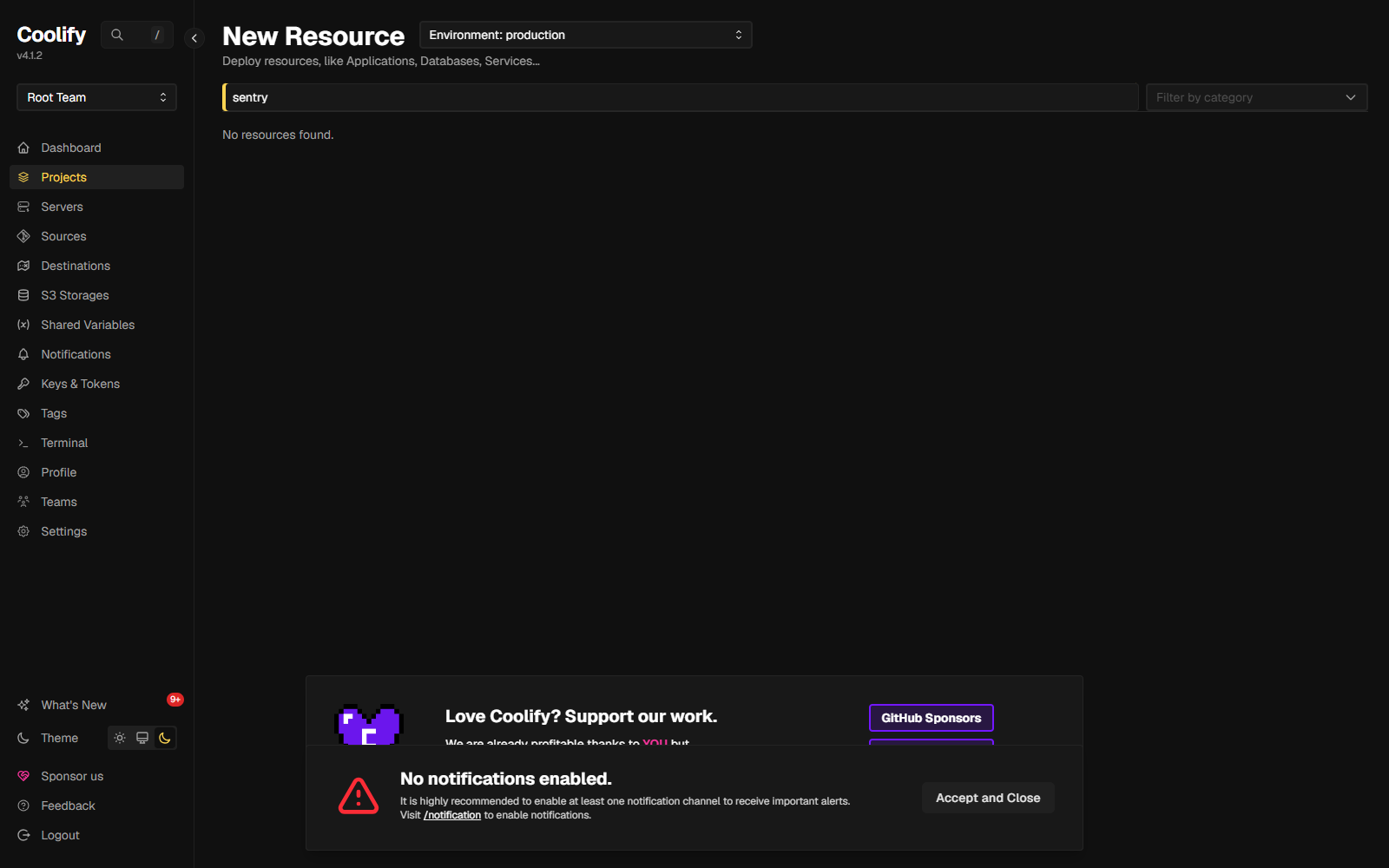
Dead end 1: the service catalog. Sentry is not in it. Not "hard to find". Not there. I pulled Coolify's live template list (the JSON file instances actually load, 339 templates) and searched:
Dead end 2: paste the official compose. This is what everyone tries next, including half the people in the GitHub thread. Sentry's docker-compose.yml is 839 lines defining 64 services, and it leans hard on YAML anchors (reusable config blocks). Coolify's YAML parser allows 128 of them. So the paste fails before anything even tries to start:
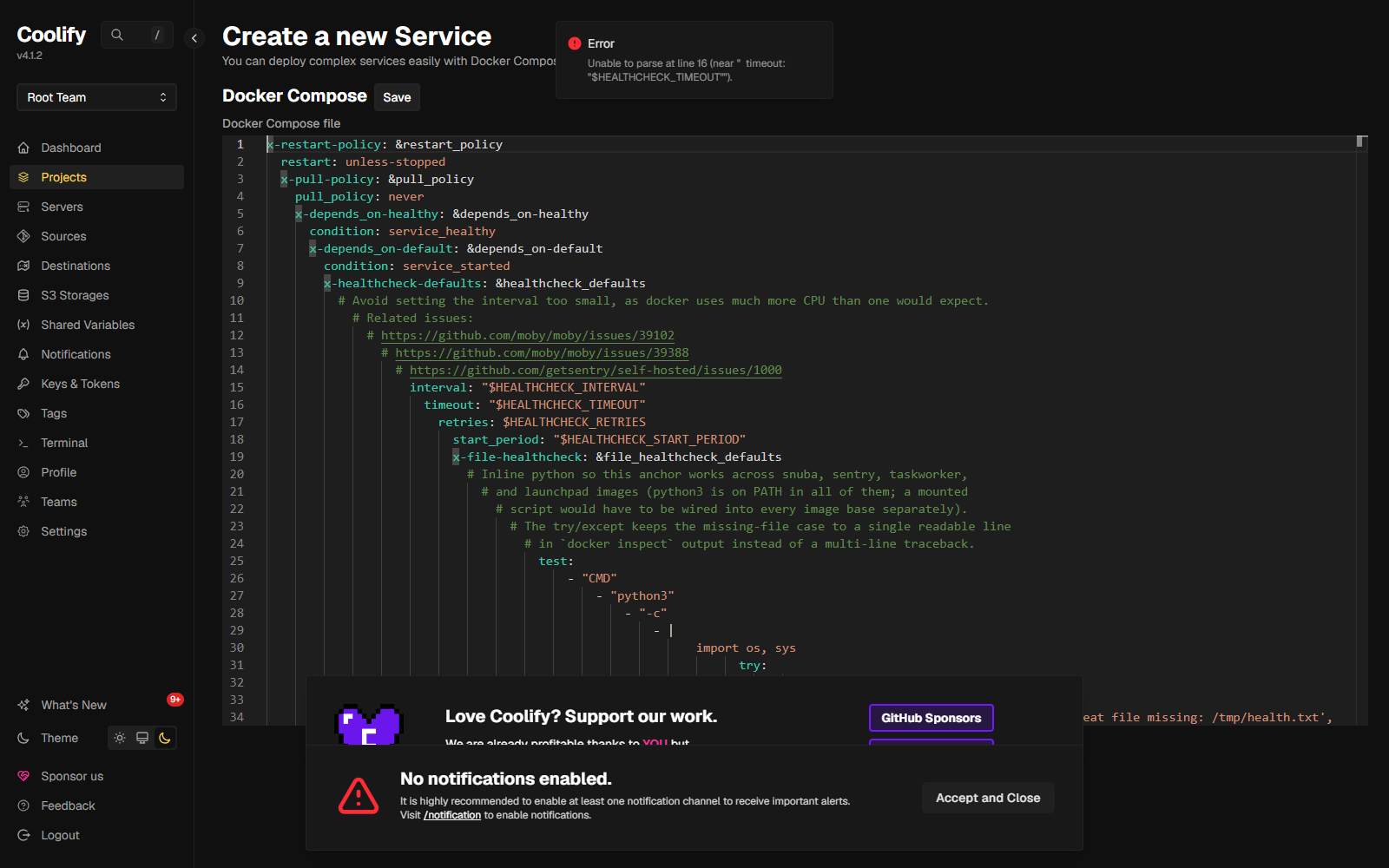
Through Coolify's API the same attempt returns a clean 500 with the real reason: Maximum number of collection aliases (128) exceeded. And even if the parser accepted it, the compose alone would not work. Sentry's install.sh does real setup work a compose file cannot: it generates secrets and relay credentials, creates Kafka topics, runs database migrations, and builds local images.
Coolify cannot deploy Sentry as a resource. That is not a Coolify bug you can wait out; Sentry's installer is a program, not a compose file. The working pattern is different: Sentry installs itself next to Coolify, and Coolify's proxy serves it. You keep one server, one proxy, real HTTPS, and the official upgrade path.
The setup we're building
The internet
https://sentry.example.com
One DNS A record. Ports 80/443 only.
Coolify's proxy (Traefik)
Terminates HTTPS
Free Let's Encrypt certificate. Routes the domain to Sentry's nginx over the internal docker network.
getsentry/self-hosted
Sentry's own stack
Installed by the official install.sh. Bound to 127.0.0.1:9000, invisible from outside. Only its nginx joins Coolify's network.
Three properties make this the setup I would actually run:
- Upgrade-safe. The proxy wiring lives in a
docker-compose.override.yml, a file Sentry's repo does not own. I re-ran the installer after setting it up: the override survived untouched. - Nothing extra exposed. Sentry's default config publishes port 9000 to the whole internet. We bind it to loopback; the only way in is through the proxy, with HTTPS.
- One server, one proxy. Your other Coolify apps keep working exactly as before. Sentry is just another domain on the same Traefik.
A note on sharing the box: my test server ran Coolify plus the full Sentry stack and had about 3 GB of RAM to spare. If your Coolify server already runs half your product, give Sentry its own box, or use errors-only mode. Squeezing the feature-complete profile next to a busy app stack is how you meet the OOM killer (the kernel process that starts shooting your containers when memory runs out).
Step 1: The server (and the swap)
Tested on a DigitalOcean 4 vCPU / 16 GB droplet ($84/mo), Ubuntu 24.04, with Coolify installed. If you are going errors-only, the $48 4 vCPU / 8 GB size works, with the caveats measured below.
Sentry's minimum spec pairs 16 GB RAM with 16 GB swap, and my measurements say the swap is not optional: the full profile sat at 6.5 GB of swap in use at idle. Create it first:
fallocate -l 16G /swapfile
chmod 600 /swapfile
mkswap /swapfile
swapon /swapfile
echo '/swapfile none swap sw 0 0' >> /etc/fstab
Check it took:
root@sentry-box:~# free -h
               total        used        free      shared  buff/cache   available
Mem:            15Gi       553Mi        14Gi       4.1Mi       450Mi        15Gi
Swap:           15Gi          0B        15Gi
Step 2: One DNS record
Add an A record for your Sentry subdomain pointing at the server's IP. That is the whole step. Do it before the proxy wiring so Let's Encrypt can issue the certificate on the first request.
| Type | Name | Value |
|---|---|---|
| A | sentry | your server's IP |
Step 3: Install Sentry (timed)
Everything happens in Sentry's official repo, cloned at the latest release tag (never master, which is nightly):
git clone --depth 1 --branch 26.7.2 https://github.com/getsentry/self-hosted.git /root/self-hosted
cd /root/self-hosted
Now the one decision that halves the machine: open /root/self-hosted/.env and pick your profile. feature-complete is the default and means the whole product, 65 containers. errors-only drops tracing, replays, and profiling, and runs 28. If you only came for error tracking, errors-only is the honest pick:
COMPOSE_PROFILES=errors-only
Then run the installer. Two flags keep it non-interactive: skip the admin-user prompt (we create the user in step 5) and skip the "report issues to Sentry" question:
./install.sh --skip-user-creation --no-report-self-hosted-issues
docker compose up -d --wait
My timed run on the 16 GB box, feature-complete: install.sh took 6 minutes 9 seconds (image pulls, migrations, Kafka topics, secret generation), and docker compose up took another 5 minutes 9 seconds to get all 65 containers healthy. Errors-only was faster: 3 minutes 55 seconds plus 1 minute 59 seconds.
root@sentry-box:~/self-hosted# ./install.sh --skip-user-creation --no-report-self-hosted-issues
...
  docker compose up --wait

-----------------------------------------------------------------
install.sh took 369 seconds
root@sentry-box:~/self-hosted# docker compose up -d --wait
up took 309 seconds
root@sentry-box:~/self-hosted# curl -s -o /dev/null -w '%{http_code}' http://127.0.0.1:9000
302
That 302 is Sentry's login redirect. The stack is alive, listening on port 9000, and right now it is exposed to the entire internet. Fix that next.
Step 4: Put it behind Coolify's proxy
Four small edits. Each one exists for a reason I hit personally.
4a. Bind Sentry to loopback. The default SENTRY_BIND=9000 publishes the port on all interfaces. Change that line in /root/self-hosted/.env to:
SENTRY_BIND=127.0.0.1:9000
4b. Tell Sentry its public URL. In sentry/config.yml:
system.url-prefix: 'https://sentry.example.com'
4c. Teach Django it lives behind an HTTPS proxy. Append to sentry/sentry.conf.py:
USE_X_FORWARDED_HOST = True
SECURE_PROXY_SSL_HEADER = ("HTTP_X_FORWARDED_PROTO", "https")
SESSION_COOKIE_SECURE = True
CSRF_COOKIE_SECURE = True
CSRF_TRUSTED_ORIGINS = ["https://sentry.example.com"]
4d. The override file. This is the piece that makes the whole setup upgrade-safe. Create /root/self-hosted/docker-compose.override.yml:
services:
  nginx:
    networks:
      - default
      - coolify
    labels:
      - traefik.enable=true
      - traefik.http.routers.sentry.rule=Host(`sentry.example.com`)
      - traefik.http.routers.sentry.entrypoints=https
      - traefik.http.routers.sentry.tls.certresolver=letsencrypt
      - traefik.http.services.sentry.loadbalancer.server.port=80
      - traefik.http.routers.sentry-http.rule=Host(`sentry.example.com`)
      - traefik.http.routers.sentry-http.entrypoints=http
      - traefik.http.routers.sentry-http.middlewares=sentry-redirect
      - traefik.http.middlewares.sentry-redirect.redirectscheme.scheme=https

networks:
  coolify:
    external: true
What it does: Sentry's own nginx container joins Coolify's proxy network, and the Traefik labels tell Coolify's proxy "route this domain to me, get a certificate, redirect plain HTTP". Coolify's Traefik watches Docker for labels, so there is nothing to configure in the Coolify UI at all.
It is tempting to attach Sentry's web or worker containers to the coolify network too (I did it to reach a mail container). Don't. Coolify's own Redis answers to the bare name redis on that network. The moment Sentry's web container joined it, "redis" started resolving to Coolify's password-protected Redis instead of Sentry's own, and the container crashlooped with Authentication required. Sentry's nginx is safe there because nginx never talks to Redis. Everything else stays on Sentry's private network.
Apply and verify:
docker compose up -d nginx
docker compose restart web
docker compose restart nginx
Sentry's nginx resolves the web container's address once, at startup. Whenever you recreate or restart web, restart nginx after it, or nginx keeps proxying to the old address and you get a 502 from a perfectly healthy stack. This bit me twice in one afternoon.
Now the proof, from outside the server. A valid certificate, an HTTPS redirect, and port 9000 closed to the world:
$ curl -sI https://sentry.lab.selfhostschool.com/ | head -3
HTTP/1.1 302 Found
Location: /auth/login/
Server: nginx
$ curl -sI http://sentry.lab.selfhostschool.com/ | head -2
HTTP/1.1 307 Temporary Redirect
Location: https://sentry.lab.selfhostschool.com/
$ echo | openssl s_client -connect sentry.lab.selfhostschool.com:443 2>/dev/null | openssl x509 -noout -issuer
issuer=C=US, O=Let's Encrypt, CN=YR1
$ nc -z -w 5 sentry.lab.selfhostschool.com 9000 || echo "9000 closed"
9000 closed
Step 5: First login and the wizard trap
Create your admin account from the terminal (the installer skipped it earlier):
docker compose exec web sentry createuser \
  --email [email protected] \
  --password 'pick-a-real-one' \
  --superuser --no-input
Open your domain and log in. Sentry shows a one-time setup wizard: root URL (already correct if you set system.url-prefix), admin email, outbound-email toggles, whether anyone can register, and the anonymous usage beacon.
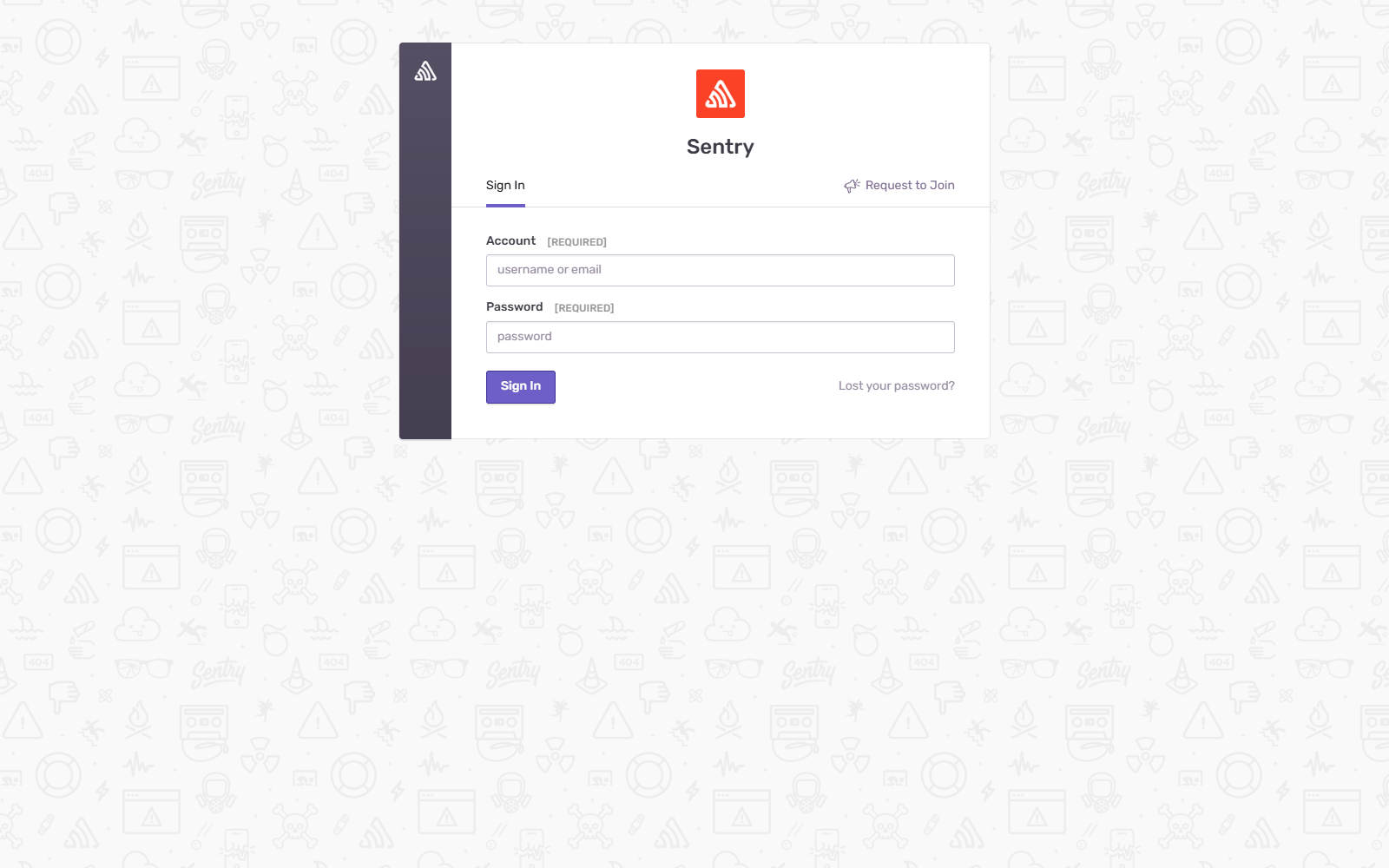
Order matters here, and I learned it the annoying way. Any option you set in config.yml becomes read-only in the UI. The wizard tries to save mail options, so if your mail block is already in the file, the wizard fails with an unhelpful "Unknown error while saving" and will not complete. Do the wizard first, then add mail settings in the next step. If you are already stuck, remove the mail.* lines from config.yml, restart web, and run the wizard again.
Step 6: Alert email, proven with Mailpit
An error tracker that cannot email you is a dashboard you will forget to open. Sentry's SMTP settings live in two places: the from-address domain in .env, everything else in config.yml.
To prove the whole loop without touching a real SMTP account, I used Mailpit, a tiny fake SMTP server with a web inbox. It IS in Coolify's catalog, so it deploys in one click. The contrast with everything above is almost comedy: Mailpit went from click to running in about 4 minutes. For production you will point the same three lines at your real SMTP provider instead.
First the from-address. In /root/self-hosted/.env, set SENTRY_MAIL_HOST to your domain and mail will come from sentry@ that domain:
SENTRY_MAIL_HOST=example.com
Then the SMTP block, at the end of /root/self-hosted/sentry/config.yml:
mail.backend: 'smtp'
mail.host: 'your-smtp-host'
mail.port: 1025
mail.username: ''
mail.password: ''
mail.use-tls: false
mail.use-ssl: false
For the Mailpit test, the host is the Mailpit container's name and the port is 1025 with TLS off, exactly as above. For a real provider, use their SMTP host and credentials, usually port 587 with mail.use-tls: true.
Restart the two containers that send mail, plus nginx (the 502 rule from step 4):
docker compose restart web taskworker
docker compose restart nginx
docker compose exec web sentry django sendtestemail [email protected]
One wiring note if you also use Mailpit for the test: Sentry's containers can only resolve the Mailpit container if they share a Docker network. I attached Mailpit to Sentry's network (sentry-self-hosted_default) by editing the service's compose in Coolify, which is the safe direction. The reverse direction, putting Sentry's web on Coolify's network, is the Redis trap from step 4.
Step 7: A real error, end to end
Time to prove the pipeline with an actual crash. In Sentry: create a project (I picked Python), and copy the DSN it gives you. The DSN (data source name) is the URL your app sends events to, and notice it is on YOUR domain now.
Then the smallest app that can fail:
import sentry_sdk

sentry_sdk.init(dsn="https://YOUR_KEY@sentry.example.com/2")

def get_discount(price, visits):
    return price / visits          # visits=0 -> the crash

get_discount(49.99, 0)
Run it, let it crash, and within seconds the issue is in your Sentry with the full stack trace, the exact line, the release, the environment:
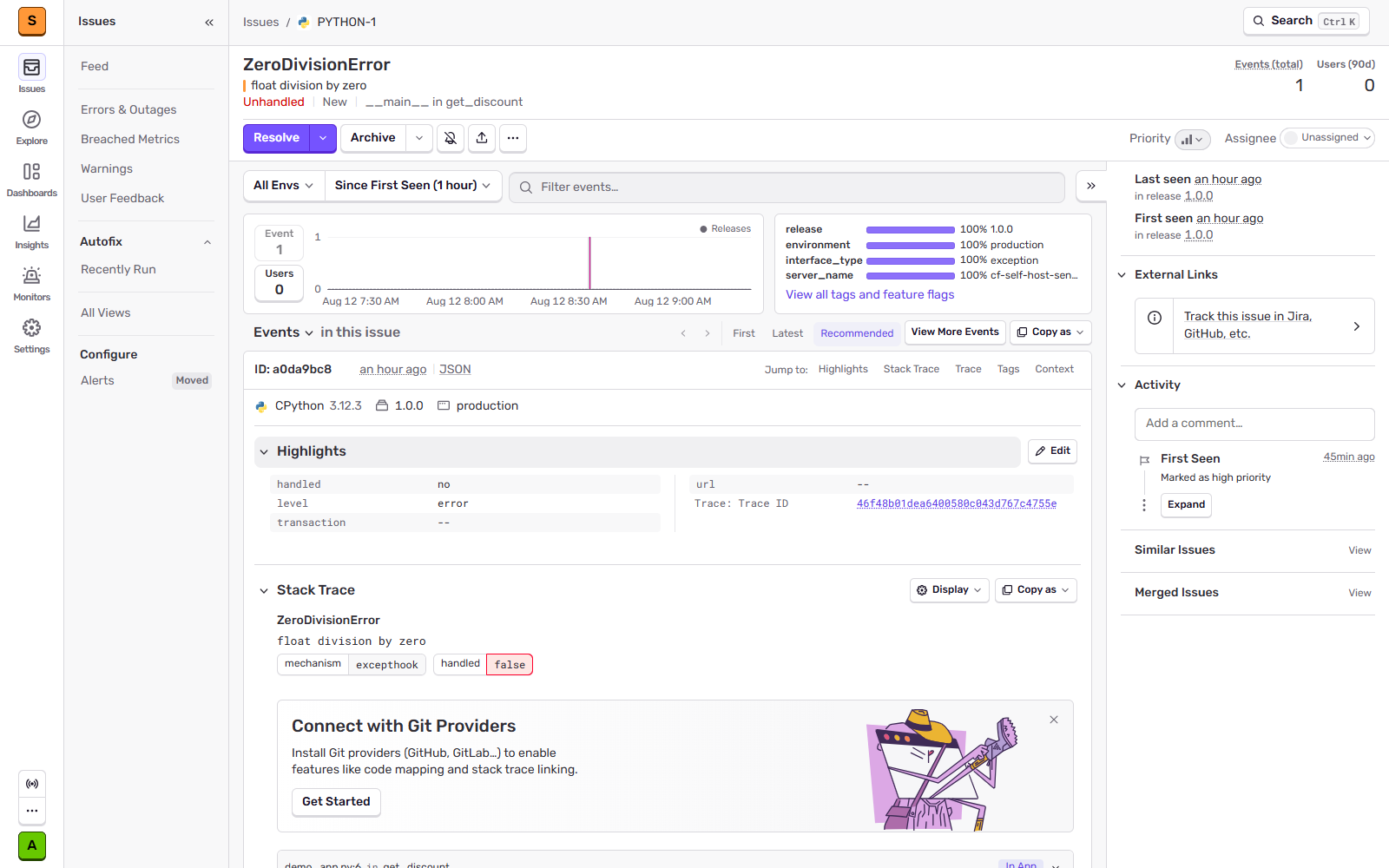
And because every new project ships with a default alert rule ("notify on high priority issues"), the email followed on its own:
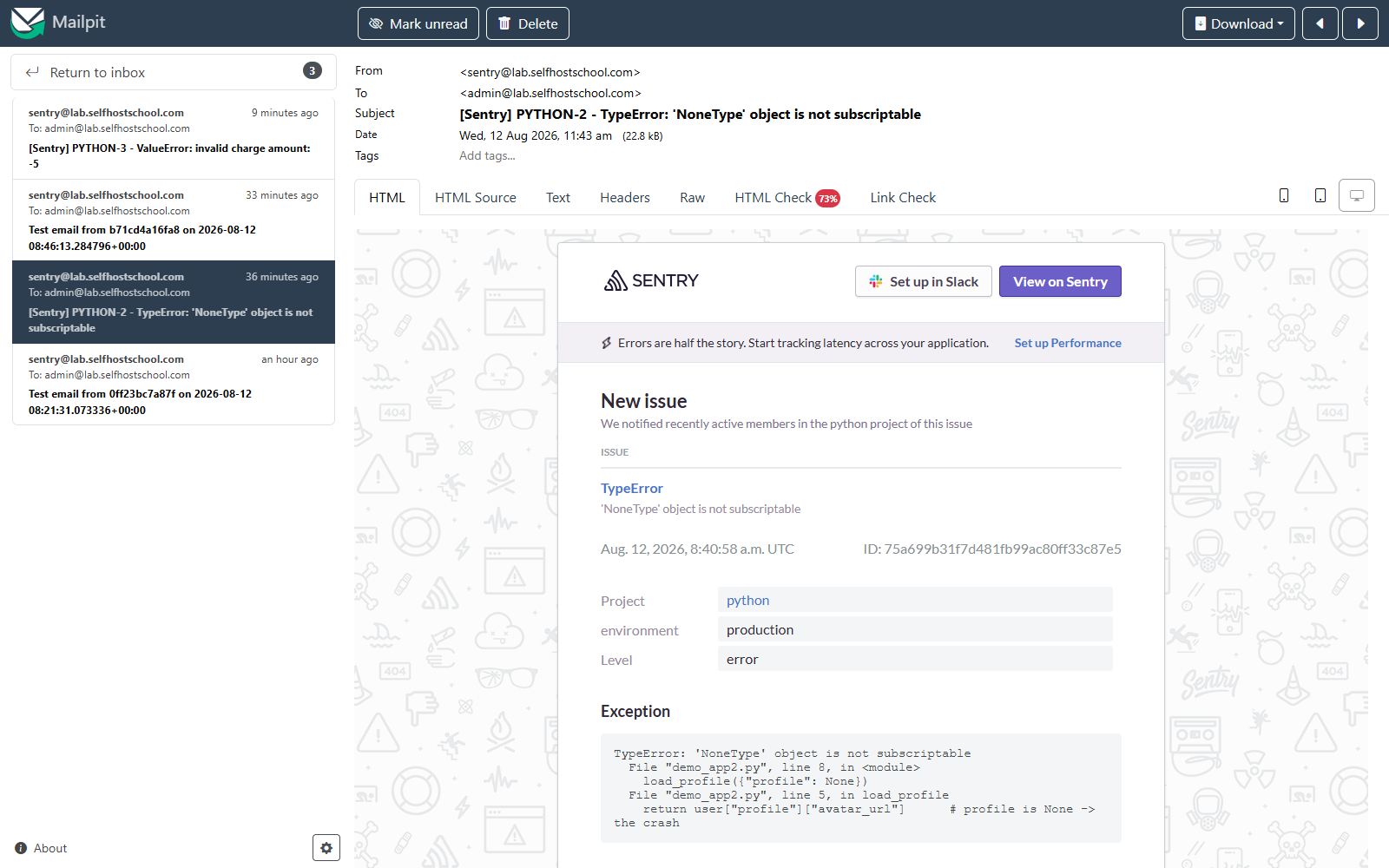
That is the whole promise of the tool, proven: exception in code, issue in the UI, email in the inbox. All of it on hardware you own, on a domain you own.
Day 2: upgrades, backups, and the canary rule
Upgrades. The official path is simple: check out the new release tag, run ./install.sh again. I timed a full re-run: 5 minutes 5 seconds, the stack came back healthy, and the override file from step 4 survived untouched, which is the whole reason we used an override instead of editing Sentry's compose. Sentry supports "hard stops" between some versions, so read the release notes before jumping many releases at once.
Backups. The minimum that saved me before: dump Postgres (users, projects, issue metadata) and tar the config. Events live in ClickHouse and Kafka volumes; for a small instance I treat them as replaceable, because losing a week of error history is annoying, while losing your projects and DSNs means re-wiring every app you own.
docker compose exec -T postgres pg_dumpall -U postgres | gzip > /root/backups/sentry-pg-$(date +%F).sql.gz
tar czf /root/backups/sentry-config-$(date +%F).tar.gz .env sentry/ docker-compose.override.yml
I restore-checked that dump into a scratch Postgres container: projects, issues, and the admin user all came back. A backup you have not restored is a wish, not a backup. The full playbook, including off-box copies, is in my backups guide.
Retention. SENTRY_EVENT_RETENTION_DAYS=90 in .env is the default. On a busy instance, lowering it is the main disk lever.
During my testing I restarted a few individual containers (memcached, web, a worker) instead of the whole stack. Ingestion silently died. The SDK kept reporting success, relay kept accepting events, and nothing landed in the UI for fifteen minutes. No error anywhere. A full docker compose cycle fixed it. So: after ANY maintenance, restart the whole stack rather than single containers, then send one deliberate test error and watch it appear. Sixty seconds of canary beats a silent week of lost errors.
Under load. I pushed roughly 75 errors plus 75 transactions per second at the box for five minutes (22,750 of each, from four parallel senders). RAM barely moved. The 4 CPU cores are what saturated: load average hit 28 while the consumers chewed through the backlog, and the box stayed up and kept ingesting. Sentry's docs say resource usage stays roughly flat regardless of traffic, and that matches what I measured: you pay the big cost at idle, not per event.
Can you run it on 8 GB?
The docs say no. I tried it anyway so you don't have to: a $48 4 vCPU / 8 GB droplet, a 16 GB swapfile, and COMPOSE_PROFILES=errors-only.
It works. Honestly, it surprised me: install.sh finished in 8 minutes 36 seconds, all 28 containers came up healthy, idle usage settled at 6.8 GB of RAM plus 1.2 GB of swap, and a real test event went all the way through the pipeline into an issue. That leaves about 1 GB of headroom.
root@sentry-8gb:~/self-hosted# free -h
               total        used        free      shared  buff/cache   available
Mem:           7.8Gi       6.8Gi       299Mi        16Mi       1.0Gi       964Mi
Swap:           15Gi       1.2Gi        14Gi
root@sentry-8gb:~/self-hosted# docker ps -q | wc -l
28
root@sentry-8gb:~/self-hosted# # canary event sent from a local script, then:
root@sentry-8gb:~/self-hosted# docker compose exec -T postgres psql -U postgres -t -c 'select short_id, message from sentry_groupedmessage;'
1 | canary on the 8GB box RuntimeError
My honest read: fine for a solo builder's side projects, where "tight" means a restart if it ever OOMs. I would not put a team's production error tracking on 1 GB of headroom. And the feature-complete profile is out of the question at this size.
The GlitchTip question
Now the comparison I promised the small-VPS crowd. GlitchTip is an open-source error tracker that speaks Sentry's protocol: your apps use the normal Sentry SDKs and just point the DSN at GlitchTip. And unlike Sentry, it IS in Coolify's one-click catalog.
Same box, same day, Sentry stopped for a clean measurement: from one click to a healthy, answering GlitchTip took 97 seconds. Four containers. About 311 MB of RAM.

| Sentry feature-complete | Sentry errors-only | GlitchTip | |
|---|---|---|---|
| Install path | install.sh + proxy wiring | install.sh + proxy wiring | Coolify one-click |
| Time to running | 11m 18s | 5m 54s | 1m 37s |
| Containers | 65 | 28 | 4 |
| Memory in use (idle) | 12 GB + 6.5 GB swap | 8 GB + 0.4 GB swap | ~311 MB (its containers) |
| Box that fits it | 16 GB ($84/mo) | 8 GB ($48/mo), tight | shares any box |
| You get | errors, tracing, replays, profiling, the full UI | errors, the full UI | errors, performance basics, uptime checks |
My rule from these numbers: GlitchTip until it hurts. If you are a solo builder who wants to know when production throws, GlitchTip on the Coolify box you already have is the rational pick, and moving to Sentry later is easy because the SDKs are identical. Choose self-hosted Sentry when you genuinely use tracing, replays, and profiling, or when event volume makes the cloud bill scary. (Coolify's catalog also has Bugsink, an even more minimal Sentry-compatible tracker. Same idea, same trade.)
My take
I went into this expecting to write "it's too heavy, don't". The real answer is more interesting.
The install itself is not the hard part. Sentry's installer is genuinely good: one script, eleven minutes, and the thing runs. The hard part is everything around it: knowing the compose paste is a dead end before you waste an evening, the four config edits that make the proxy work, the network trap, the wizard order, the canary rule. That is the gap between "it started" and "I trust it". This guide is that gap, written down.
And the sizing decision turned out to be a clean three-way split. Full Sentry if you will use the full product and can feed it a 16 GB box. Errors-only if you want real Sentry on $48. GlitchTip if you want error emails this afternoon on the server you already own. All three are legitimate. What is not legitimate is what the internet kept telling me: that there is no working path. There is. I just walked it with a stopwatch.
What this is part of
Sentry is one tenant. The real skill is running your whole stack this way: your apps, your analytics, your error tracking, your backups, on servers you own, without the tenants stepping on each other. That is what I teach in Self Hosting 2.0: 34 lessons from a blank server to a full stack you own, including the hardening and backup playbooks this guide only points at.
Course
Want the full system?
FAQ
Can you install Sentry with one click on Coolify?
No. Coolify's live catalog has 339 service templates and Sentry is not one of them (the template request has been open since August 2024). Pasting the official compose fails in Coolify's YAML parser: Sentry's file uses more anchors than the 128 the parser allows. The working path is the official install.sh next to Coolify with Coolify's proxy in front, which is this guide.
How much RAM does self-hosted Sentry actually need?
Measured on 26.7.2: the feature-complete profile ran 65 containers and held 12 GB of RAM plus 6.5 GB of swap at idle. Errors-only ran 28 containers at 8 GB with almost no swap. The official "16 GB + 16 GB swap" minimum is real, not padding.
Can you run Sentry on an 8 GB server?
Errors-only mode, yes, verified end to end: 28 healthy containers, 6.8 GB + 1.2 GB swap, about 1 GB of headroom, and a test event ingested. It is tight, and feature-complete does not fit. Details in the 8 GB section.
Should I use GlitchTip instead?
If you mainly want error tracking on a small box: in my experience, yes. Same SDKs, deployed from Coolify's catalog in 97 seconds, ~311 MB of RAM. Sentry earns its weight when you use tracing, replays, and profiling. The measured comparison is above.
Is self-hosted Sentry free?
The software costs nothing and has no per-seat or per-event fees. The server is the real bill: about $84/month for the 16 GB box the full profile needs, more than Sentry's own $26 Team plan. Self-hosting pays off with volume, privacy requirements, or a hard "no usage-based bills" rule.
How do upgrades work?
Check out the new release tag, run ./install.sh again. My timed re-run took 5 minutes 5 seconds and preserved the proxy override untouched. Dump Postgres and tar the config first; my backup restore-checked cleanly.
Related


Get the free Vibe Engineering Blocks guide
The exact building blocks I use to ship real products with AI — yours as a free PDF.
Questions & Discussion
Ask a question about this guide →Have a question? Ask it in the community — it's tagged #guide and linked back here. Reading is open to everyone; posting needs a free account.
Loading questions…