Self-Host an LLM with Ollama on a VPS: Real Numbers From 6 Servers
 Hasan Aboul Hasan
Published 2026-08-12
Hasan Aboul Hasan
Published 2026-08-12
Everyone asks if self-hosting an LLM is worth it. Nobody answers with numbers, so I rented six DigitalOcean servers (three CPU, three GPU, from $48/month to $4.41/hour), installed Ollama on all of them, and measured the same model everywhere: tokens per second, RAM and VRAM, how many concurrent users each box survives, and the real cost per million tokens next to API prices. Then I put the API behind HTTPS with a key and consumed it from a real app. This guide is the install, the security setup, and every number I got.
- Ollama on your own server with llama3.1:8b pulled and answering
- The API on your own domain, HTTPS, protected by an API key
- A server sized with measured numbers, not guesses: from "just me" to "my SaaS users"
- Your app talking to it through the OpenAI-compatible endpoint, nothing about your prompts leaving your server
Ollama is the easiest way to run open LLMs on a machine you control. One command installs it, one command pulls a model, and it speaks an OpenAI-compatible API. Your prompts stay on your box, and no per-token meter is running.
The question everyone argues about is whether running it on a rented server is worth it. The top result for "self host ollama" is literally a Reddit thread asking that. The answers are opinions. Mine were too, and I run most of my stack self-hosted, so I wanted real numbers.
So I measured it. Six servers, same model, same benchmark scripts, one day: tokens per second alone and under concurrent load, exact VRAM per model, the point where each box falls over, and what a million tokens actually costs on each one. Along the way I hit four traps that no install guide mentions. All four are documented below with their fixes.
Ollama 0.32.9 on DigitalOcean droplets, August 2026. The core model is llama3.1:8b (Q4_K_M, 4.9 GB) on all six boxes, plus llama3.2:3b on the CPU boxes and OpenAI's gpt-oss:20b on the GPUs. Every speed number is Ollama's own timing (eval_count over eval_duration), 3 runs minimum per data point, and the worst standard deviation across all single-user results was 0.58 tokens/sec. Concurrency tests fire 3 requests per stream of about 150 output tokens each, with prompts varied so caching cannot cheat.
The short answer
If you just want the verdict before the evidence, here it is.
A cheap CPU VPS runs an LLM for one person. llama3.2:3b on a $48/month droplet generates 5 to 7 tokens/sec. Usable for background jobs and personal tools. The 8B model on the same box crawls at 2.8 tokens/sec. And no CPU box can serve two people at once: throughput stays flat around 7 tokens/sec total while latency explodes.
A GPU changes the game completely. The cheapest GPU droplet DigitalOcean rents (RTX 4000 Ada, 20 GB VRAM, $0.76/hour) ran the same 8B model at 63 tokens/sec for one user, and served 16 concurrent users at reading speed. The H100 served 32 at once, at 529 tokens/sec combined.
On cost, the API usually wins. My best box produces tokens at $0.84 per million, but only when fully busy. gpt-4o-mini costs $0.60 with zero servers to babysit. Self-hosting wins on privacy, on flat predictable cost, and on control over your own stack. It rarely wins on cost per token. Now the evidence.
Pick your server: the six boxes I tested
All six are stock DigitalOcean droplets anyone can rent today. Three CPU, three GPU:
| Box | Specs | Price | What it is for |
|---|---|---|---|
s-4vcpu-8gb | 4 shared vCPU, 8 GB RAM | $48/mo | The cheapest thing that works |
s-8vcpu-16gb | 8 shared vCPU, 16 GB RAM | $96/mo | Does doubling vCPUs help? (spoiler: barely) |
c-8 | 8 dedicated vCPU, 16 GB RAM | $168/mo | The best CPU can do |
gpu-4000adax1-20gb | RTX 4000 Ada, 20 GB VRAM | $0.76/hr (~$555/mo) | The budget GPU story |
gpu-6000adax1-48gb | RTX 6000 Ada, 48 GB VRAM | $1.57/hr (~$1,146/mo) | Fastest single-user speed |
gpu-h100x1-80gb | H100, 80 GB VRAM | $4.41/hr (~$3,219/mo) | What serious scale looks like |
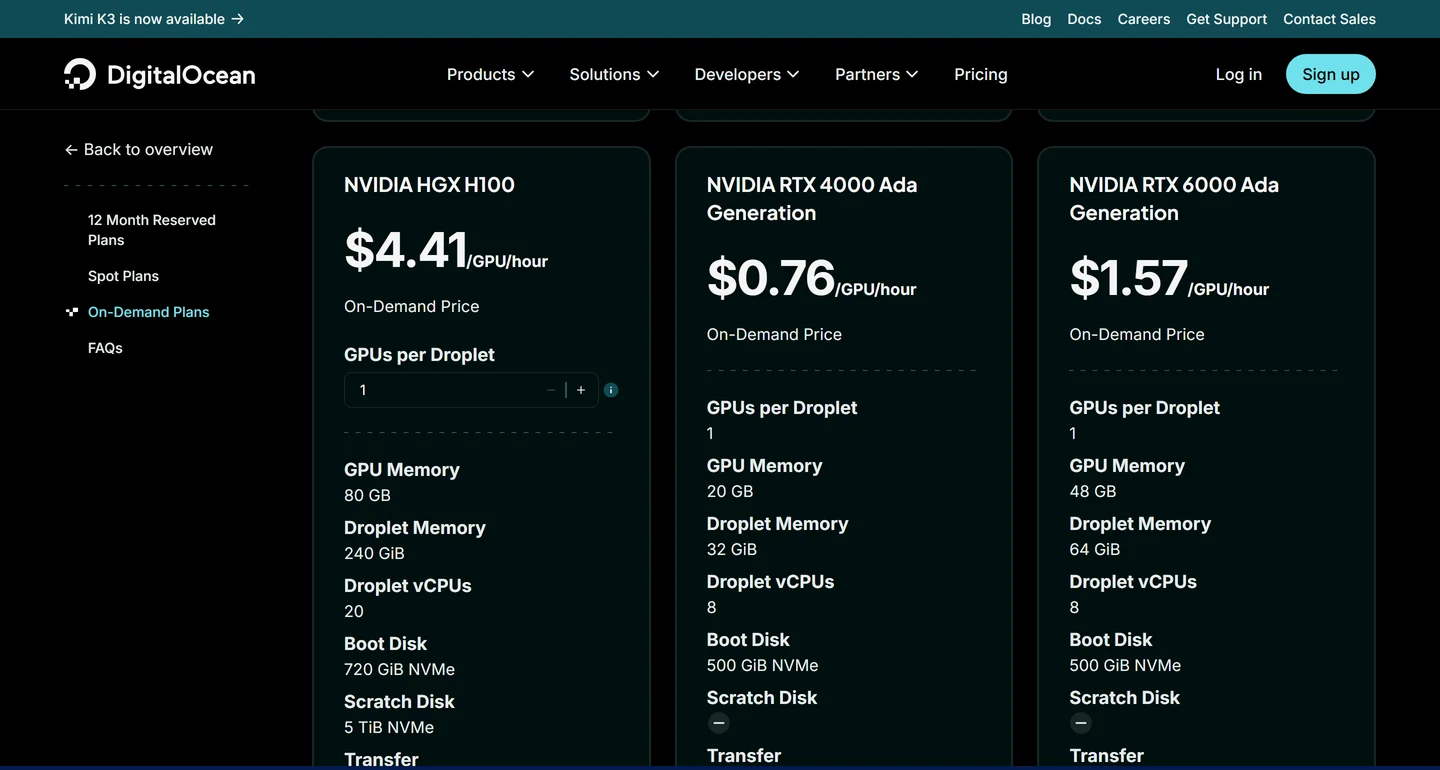
Two practical notes from creating these. GPU droplets live in fewer regions (mine were Toronto; my CPU boxes were Frankfurt), and they boot from DigitalOcean's "NVIDIA AI/ML Ready" image, which ships Ubuntu 22.04 with the driver and CUDA preinstalled. Nothing to install for the GPU: nvidia-smi worked 70 seconds after I clicked create.
One measured surprise worth your money: on CPU, dedicated cores beat shared cores by about 30% at the same core count. The c-8 ran the 8B at 6.8 tokens/sec against 5.4 on the shared 8-vCPU box. Shared vCPUs time-share a physical core with the neighbors; sustained inference is exactly the workload that notices.
Install Ollama and pull your models
The install is genuinely one command, and it behaves correctly out of the box: the API binds to localhost only, so nothing is exposed yet. This is my timed run on the fresh 16 GB droplet:
$ curl -fsSL https://ollama.com/install.sh | sh
>>> Installing ollama to /usr/local
>>> Downloading ollama-linux-amd64.tar.zst
>>> Creating ollama user...
>>> Install complete. Run "ollama" from the command line.
WARNING: No NVIDIA/AMD GPU detected. Ollama will run in CPU-only mode.
# 19 seconds, start to finish. On the GPU boxes the same script found CUDA on its own.
$ ollama pull llama3.2:3b && ollama pull llama3.1:8b
# 21s and 41s. DigitalOcean pulls the model registry at about 230 MB/s (1.3 GB/s on the GPU boxes).
$ ollama list
NAME           ID              SIZE      MODIFIED
llama3.1:8b    46e0c10c039e    4.9 GB    Less than a second ago
llama3.2:3b    a80c4f17acd5    2.0 GB    41 seconds ago
$ curl -s localhost:11434/api/generate -d '{"model":"llama3.2:3b","prompt":"Say hello in five words.","stream":false}'
"response": "Hello, how are you today?"
That is a working, private LLM. Under a minute and a half on a rented box, including both model downloads.
Ollama keeps a model loaded for 5 minutes after its last request (the keep_alive default). On my 8 GB box, asking for the 8B while the 3B was still warm meant 3 GB + 4.9 GB on a box with 7.4 GB free. The kernel's OOM killer shot the model server mid-load. I have the dmesg line to prove it. DigitalOcean droplets also ship with no swap, so there is no cushion. On an 8 GB box: run one model, or add a 2 GB swapfile before you experiment with switching.
Expose the API safely (HTTPS + key)
Ollama has no authentication. None. Anyone who can reach port 11434 can run your models, read your prompts, and delete your downloads. And a fresh server gets found fast: when I once left a new droplet exposed on purpose, the first scanner hit it in under 3 minutes.
The safe setup is three layers, and the whole thing takes about five minutes:
Layer 1: leave Ollama on localhost. The default. Don't set OLLAMA_HOST=0.0.0.0, whatever a tutorial tells you.
Layer 2: firewall. Only SSH and the web ports are open:
ufw allow OpenSSH
ufw allow 80/tcp
ufw allow 443/tcp
ufw --force enable
Layer 3: Caddy with HTTPS and an API key. Point a DNS A record at your server, install Caddy, and use this config. Caddy fetches the certificate on its own (Let's Encrypt, free; mine was issued 4 seconds after reload):
ollama.example.com {
    @authed header Authorization "Bearer YOUR-LONG-RANDOM-KEY"
    handle @authed {
        reverse_proxy 127.0.0.1:11434 {
            header_up Host 127.0.0.1:11434
        }
    }
    handle {
        respond "unauthorized" 401
    }
}
See the header_up Host line? Without it, your proxied requests come back as a bare 403 with an empty body, even with a valid key. Ollama has DNS-rebinding protection: it rejects any request whose Host header is not localhost. Your proxy forwards ollama.example.com as the Host, so Ollama refuses it. The one-liner rewrites the Host on the way in. I lost a round to this one; the fix is verified in the transcript below.
Verified from outside the box, all three checks:
$ curl -s -o /dev/null -w '%{http_code}' https://ollama.example.com/api/version
401
$ curl -s -H "Authorization: Bearer $KEY" https://ollama.example.com/api/version
{"version":"0.32.9"}   HTTP 200
$ curl -s --max-time 8 http://SERVER-IP:11434/api/version
unreachable (good, the firewall is doing its job)
If you would rather not expose the API at all, there is an even simpler pattern for a single developer: an SSH tunnel. ssh -L 11434:127.0.0.1:11434 root@your-server and your laptop's localhost:11434 IS the server's Ollama. No ports opened, no proxy, no key. I use both, and the app section below shows each one working.
The benchmarks: CPU vs GPU, same model
Same llama3.1:8b, same prompts, six boxes. One chart:
Same model, six servers you can rent today
llama3.1:8b (Q4_K_M), single user, generation tokens/sec. Mean of 9 timed runs per box, three prompt shapes, worst stdev 0.58. DigitalOcean, August 2026.
The shape of this chart is the whole CPU-vs-GPU decision. The three CPU bars are not "slower". They are a different category: 2.8 to 6.8 tokens/sec means watching words appear one by one. The cheapest GPU is 9 times faster than the best CPU box, and the H100 is 38 times faster than the $96 droplet.
Two model-ladder numbers worth knowing. The small llama3.2:3b is the honest CPU recommendation: 12 to 15 tokens/sec on the dedicated box, real reading speed, for $168/month. And OpenAI's gpt-oss:20b, a 13 GB download, ran at 74.6 tokens/sec on the $0.76/hour GPU. A 20-billion-parameter reasoning model, faster than the 8B dense model, because only a fraction of its experts fire per token. VRAM proof from my run:
$ nvidia-smi --query-gpu=name,memory.total,driver_version --format=csv,noheader
NVIDIA RTX 4000 Ada Generation, 20475 MiB, 580.173.02
$ curl -s localhost:11434/api/ps | python3 -m json.tool
"name": "llama3.1:8b"
"size":      5271715839
"size_vram": 5271715839   ← 100% of the model in VRAM, zero CPU spill
"context_length": 4096
$ nvidia-smi --query-gpu=utilization.gpu,memory.used --format=csv,noheader,nounits
95, 5226
# mid-generation: 95% GPU utilization, 5.1 of 20 GiB used
If you serve gpt-oss:20b through the raw API, know this: it is a reasoning model, and with a capped num_predict its entire token budget can go into the separate thinking field while response comes back empty. My benchmark hit exactly that. Read both fields in your client, or disable thinking per request.
How many users can one box handle?
This is the question that decides real deployments, and it is the one no guide measures. Ollama processes OLLAMA_NUM_PARALLEL requests at once and queues the rest. So I set that to each test's stream count and pushed every box up a ladder: 1, 2, 4, 8, 16 streams, and 32 on the H100.
What concurrency does to each box
llama3.1:8b, 3 requests per stream at ~150 output tokens each, OLLAMA_NUM_PARALLEL matched to the stream count.
† The RTX 6000 Ada point at 16 streams ran with OLLAMA_CONTEXT_LENGTH=2048 and the H100 at 32 with 1024: default 4,096-token contexts do not fit in VRAM at high parallelism. The H100 point at 8 streams is omitted (a model reload mid-run poisoned that window).
Read the left panel first. The CPU line is flat: 7 tokens/sec total whether one person or four are asking. CPU inference is bound by memory bandwidth, so concurrency just divides the same speed between users, and the right panel shows what that does to their waiting time: p95 latency of 128 seconds at 4 streams. Four users on CPU is not slow. It is broken.
The GPUs scale the way you would hope. The $0.76/hour card climbs to 252 tokens/sec at 16 streams, every user still getting 13 to 30 tokens/sec. The H100 reaches 529 tokens/sec at 32 streams, p95 under 9 seconds for full 150-token answers:
offload_check[level=32]: offloaded 33/33 layers   (NUM_PARALLEL=32, CONTEXT_LENGTH=1024)
$ python3 bench_concurrent_level.py --model llama3.1:8b --level 32 --requests 3
"ok": 96, "failed": 0
"agg_eval_tok_s": 528.86
"per_stream_tok_s": [17.4 ... 22.7]   # all 32 users at reading speed
"ttft_p95_s": 0.89
"latency_p95_s": 8.73
Getting to those numbers taught me the two GPU lessons of this whole project.
On the 48 GB card, two ladder levels ran 4 times slower than their neighbors. Same model, same box. The logs had the answer: offloaded 20/33 layers to GPU. Ollama's memory estimator had quietly put a third of a 5 GB model on the CPU, on a card with 43 GB free. It reproduced on a fresh droplet, at the same OLLAMA_NUM_PARALLEL values. Everything still "works", so you only notice if you are measuring. If your GPU numbers ever look wrong, check journalctl -u ollama | grep offloaded before anything else. Forcing num_gpu in request options restored full speed in my runs.
Ollama allocates its KV cache (the model's working memory for a conversation) as context length times parallel slots. At NUM_PARALLEL=32 with the default 4,096-token context, that allocation came out to 128 GiB, on an 80 GB card. Hard failure: cudaMalloc failed: out of memory, every request errored. Dropping the per-slot context to 1,024 tokens made the same 32-slot setup fly. Before you raise parallelism, do this multiplication. It is the sizing rule for serving many users: shorter context per slot, or more VRAM.
Put together, here is the capacity table I wish had existed before I started. "Comfortable" means the biggest tested load where p95 time-to-first-token stayed at or under 3 seconds and p95 latency at or under 12 seconds. "Sustained users" assumes an active chat user sends 8 requests an hour at about 220 output tokens each:
| Box | Price | Single-user speed | Comfortable concurrency | Best aggregate | Sustained chat users |
|---|---|---|---|---|---|
| s-4vcpu-8gb | $48/mo | 2.8 tok/s | 1 (barely) | 2.8 tok/s | 1 |
| s-8vcpu-16gb | $96/mo | 5.4 tok/s | 1 | 9.0 tok/s | ~18 background-job users, not chat |
| c-8 dedicated | $168/mo | 6.8 tok/s | 1 | 7.7 tok/s | ~15 background-job users, not chat |
| RTX 4000 Ada | $0.76/hr | 63 tok/s | 16 streams | 252 tok/s | ~515 |
| RTX 6000 Ada | $1.57/hr | 143 tok/s | 8 streams | 360 tok/s | ~737 |
| H100 80GB | $4.41/hr | 206 tok/s | 32 streams | 529 tok/s | ~1,081 |
The row to stare at is the RTX 4000 Ada. For a SaaS with a few hundred active users of an 8B-class feature, the cheapest GPU droplet DigitalOcean sells is genuinely enough. That surprised me.
Is it cheaper than the API?
Take each box's best measured throughput, divide the hourly price by tokens per hour, and you get an honest dollars-per-million-tokens figure to hold against the API price lists:
Is it cheaper than the API? Only if you keep it busy
USD per 1M output tokens, llama3.1:8b at each box's best measured throughput. Dashed lines: API prices, August 2026.
Assumes the box is fully busy. Idle time raises the effective price in direct proportion: a GPU at 10% utilization costs 10× these numbers per token. The s-4vcpu-8gb figure is single-stream (it cannot serve concurrent users).
Three honest readings. CPU self-hosting never wins on cost: $4.41 to $9.04 per million tokens against $0.60 for gpt-4o-mini. The budget GPU at $0.84 per million beats Claude Haiku 4.5 by 6x and gpt-5-mini by more than double, but still loses to gpt-4o-mini. And every self-hosted number assumes the box is busy. At 10% utilization, multiply by 10.
So why do I self-host anyway? Because the meter is the point. A flat $48 or $555 a month is a number you can plan a product around, and nobody re-prices it mid-quarter. Your prompts and your users' data stay on hardware you control. And an 8B model you own completely is enough for summarization, extraction, tagging, drafts, and most internal tools. The same logic that moved my whole stack off managed clouds applies to the model layer too.
A private LLM, owned end to end
That is the whole bill for the box this guide starts on: unlimited tokens, your data on your disk, no per-seat pricing, no meter. Sizing servers, securing them, and running real apps on them is the entire skill I teach in Self Hosting 2.0, 34 lessons from blank VPS to a full stack you own.
What specs do you actually need
The same data, folded into three honest recommendations:
Just you, personal tools, background jobs: the $48 CPU box. Run llama3.2:3b, not the 8B. 5 to 7 tokens/sec is fine for automations that nobody watches (summaries, tagging, drafts landing in your inbox). Add a 2 GB swapfile, stick to one model, and it will quietly do its job. If you already run n8n or PyRunner on a VPS, this is the same move for the model layer.
You want real chat speed, or a small team: the RTX 4000 Ada at $0.76/hour. 63 tokens/sec single-user, 16 people served at once, room for gpt-oss:20b at 74 tokens/sec. If it only needs to run during work hours, snapshot it and power it off at night: GPU droplets bill hourly, so 8 hours a weekday is about $130/month.
Production SaaS feature for hundreds of users: start with one 4000 Ada, and know your two knobs. Set OLLAMA_NUM_PARALLEL to your real concurrency, size OLLAMA_CONTEXT_LENGTH so context times slots fits VRAM, and load-test with the ladder pattern from this guide before launch. Past ~500 active users, an H100 at $2.32 per million tokens is still cheaper per token than Claude Haiku, or you scale sideways with two smaller GPUs behind a load balancer.
Consume it from a real app
The part that makes this a product feature and not a toy: your app talks to your server. Ollama ships an OpenAI-compatible endpoint at /v1, which means every OpenAI SDK on earth already supports your private LLM. Change the base URL, pass your Caddy key as the API key, done.
I verified it three ways from my laptop against the secured server. First with SimplerLLM, my open-source Python library, through both routes (the public HTTPS endpoint and the SSH tunnel), then with a raw curl so you can see exactly what any SDK does under the hood:
$ python consume_ollama.py
=== Route A: OpenAI-compatible endpoint (HTTPS + API key) ===
    base_url = https://ollama.example.com/v1
    [60.0s] The main benefit of self-hosting a Large Language Model (LLM) is
    that it allows for full control and customization over the model's
    functionality, data usage, and deployment environment ...
=== Route B: native Ollama provider via SSH tunnel ===
    OLLAMA_URL = http://127.0.0.1:11435/
    [25.0s] The primary benefit of self-hosting a Large Language Model (LLM)
    is having complete control and ownership over the model ...
$ curl -s https://ollama.example.com/v1/chat/completions -H "Authorization: Bearer $KEY" \
  -d '{"model":"llama3.1:8b","messages":[{"role":"user","content":"Reply with exactly: SELF-HOSTED OLLAMA API OK"}]}'
"content": "SELF-HOSTED OLLAMA API OK"
"usage": {"prompt_tokens": 23, "completion_tokens": 10, "total_tokens": 33}
Those 60 and 25 second timings are the CPU box generating at its measured 2.5 tokens/sec, a nice accidental cross-check of the benchmarks. On the GPU box the same calls come back in about 2 seconds.
The Python side is four lines with SimplerLLM (any OpenAI client looks the same). Set OPENAI_BASE_URL=https://ollama.example.com/v1 in your environment first, then:
from SimplerLLM.language.llm import LLM, LLMProvider

llm = LLM.create(provider=LLMProvider.OPENAI, model_name="llama3.1:8b",
                 api_key="YOUR-CADDY-KEY")
print(llm.generate_response(prompt="Summarize this ticket: ..."))
My take
I went in expecting the GPUs to win on speed. They did. What I did not expect was how completely the "worth it" question splits into two different questions.
For cost per token, the API providers have won, full stop. They run these models at a scale and utilization you cannot match with one rented card, and gpt-4o-mini at $0.60 per million is the proof.
But that was never really the question. The question is whether $48 a month buys you a model that is yours: prompts that never leave your box, costs that never surprise you, a stack with no usage dashboard and no deprecation emails. Measured against that, yes. A 3B on a cheap droplet for your automations, or the $0.76/hour GPU serving 16 real users, both do honest work. In my experience the builders who self-host their LLM do it for the same reason they self-host anything: not to save pennies, to own the thing.
What this is part of
An LLM server is one tenant on a box you own. The full skill is running your whole stack this way: the analytics, the automations, the backups, the hardening, all next to each other without the tenants fighting. That is what I teach in Self Hosting 2.0: 34 lessons from a blank server to a stack you fully own, including the security playbook this guide applied in one section.
Course
Want the full system?
FAQ
Can you run an LLM on a CPU-only VPS?
Yes, for one user and small models. Measured: llama3.2:3b generates 5 to 7 tokens/sec on a $48/month droplet, 12 to 15 on a $168 dedicated box. The 8B crawls at 2.8 tokens/sec on the cheap box. And CPU throughput does not scale with users: 4 concurrent streams pushed p95 latency to 128 seconds. Multi-user means GPU.
How much RAM or VRAM does llama3.1:8b need?
The Q4_K_M build is 4.9 GB and sat fully in VRAM at exactly its own size in my GPU runs (4,096-token context). On CPU, peak system RAM hit 6.2 GB during generation, so 8 GB is the floor, with nothing else heavy on the box. Watch the 5-minute keep_alive: switching models inside that window on an 8 GB box OOM-killed my server.
How many concurrent requests can Ollama handle?
As many as OLLAMA_NUM_PARALLEL allows, queueing the rest. Measured with llama3.1:8b: 16 streams at 252 aggregate tokens/sec on a 20 GB RTX 4000 Ada, 32 streams at 529 on an H100 with p95 latency 8.7 seconds. On CPU the answer is one; aggregate throughput stays ~7 tokens/sec no matter the stream count.
Is self-hosting an LLM cheaper than the API?
Usually no. My best measured figure is $0.84 per million output tokens (RTX 4000 Ada, fully busy), against gpt-4o-mini at $0.60, gpt-5-mini at $2.00, Claude Haiku 4.5 at $5.00. Idle time multiplies your effective price. Self-host for privacy, flat costs, and ownership, not for cheap tokens.
What VPS specs do I need for Ollama?
Personal use with a 3B model: 4 vCPU / 8 GB, $48/month. Real chat speed or a small team: a 20 GB GPU (63 tokens/sec single-user, 16 concurrent). Hundreds of users: the same card still holds (~515 sustained chat users by my math), then H100-class hardware. Full measured table above.
Why did my Ollama GPU suddenly get 4x slower?
Probably silent partial offload. Check journalctl -u ollama | grep offloaded: if you see something like 20/33 layers, Ollama put part of the model on the CPU even though VRAM was free. I reproduced this on a 48 GB card with a 5 GB model after changing OLLAMA_NUM_PARALLEL. Force num_gpu in request options or lower OLLAMA_CONTEXT_LENGTH.
Do I need to secure the Ollama API?
Yes. There is no built-in auth at all. Keep it on 127.0.0.1, firewall everything but 22/80/443, and put Caddy with an API key in front. Remember the Host header rewrite (header_up Host 127.0.0.1:11434), or every proxied request gets a bare 403 from Ollama's DNS-rebinding protection.
Related


Get the free Vibe Engineering Blocks guide
The exact building blocks I use to ship real products with AI — yours as a free PDF.
Questions & Discussion
Ask a question about this guide →Have a question? Ask it in the community — it's tagged #guide and linked back here. Reading is open to everyone; posting needs a free account.
Loading questions…