How to Make a Realistic AI Clone of Yourself (HeyGen + Seedance 2.5, Tested on 16 Tools)
 Hasan Aboul Hasan
Published 2026-09-19
Hasan Aboul Hasan
Published 2026-09-19
I ran 15 experiments to clone myself: 16 tools, over 140 test videos of my face, and over $240 of my own money. Two tools survived, HeyGen and Seedance 2.5, and they are good at different jobs. The one problem no tool solved is the voice. Every clone said my words in someone else's accent, so I put my real recording back. This page is the recipe for both tools, every prompt I ran, what to record, and the small script that brings your real voice back.
- A HeyGen twin of you that says any recording you upload
- A Seedance 2.5 clip of you in any scene, or in your real room, in your real voice
- The five things Seedance needs, and the exact files I used for each
- The relink script that puts your real recording back on the video
- A test routine that costs cents, not dollars
What you need first
- A camera that shoots 1080p or better, and a mic
- 3 or 4 photos of yourself from one session (the checklist is below)
- For the talking-head twin: a HeyGen account with API credit
- For Seedance 2.5: a BytePlus ModelArk account. Its console is where you register your face.
- About $10 for tests
- For the relink script: Python and ffmpeg on your computer
Watch the video
This page is the written version of my AI clone video. The video shows everything moving. This page has every file behind it.
Which one is real?
Three clips. Same 14 seconds, same words. One is my real camera. One is HeyGen. One is Seedance 2.5.
Click a clip to play it. They start muted, so judge the picture: the face, the mouth, the hands. Pick the one you think is real, then open the answer.
Reveal the answer
A is Seedance 2.5. B is my real camera. C is HeyGen.
One audio track under all three: my real recording. The sound gives nothing away, and that is the whole point of this guide.
Clips you open after the reveal play with sound.
What did not work
Most of what I tried failed. You will probably be tempted by some of these, so here is all of it in one place.
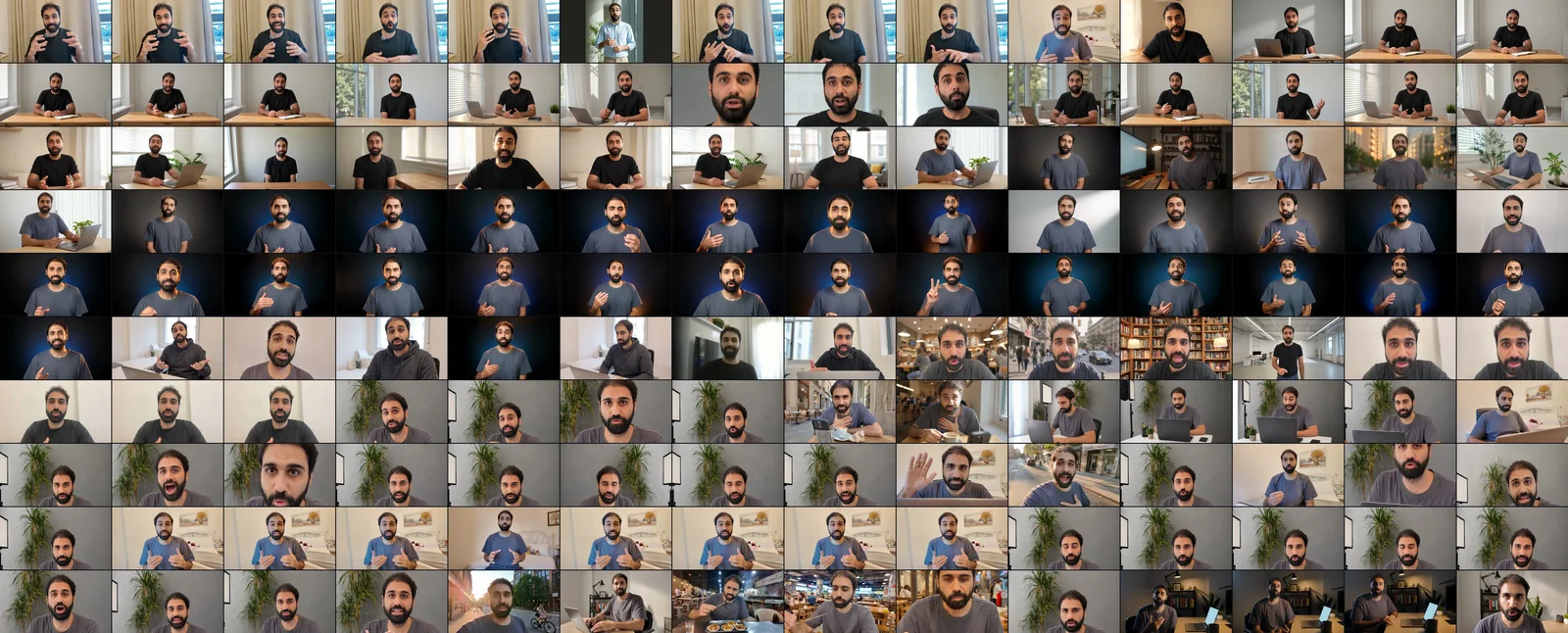
Sixteen tools and routes, what I used each one for, and why it lost. Most are video models (they make the whole scene, not only your face) or lipsync tools (they repaint the mouth after the video is made, to match a voice). The two green rows are the ones that survived.
| Tool | What I tried it for | Why it lost | Lab test |
|---|---|---|---|
| HeyGen Avatar V (also IV, III and photo looks) | A talking-head twin | Survived. The best twin I made. Avatar V beat IV. | clone-01, 04, 11 |
| Seedance 2.5 on ModelArk | Me in any scene, driven by my recording | Survived. Only after I registered my face. | clone-06, 15 |
| Synthesia | A talking-head avatar | Its voice clone was very bad for my accent, and your own audio in their editor needs the Enterprise plan | clone-13 |
| Google Omni Flash | Avatar and video model | The best face I saw. But it cannot take my recording as input, its own voice is not my accent, and clips stop at 8 to 10 seconds | clone-14 |
| Seedance 2.0 on fal | Video model | Ignored my recording as a track and invented its own speech, so it needed a lipsync pass on top | clone-05 |
| HappyHorse 1.0 | Video model | Crash-zoomed itself into a close-up, restless in both takes | clone-06 |
| Veo 3.1 | Video model | "It drifted": it beautified me into a squarer jaw | clone-06 |
| Kling O3 | Video model | "Not a good match" for my face | clone-06 |
| Kling AI Avatar | Animate one photo | It was me, but the talking motion looked weird | clone-05 |
| OmniHuman 1.5 | Avatar from a photo | The camera moved by itself (84 px of drift): "very bad" | clone-12, 14 |
| Hunyuan Avatar | Avatar from a photo | Never rendered: fal's queue never served it ($0) | clone-12 |
| sync v3 | Lipsync on my real voice | Starts in sync, drifts out by the end | clone-05, 08 |
| sync v2/pro | Lipsync on my real voice | Behind v3 in my tests, with the face and mouth wandering at times | clone-05 |
| Pixverse lipsync | Lipsync on my real voice | The same slow drift | clone-08 |
| VEED lipsync | Lipsync on my real voice | "Bad" | clone-08 |
| Tavus Hummingbird | Lipsync on my real voice | Pulled from fal (404), so it never ran | clone-08 |
Three of them are worth seeing, because you will probably try them.
You hear: Synthesia's generated voice
You hear: Omni's own voice
You hear: my real voice
Google says it plainly in its Omni launch post: "only voice references will be supported for audio to start". A voice reference is the sample you record once when you set up the avatar. It is not your line. I could put my real voice back afterwards, the same trick I use on Seedance below, and the lip sync held. What kept Omni off my list in the end is the length: 8 to 10 seconds a clip. If Google adds audio input and longer clips, I think Omni goes to the top of this list.
The last one is the voice. I tried five ways to clone my voice, and in all five it was not my accent:
- HeyGen voice clone✗
- Synthesia voice clone✗
- Google Omni✗
- Seedance's own voice✗
- Seedance driven by my recording✗
Remember this one. It comes back later, with the fix.
The two that survived, and which one for which job
Two tools survived, and they do different jobs. HeyGen is a talking-head tool. You record yourself once, it builds your twin, and then you upload any audio and the twin says it. Seedance 2.5 is a video model, so you can be anywhere, doing anything.
| HeyGen | Seedance 2.5 | |
|---|---|---|
| What it is | Your twin, talking to camera, one shot | You in any scene |
| Shirt and room | A $1 photo look changes them | Any scene, or your real room from a video of you |
| Its own voice | Not my accent | Not my accent |
| Your real voice | Upload it, the twin lip-syncs to it | Attach it, then put it back over the video |
| Length | Longer videos in one render (67 seconds was my longest test) | 4 to 30 seconds per clip |
| Resolution | 1080p, 25 fps | 720p is what I used |
| Price | $4 per minute | About $14 per minute at 720p |
So the choice is simple:
| The job | Use |
|---|---|
| A talking-head video | HeyGen |
| You in a real scene, or a Short | Seedance 2.5 |
If you only want to talk to camera, HeyGen at $4 a minute and one good recording is enough. You do not need Seedance.
Seedance costs about 3.5 times more per minute, and the video reference doubles that again, because you pay for every second of the reference too. (A reference is a file the model copies from. Here it is a short video of you.)
Neither tool can speak in my accent, in any mode I tried. If your accent is part of your channel, plan on putting your real recording back every time.
About the 720p: that is what I used, not a limit. 1080p is on the price list at $0.569 a second, about 2.5 times the 720p price. I never rendered it, so I cannot tell you if it is worth it.
The HeyGen recipe
HeyGen is the easy one. It comes down to three things: the footage, the voice, and one small trick.
1. The footage is the whole secret
My first twin came from footage I already had, calm and in Arabic. Look at the teeth: one flat white band, like piano keys.
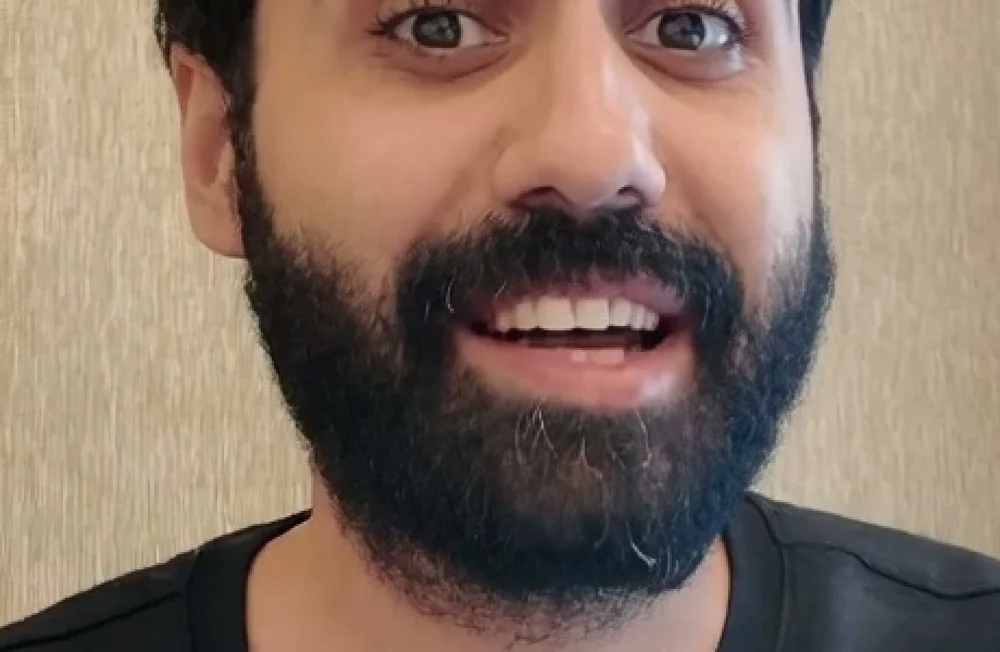
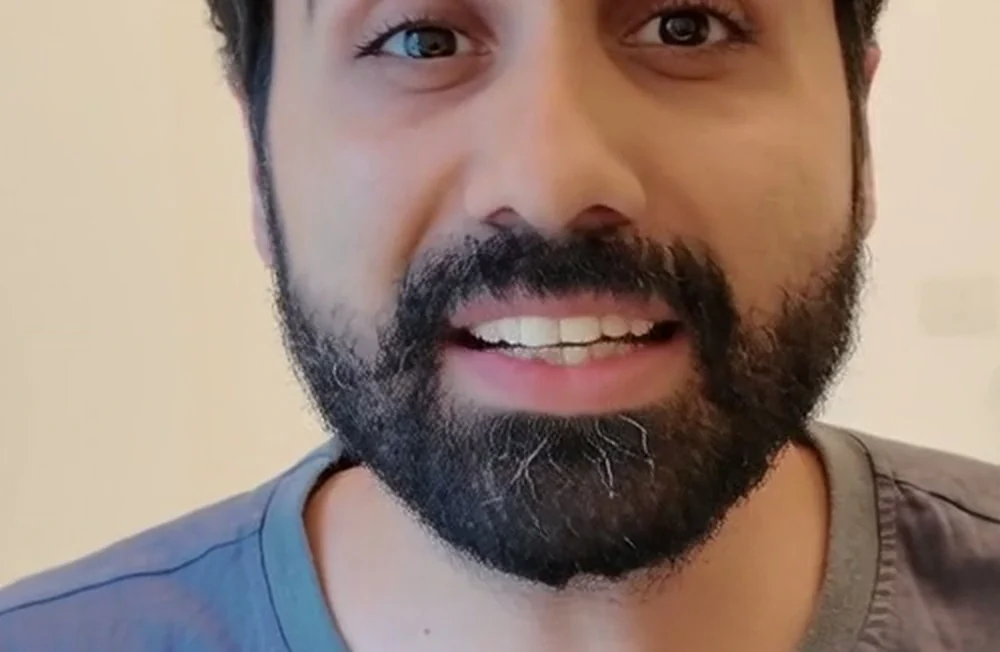
It was not the resolution: I tested that, and the band stayed. The fix was new footage, shot only for the twin: my real on-camera energy, my teeth visible, even light on my face, in English. I changed all of that at once, so I cannot tell you which part mattered most. That twin is the one I still use. The full shooting checklist is in the recording section.
HeyGen has more than one avatar engine. Avatar V beat Avatar IV for me: 2.1 times faster to render, finer detail, and calmer hands.
2. Never use its voice clone
HeyGen can clone your voice. For my accent it was very bad. So record your line and upload it. The twin lip-syncs to your recording, so the voice is really yours.
If you have a plain American or British accent, the voice clone might work for you. Test it yourself before you trust it.
3. Two cameras from one photo
In HeyGen you can add a photo of yourself as a new look, like a different shirt or a different room. It cost me $1 per look, and I measured that twice. Now crop the same photo a bit tighter and add it again as a second look. You have two cameras in the same room, a wide one and a close one, and you can cut between them like a real shoot.
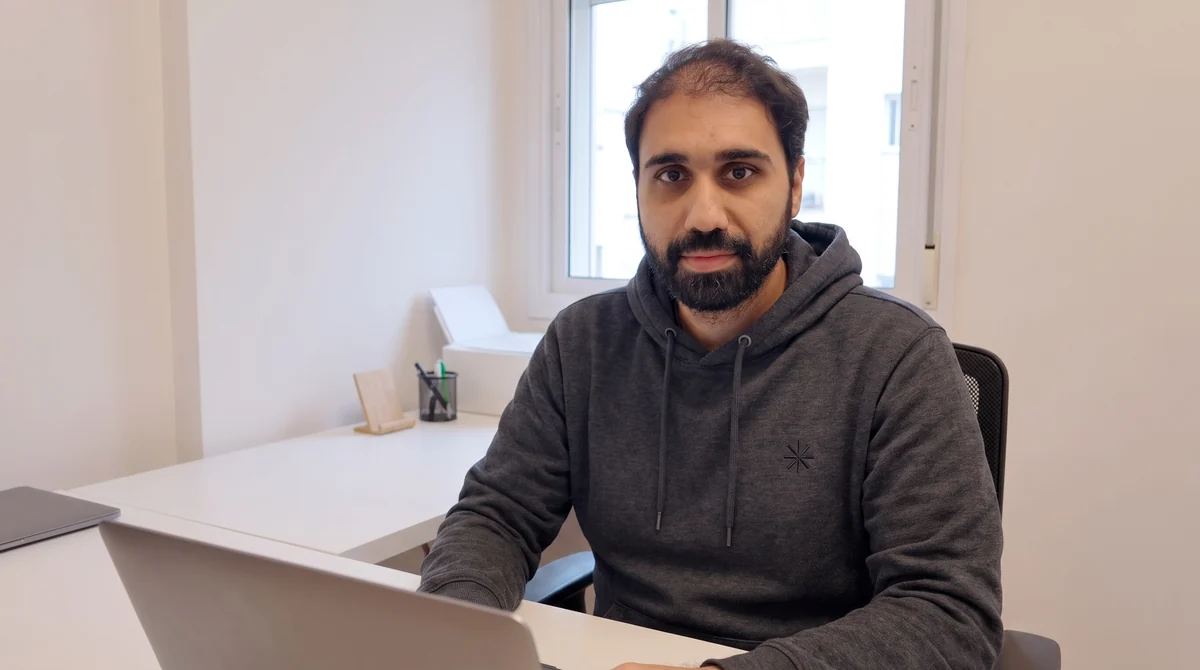
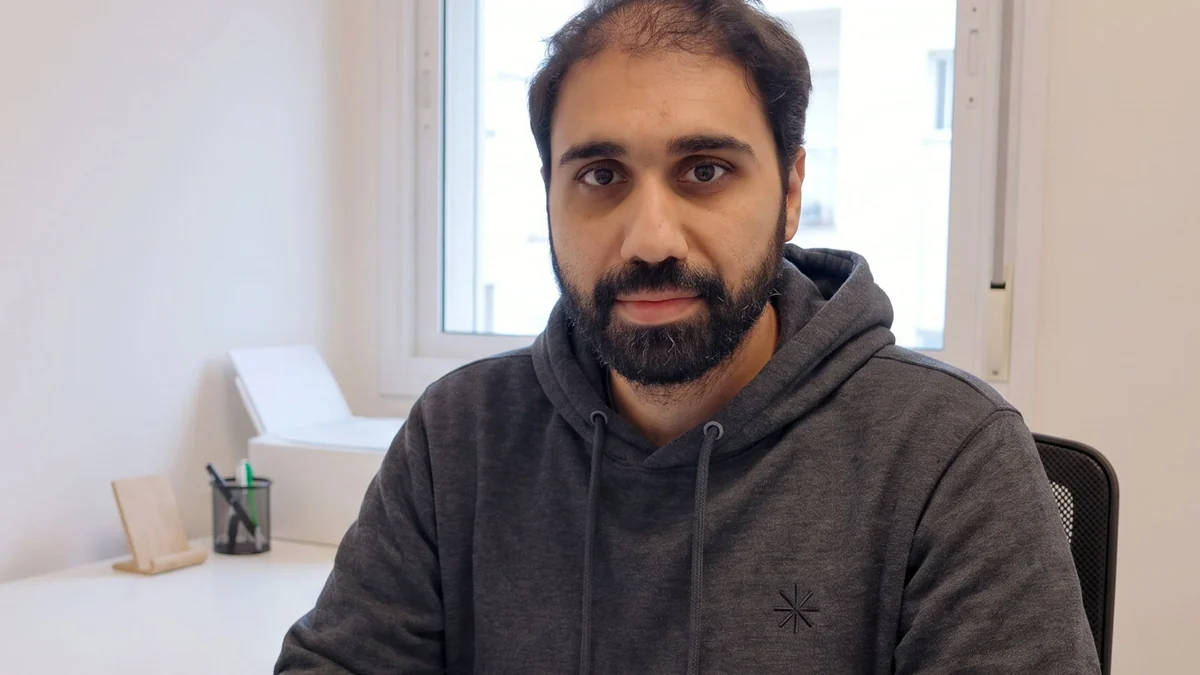
To be exact: the look in this demo was generated inside HeyGen from a prompt (me in a hoodie, in an office), then cropped. A look made from a real photo of me worked too.
You hear: my real voice
4. Length, price and frame rate
- Length. I rendered 67 seconds in one go, for $4.47. That is the longest I tested, so I will not promise you more.
- Price. On the API, a twin render cost me $4.00 a minute and a photo look render $3.00 a minute, billed in whole seconds, rounded down. HeyGen's price list puts creating a twin at $1. The HeyGen API is pay-as-you-go and separate from their web plans.
- Frame rate. The output is 1080p at 25 fps. If your timeline runs at 30 fps, convert the clip first, or it judders.
The Seedance recipe: five things
Seedance needs more work. But when you want a real scene, the result is on another level. You need five things.
1. Where to use it
This one cost me time. I tried Seedance 2.5 on fal first and uploaded my face. It refused. That happened once, I did not retry, and the same files went through on Seedance 2.0. This is what fal sent back:
fal, Seedance 2.5, images of my facecontent_policy_violation / partner_validation_failed
Then I went to ModelArk, the BytePlus API that runs Seedance 2.5. It refused too. Photos and video are checked separately, so they fail with two different codes:
ModelArk, images of my faceInputImageSensitiveContentDetected.PrivacyInformation
ModelArk, my videoInputVideoSensitiveContentDetected.PrivacyInformation
the input video 'content[5]' may contain real person
The images in those first refusals were AI-made reference sheets of my face, built from a photo of me. The check looks at the likeness, not at where the image came from.
Verifying my account (KYC) did not fix it. What fixed it was registering my face. In the ModelArk console: Playground → "Add Real-Human Assets to ModelArk Library" → likeness authorization. You upload your photos and your video there and confirm that it is really you. Each file becomes a likeness asset (your face, registered and approved in the console) with an asset:// id, and that id goes in the request instead of the file.
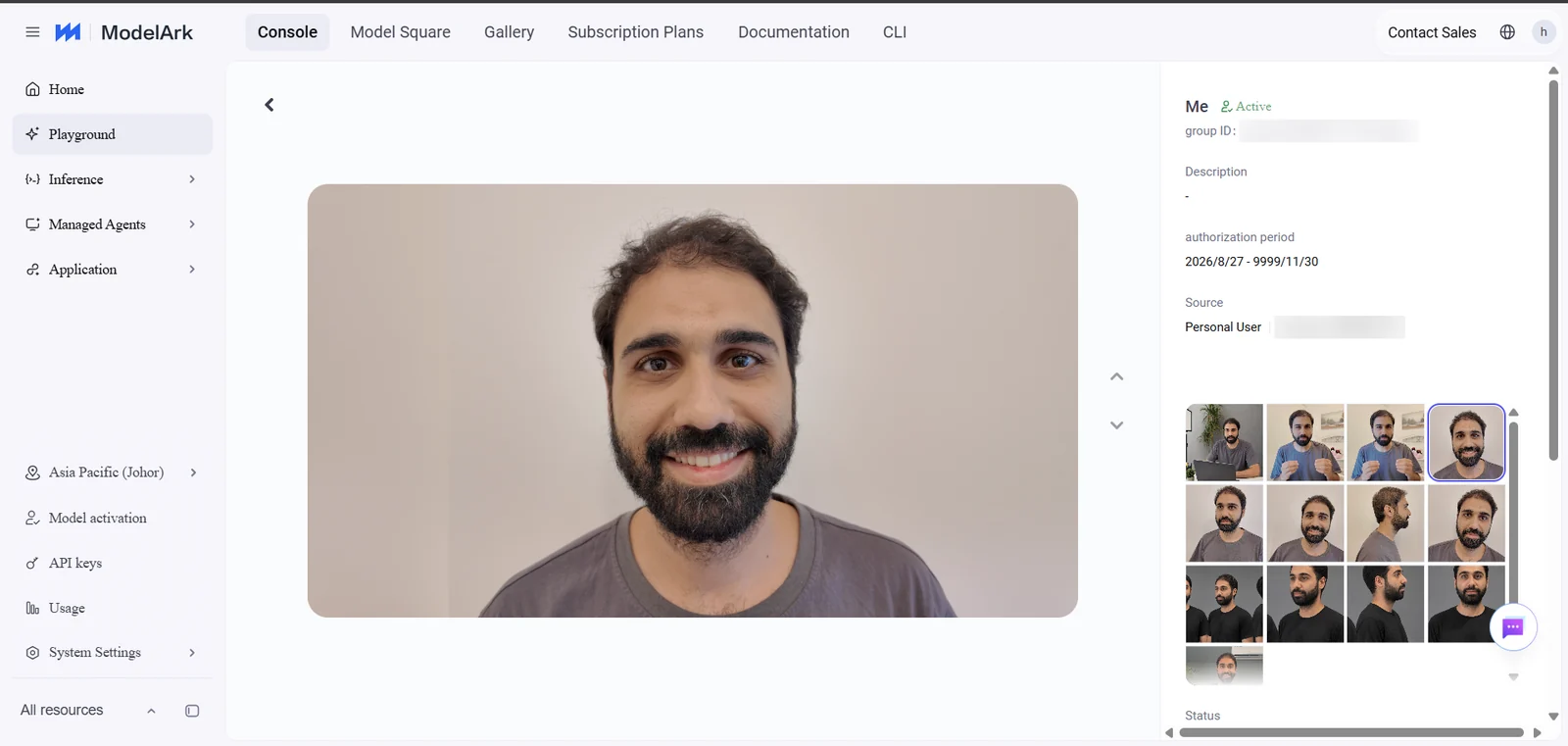
Three things I learned the hard way:
- Registration is per file. A registered photo does not cover a video.
- Your audio never needs registering. The check looks for faces, and my recording went through as a plain link every time.
- A refused request costs $0, so it is only lost time. Once, a finished render was refused on the way out instead (
OutputVideoSensitiveContentDetected, on my first cafe prompt). I have no record of whether that one was billed.
The model id is dreamina-seedance-2-5-260628, on ark.ap-southeast.bytepluses.com. It is an async API: you submit a task, you get an id back, and you ask for the result until it is ready.
This is the request body. You send it with POST /api/v3/contents/generations/tasks and your API key, and you get back a task id. In the prompt, the files are named in the order you attach them: @Image1 to @Image3, @Video1, @Audio1.
{
  "model": "dreamina-seedance-2-5-260628",
  "content": [
    {"type": "text", "text": "<your prompt>"},
    {"type": "image_url", "image_url": {"url": "asset://<registered photo 1>"}, "role": "reference_image"},
    {"type": "image_url", "image_url": {"url": "asset://<registered photo 2>"}, "role": "reference_image"},
    {"type": "image_url", "image_url": {"url": "asset://<registered photo 3>"}, "role": "reference_image"},
    {"type": "video_url", "video_url": {"url": "asset://<registered video>"}, "role": "reference_video"},
    {"type": "audio_url", "audio_url": {"url": "https://<your hosted recording>.wav"}, "role": "reference_audio"}
  ],
  "generate_audio": true,
  "ratio": "16:9",
  "resolution": "720p",
  "duration": 14,
  "watermark": false
}
You do not have to write the HTTP calls yourself. The zip has modelark_seedance.py, which submits, saves the task id, waits, and downloads the mp4. It needs Python and the requests package. Install that once, in your terminal:
pip install requests
Then put your ModelArk API key in an environment variable. On Windows, in PowerShell:
$env:ARK_API_KEY = "your-key"
On macOS or Linux, in the terminal:
export ARK_API_KEY="your-key"
Then run this in the folder where you unzipped the files, with your own asset:// ids and the public link to your recording. It prints the status every 10 seconds and saves take-1.mp4 when the render is done:
python modelark_seedance.py submit --prompt prompts/talking-head-with-video-reference.txt --image asset://YOUR-PHOTO-1 --image asset://YOUR-PHOTO-2 --image asset://YOUR-PHOTO-3 --video asset://YOUR-VIDEO --audio https://YOUR-HOST/your-line.wav --duration 14 --resolution 720p --out take-1.mp4
Add --dry-run to that command to print the request without sending it. That costs nothing.
Show the whole script (modelark_seedance.py)
r"""Submit a Seedance 2.5 render on BytePlus ModelArk, wait for it, download it.

This is the request I used for every clip in the guide, cut down to one file.

BEFORE YOU RUN IT

    1. An API key from the ModelArk console (API keys page), in an environment variable:
           Windows PowerShell:  $env:ARK_API_KEY = "your-key"
           macOS / Linux:       export ARK_API_KEY="your-key"
    2. Your photos and your video reference registered as likeness assets in the console
       (Playground -> "Add Real-Human Assets to ModelArk Library" -> likeness
       authorization). Each one gives you an asset:// id. Without this, a real face is
       refused with InputImageSensitiveContentDetected.PrivacyInformation (photos) or
       InputVideoSensitiveContentDetected.PrivacyInformation (video), billed $0.
    3. Your recording of the line at a public https link. Audio never needed registering
       in my tests: the check that refuses real people looks at faces, not voices.

RUN

    python modelark_seedance.py submit --prompt prompt.txt \
        --image asset://asset-AAA --image asset://asset-BBB --image asset://asset-CCC \
        --video asset://asset-DDD --audio https://example.com/my-line.wav \
        --duration 14 --resolution 720p --ratio 16:9 --out take-1.mp4

    In the prompt, the files are named in the order you pass them: the images are
    @Image1, @Image2, @Image3, the video is @Video1, the audio is @Audio1.

    Add --dry-run to print the request without sending it (free).

IF IT GETS STUCK

    The task id is saved to take-1.mp4.task.json BEFORE the script starts waiting. If
    your connection drops or you close the terminal, do NOT submit again: you would pay
    for the render twice. Pick the same task up where it is:

    python modelark_seedance.py poll cgt-20260908171308-xxxxx --out take-1.mp4

REQUIREMENTS

    Python 3.9+ and requests (pip install -r requirements.txt).
"""
from __future__ import annotations

import argparse
import json
import os
import sys
import time
from pathlib import Path

import requests

BASE = "https://ark.ap-southeast.bytepluses.com/api/v3"
MODEL = "dreamina-seedance-2-5-260628"
USD_PER_MILLION_TOKENS = 10.67   # what my renders were billed; check your own console


def key() -> str:
    k = os.environ.get("ARK_API_KEY", "").strip()
    if not k:
        sys.exit("ARK_API_KEY is not set. Put your ModelArk API key in that environment variable.")
    return k


def call(method: str, path: str, body: dict | None = None, retries: int = 4) -> tuple[int, dict]:
    """Network hiccups retry with backoff. An HTTP error is an answer and returns at once."""
    last = ""
    for attempt in range(retries + 1):
        try:
            r = requests.request(method, BASE + path, json=body, timeout=120,
                                 headers={"Authorization": f"Bearer {key()}"})
            try:
                return r.status_code, r.json()
            except ValueError:
                return r.status_code, {"error": {"message": r.text[:300]}}
        except requests.RequestException as e:
            last = str(e)
            time.sleep(2 ** attempt)
    return 0, {"error": {"message": f"network failure after {retries} retries: {last}"}}


def build_content(args) -> list[dict]:
    content = [{"type": "text", "text": Path(args.prompt).read_text(encoding="utf-8").strip()}]
    for url in args.image:
        content.append({"type": "image_url", "image_url": {"url": url}, "role": "reference_image"})
    for url in args.video:
        content.append({"type": "video_url", "video_url": {"url": url}, "role": "reference_video"})
    for url in args.audio:
        content.append({"type": "audio_url", "audio_url": {"url": url}, "role": "reference_audio"})
    return content


def submit(args) -> int:
    """Send the render. The task id is saved BEFORE the first poll: a dropped connection
    must never lose a task that is already billing."""
    body = {
        "model": MODEL,
        "content": build_content(args),
        "generate_audio": True,
        "ratio": args.ratio,
        "resolution": args.resolution,
        "duration": args.duration,
        "watermark": False,
    }
    if args.dry_run:
        print(json.dumps(body, indent=2, ensure_ascii=False))
        return 0

    code, resp = call("POST", "/contents/generations/tasks", body)
    if code >= 400 or not resp.get("id"):
        err = resp.get("error", {})
        print(f"REFUSED ({code}) {err.get('code')}: {err.get('message', '')}")
        if "SensitiveContentDetected" in str(err.get("code")):
            print("A real face was sent as a plain file. Register it as a likeness asset in the"
                  " ModelArk console and pass its asset:// id instead. This refusal cost $0.")
        return 1

    task_id = resp["id"]
    out = Path(args.out)
    sidecar(out).write_text(json.dumps({"task_id": task_id, "request": body}, indent=2), encoding="utf-8")
    print(f"task {task_id} submitted (id saved to {sidecar(out).name}); waiting...")
    return wait(task_id, out)


def sidecar(out: Path) -> Path:
    return out.with_name(out.name + ".task.json")


def wait(task_id: str, out: Path) -> int:
    """Poll every 10 s until the task ends, then download the mp4 at once: the link in the
    answer is a temporary signed URL."""
    started = time.time()
    status: dict = {}
    while time.time() - started < 3600:
        code, status = call("GET", f"/contents/generations/tasks/{task_id}")
        if code == 0 or code >= 400:
            err = status.get("error", {})
            print(f"POLL FAILED ({code}) {err.get('code')}: {err.get('message', '')}")
            print("Check ARK_API_KEY and the task id. The task itself may still be running:"
                  f" resume with: poll {task_id} --out {out}")
            return 1
        state = status.get("status", "unknown")
        if state in ("succeeded", "failed", "cancelled"):
            break
        print(f"  {state} ({int(time.time() - started)} s)")
        time.sleep(10)
    else:
        print(f"still not done after an hour. Resume later with: poll {task_id} --out {out}")
        return 1

    prev = json.loads(sidecar(out).read_text(encoding="utf-8")) if sidecar(out).exists() else {"task_id": task_id}
    sidecar(out).write_text(json.dumps({**prev, "response": status}, indent=2), encoding="utf-8")
    if status.get("status") != "succeeded":
        print(f"TASK {status.get('status')}: {json.dumps(status.get('error') or status)[:600]}")
        return 1

    url = (status.get("content") or {}).get("video_url")
    if not url:
        print(f"no video_url in the answer: {json.dumps(status)[:400]}")
        return 1
    with requests.get(url, stream=True, timeout=600) as r:
        r.raise_for_status()
        with open(out, "wb") as fh:
            for chunk in r.iter_content(1 << 20):
                fh.write(chunk)
    tokens = (status.get("usage") or {}).get("completion_tokens", 0)
    print(f"saved {out}  ({int(time.time() - started)} s)")
    if tokens:
        print(f"tokens billed: {tokens:,} (about ${tokens * USD_PER_MILLION_TOKENS / 1e6:.2f}"
              f" at ${USD_PER_MILLION_TOKENS}/M; your console has the real number)")
    return 0


def main() -> int:
    ap = argparse.ArgumentParser(description=__doc__, formatter_class=argparse.RawDescriptionHelpFormatter)
    sub = ap.add_subparsers(dest="cmd", required=True)

    s = sub.add_parser("submit", help="send a new render")
    s.add_argument("--prompt", required=True, help="a text file with the prompt")
    s.add_argument("--image", action="append", default=[], help="asset:// id of a registered photo (repeat, in order)")
    s.add_argument("--video", action="append", default=[], help="asset:// id of your registered video reference")
    s.add_argument("--audio", action="append", default=[], help="public https link to your recording of the line")
    s.add_argument("--duration", type=int, default=12, help="seconds, 4 to 30")
    s.add_argument("--resolution", default="720p", choices=["480p", "720p", "1080p"])
    s.add_argument("--ratio", default="16:9", help='"16:9" or "9:16"')
    s.add_argument("--out", required=True, help="where to save the mp4")
    s.add_argument("--dry-run", action="store_true", help="print the request, send nothing")

    p = sub.add_parser("poll", help="pick up a task you already submitted")
    p.add_argument("task_id")
    p.add_argument("--out", required=True)

    args = ap.parse_args()
    if args.cmd == "submit":
        if not 4 <= args.duration <= 30:
            sys.exit("--duration must be between 4 and 30 seconds")
        return submit(args)
    return wait(args.task_id, Path(args.out))


if __name__ == "__main__":
    raise SystemExit(main())
2. Photos
3 or 4 real photos of you: front, front with a smile where your teeth show, three-quarter, and the side with your ear visible. Take them the same day, in the same light, in the same shirt. These are my four:
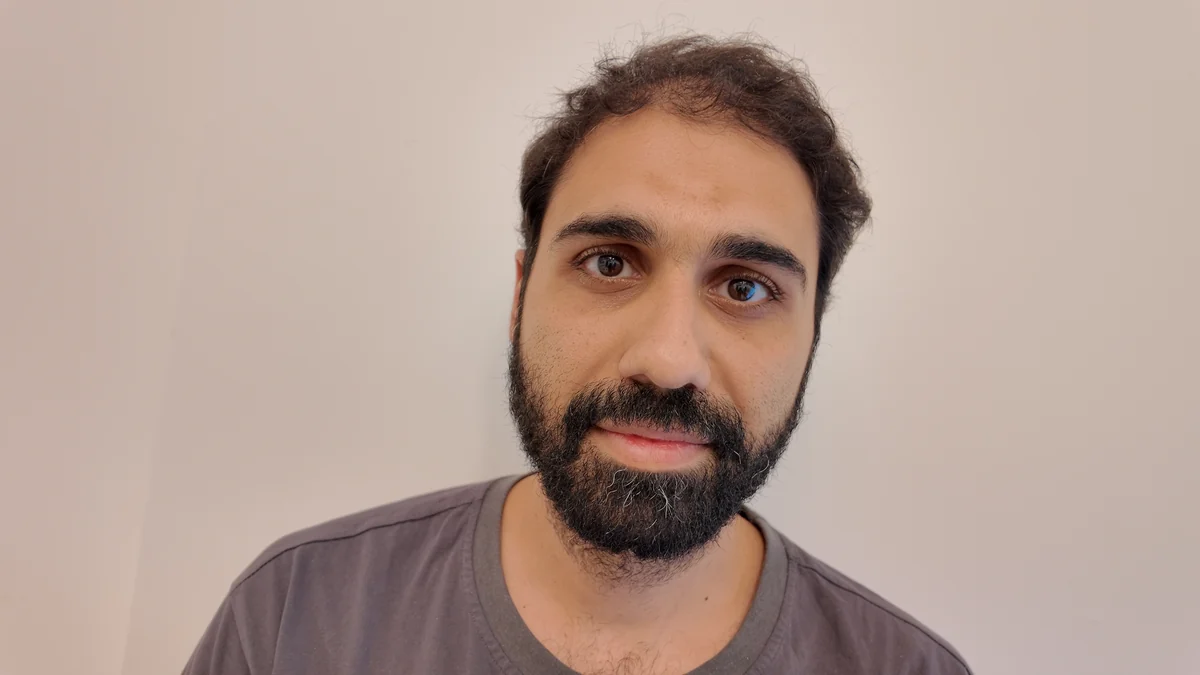
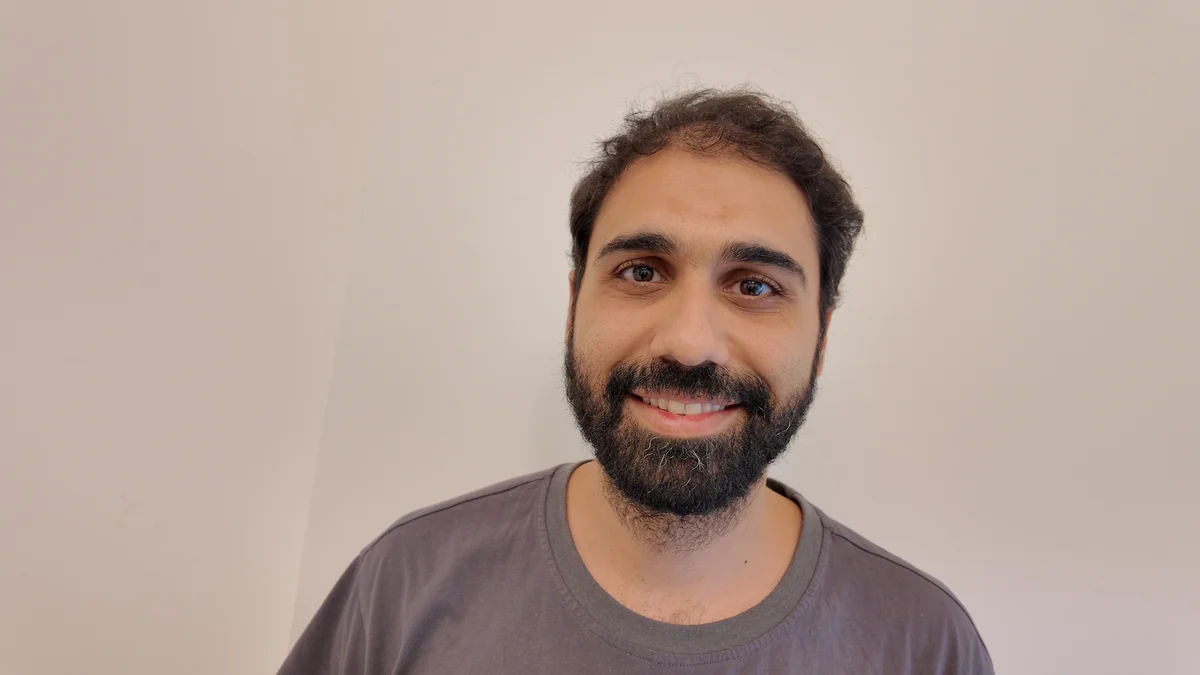
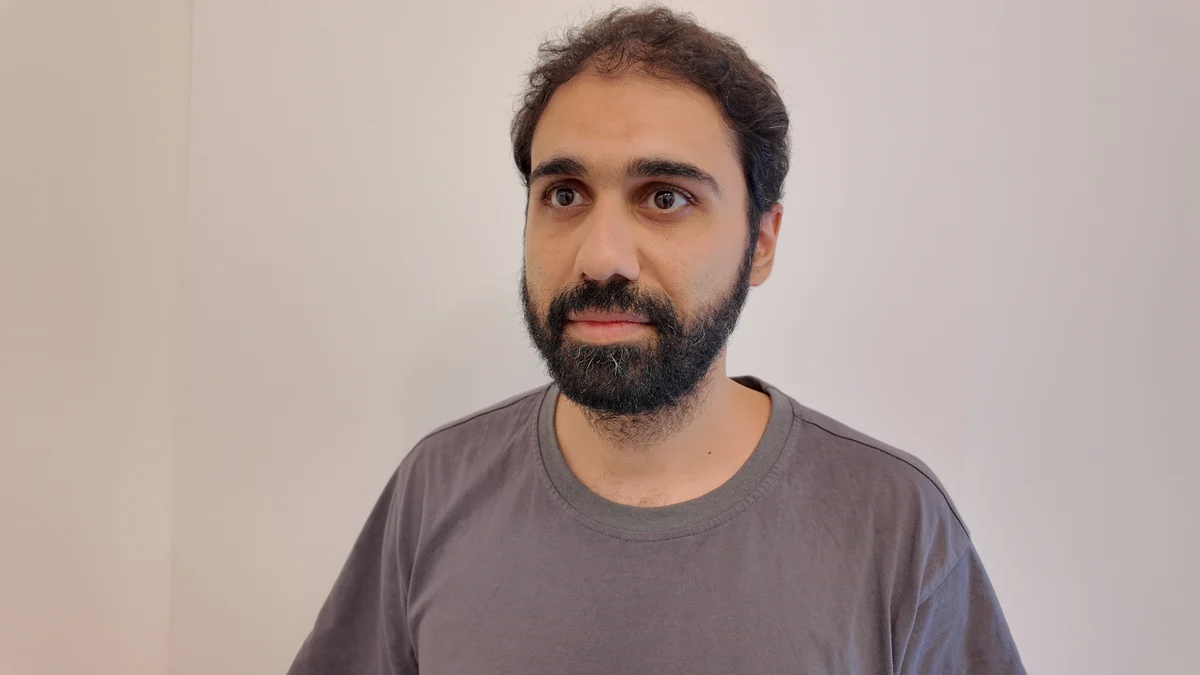
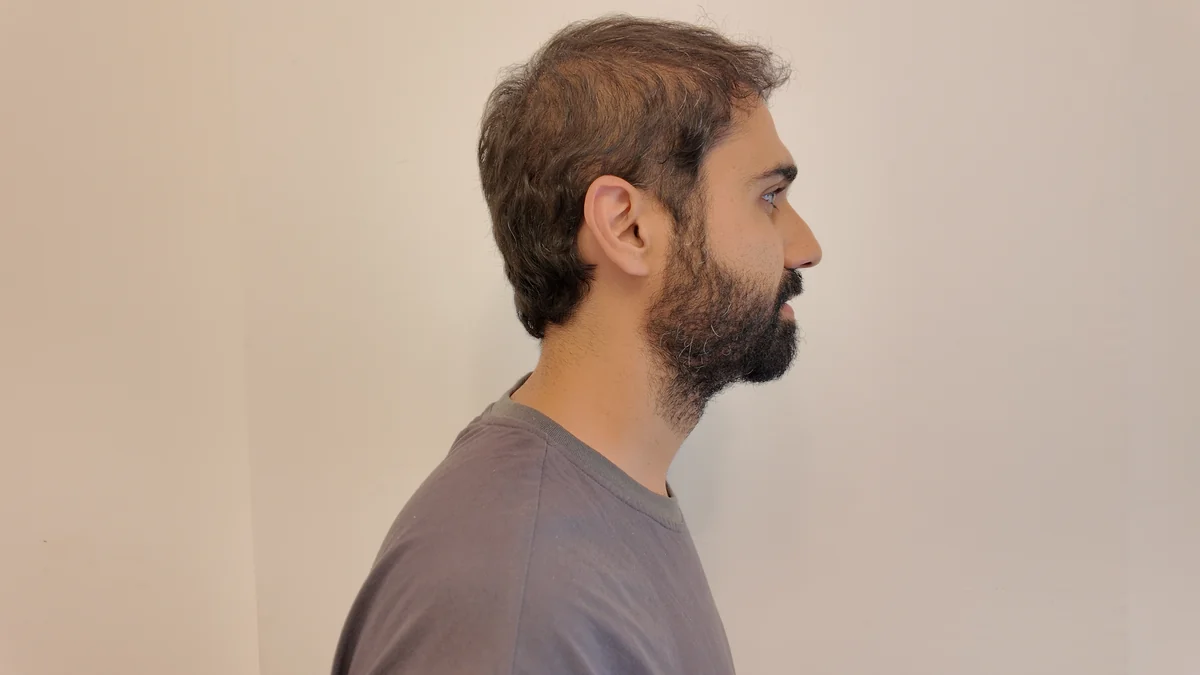
Now look at this. I wrote in the prompt "a slight natural smile", and I got a smile. But it is not my smile. When I added a real photo of me smiling, I got my smile. It happened the same way on Seedance 2.0 and on 2.5.
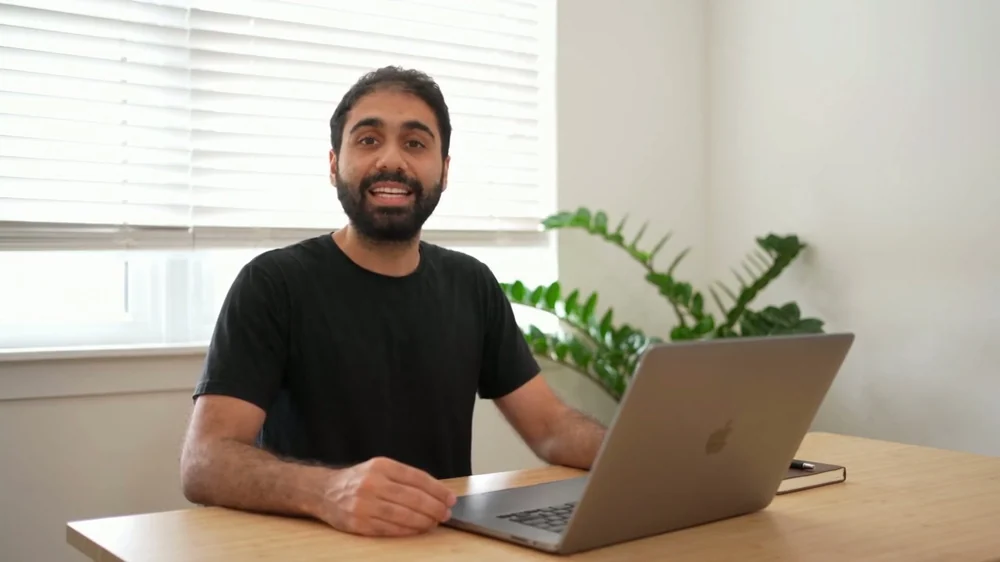
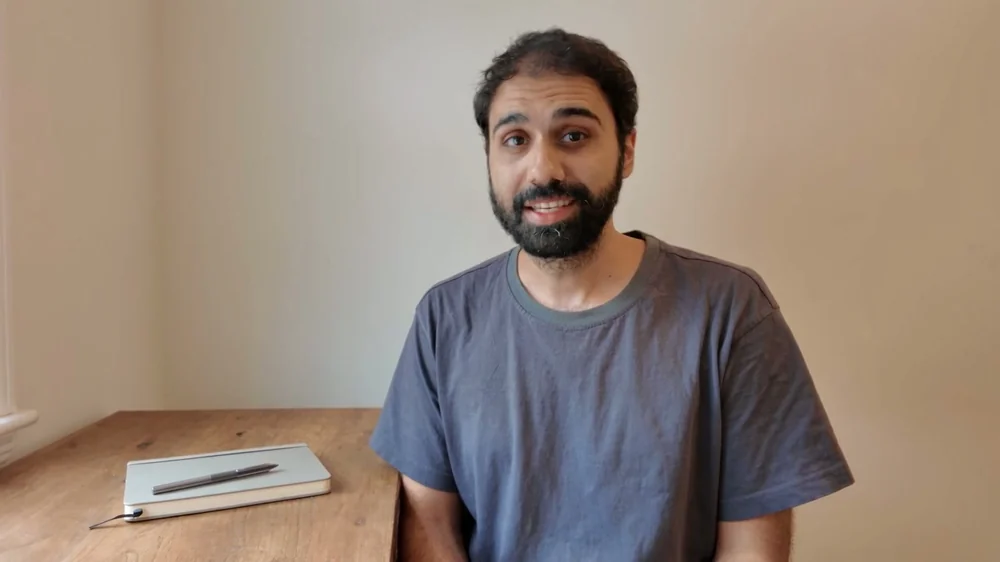
The expression comes from the photos, not from the prompt.
The photos carry your shirt too. My grey tee came back without a word about clothes in the prompt. There is one exception: when a video of you shows a different shirt, the video wins. More on that in thing 4.
3. Your recording of the line
Record the exact words you want the clone to say, with your voice and your mic, and attach it as the audio reference (@Audio1). The model says those words back word for word: the transcript of my render matched my line exactly. And it says them in my tone.
Look at the difference. Same prompt, same photos. On the left, no recording: the words are right, but it is a stranger's voice. On the right, with my recording: my tone, my words.
You hear: a stranger's generated voice
You hear: generated from my recording
Here is something I did not expect. The recording controls the acting too. Where I paused in my recording, the clone made a big grin. Where I got louder, it threw its hands. The prompt for this take even asked for "one small breath of a smile" that "does not widen". The recording won.
You hear: the render's generated audio
first-step-11s.wav · my recording, 11.5 s
- My pause, just after 6.0 s (about -41.5 dB on the lab's loudness measure). The clone grinned here.
- My loudest words, 9.0 to 9.5 s (about -18 dB). The clone threw its hands here.
So the way you read the line is the way the clone acts it. If you want a calm take, read it calm. The talking-head prompt in the scene prompts names that pause and tells the face to rest through it. In the one take I measured, the face stayed calm through the pause.
One more thing: the level. Normalise your take to about -21 LUFS (a loudness number your audio editor shows). My raw takes came in at -39 LUFS. I brought them up to match the take that had worked, so loudness was not one more thing changing between tests.
4. A video of you talking
This is the one that surprised me the most. A short video of you talking, 14 seconds is enough. You register it like the photos and attach it as @Video1.
On the left, my real camera. On the right, the clone. It rebuilt my real room: the painting, the headboard, even the plush toys and the nightstand.
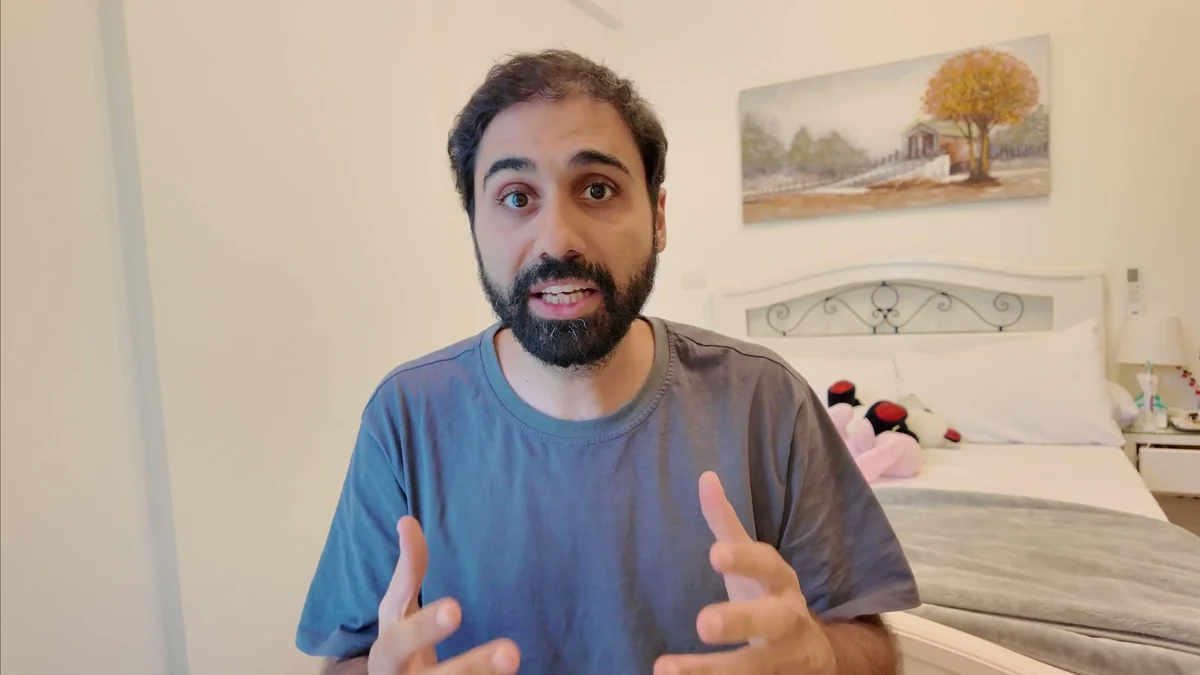
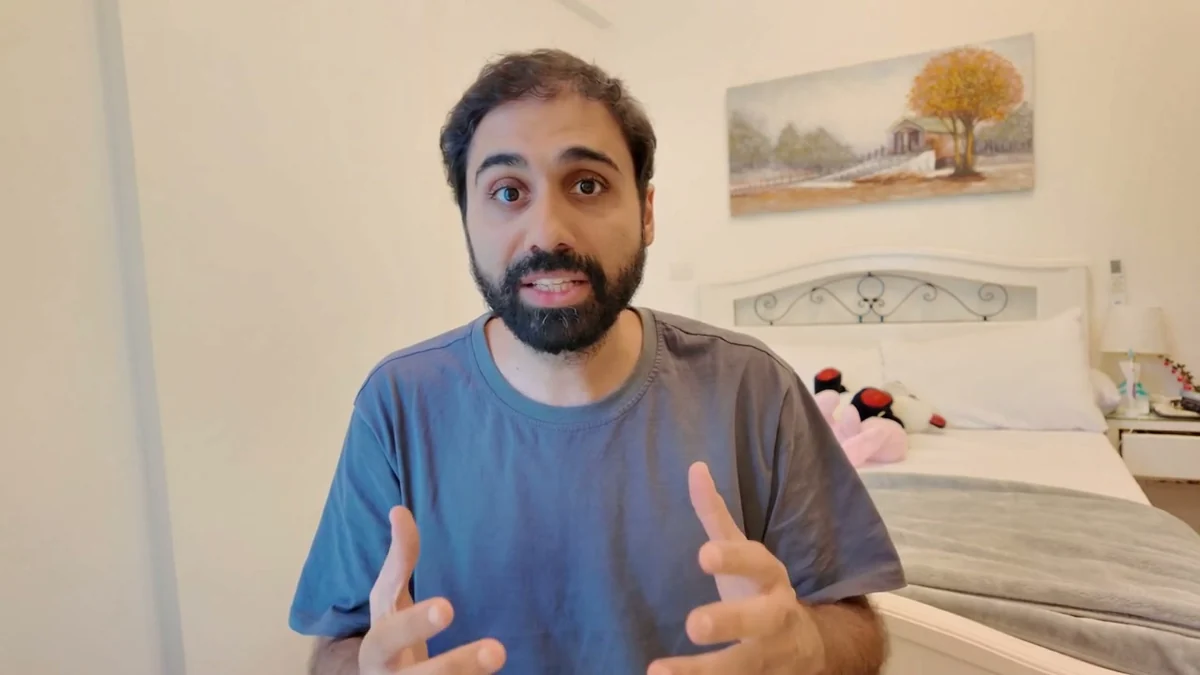
You hear: my real voice
Before the video reference, I described my room in the prompt, in detail: the headboard, the toys, the painting of a tree. I got a different room. Yellow walls, a square painting, a bee plush. And it sat me on the bed.
You hear: generated audio
Words describe a kind of room. Only the video shows the model your room.
Then the framing. Before the video reference I had to generate every clip twice and keep the one that matched. With it, I generated 7 clips, and all 7 framed within 1.5% of my real camera. The number under each take is how much bigger or smaller my face is than in my real footage:
 -0.5%
-0.5% +1.4%
+1.4%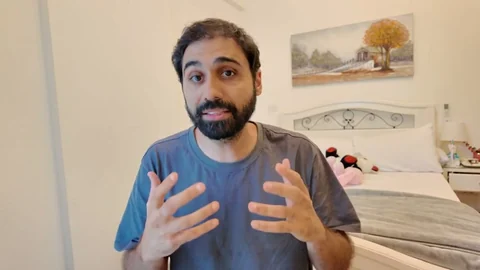 -0.5%
-0.5%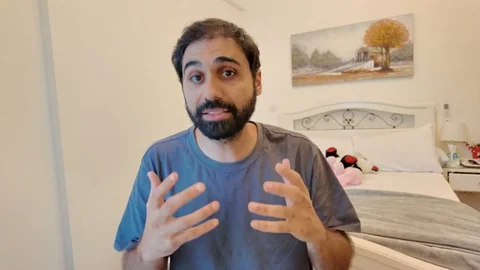 +0.1%
+0.1%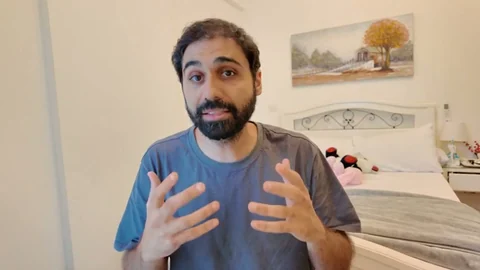 -0.5%
-0.5%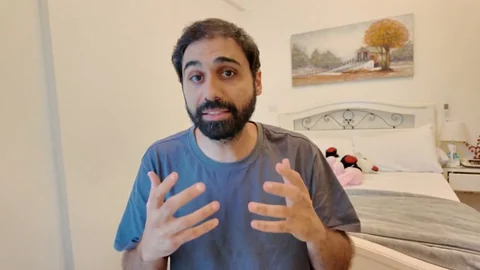 +0.6%
+0.6%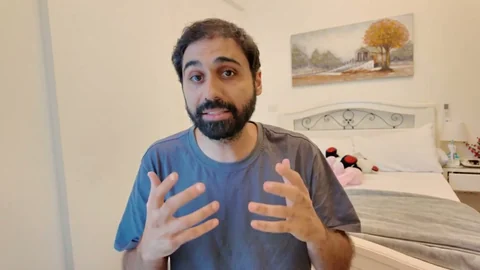 +0.6%
+0.6%
Face size against my real camera
one take within 1.5% my real footage against itself (+3.0%)
Do not read an order into those seven. Two identical requests landed 1.1 points apart, so these are the same result, repeated. For scale: two moments of my real footage differ by 3.0% on the same measure.
The video also wins over the photos when they disagree. My photos show a grey tee. My video shows a blue one. The clone came back in blue, and the prompt said nothing about clothes.
In my tests it also seemed to help the lips.
The catch is the price. ModelArk bills every second of the reference at the same rate as the output. A 14-second reference on a 14-second clip is exactly double: $3.23 becomes $6.46 at 720p.
5. The prompt
You will like this one, because it is short. 1,133 characters, five small paragraphs:
- Who: the man in image 1, 2 and 3, and video 1 is the exact shot to reproduce.
- What he says: the line from audio 1, with the words in quotes.
- Where: the room is the one in the video, and nothing in it is redesigned.
- How he moves, plus the one line I always keep: do not beautify him, keep the skin texture and the beard exactly like the photos.
- The camera, and what I do not want: no music, no subtitles, no cuts.
This is the exact prompt behind take 4 in the strip above. Paste it into the text part of the request (or save it as the prompt file for the script). Swap my quoted line for yours, word for word as you said it:
The man in @Image1, @Image2 and @Image3. @Video1 is the exact shot to reproduce.

He says the dialogue from @Audio1, in the exact voice of @Audio1: "Make sure to read everything in detail before you hit enter. The next step is to give back your feedback. Discuss with Claude, make sure everything is clear for you before you do anything."

The room is the one in @Video1 and nothing in it is redesigned. He sits where he sits there, facing the camera.

His hands come up in front of his chest as he speaks, open and moving with his words the way they do in @Video1, staying below his chin and inside the frame. His eyes stay on the lens. His head moves a little as he talks. Do not beautify him, do not smooth or slim his face: keep the skin texture, the uneven beard edge and the lines of the reference photographs exactly as they are.

Horizontal framing, camera at his seated eye level and straight on, the stillness of a camera on a tripod with only the faintest drift. Soft natural daylight from the left, true-to-life colour, no stylisation and no grade. One continuous shot. No music. No subtitles. No text overlays. No cuts.
My first prompt was almost double this, 1,997 characters. It had a long description of my room, a paragraph for my shirt, and a sentence about the camera position. I deleted them in two rounds, and nothing changed in the result, because the references already show all of it. This is that first prompt, with the parts I deleted struck out:
- Deleted first: the room description (1,997 → 1,574 characters)
- Deleted next, together: the shirt paragraph and the camera sentence (→ 1,133 characters)
After both cuts, the room score read 0.825, the same as before, and the framing landed at +0.1%. So the rule is simple: don't describe in the prompt what the model can already see.
One more thing. If you want a more real scene, write the prompt like a timeline: [0s-4s] he does this, [4s-9s] he looks away and says that. The food hall prompt I ran has six timed beats, and the render followed all six, in order:
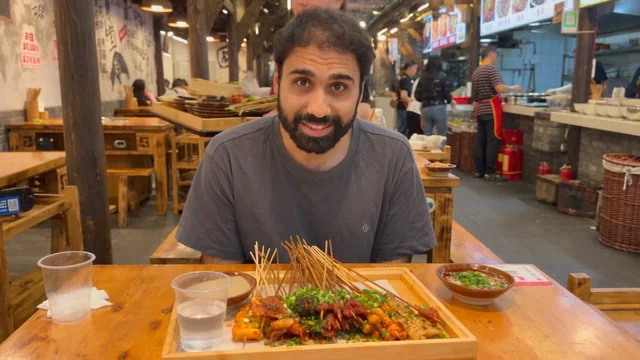 0-4 s glances at the lens, first line
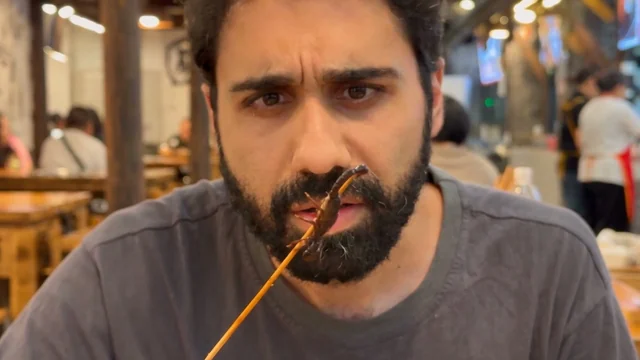 4-9 s studies the scorpion, close
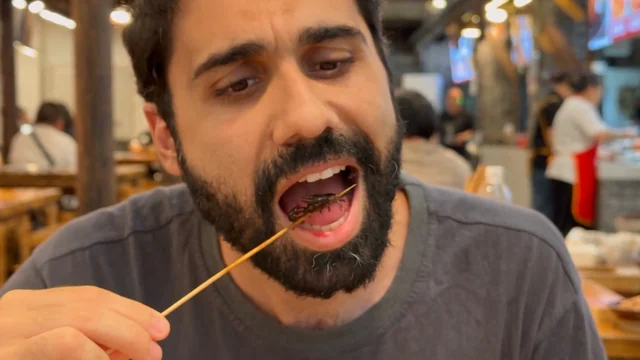 9-14 s eats it, close
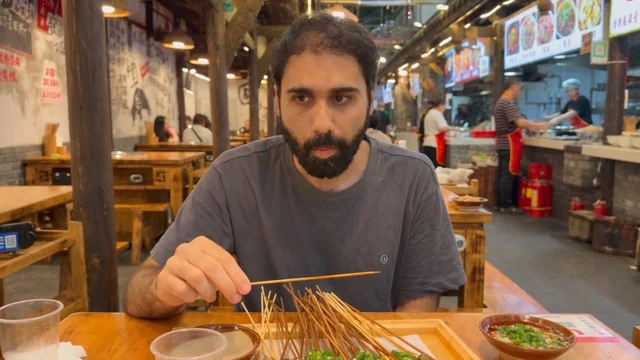 14-19 s chews, wider again
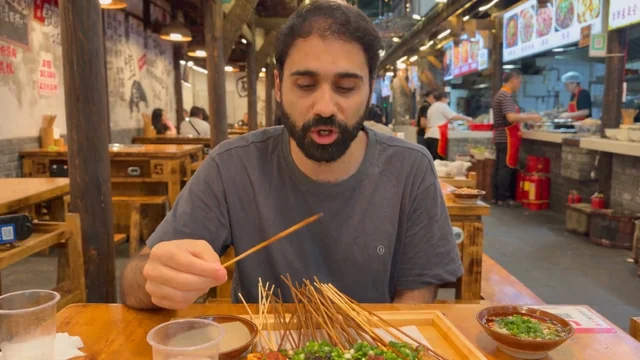 19-24 s the empty stick, last line
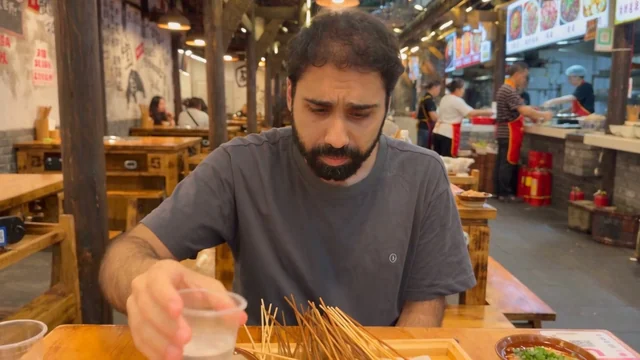 24-30 s drinks, looks around
It even changed the framing on the beats: close for beats 2 and 3, wider again from beat 4. To be exact about how: the move in at 4.1 seconds is a hard cut inside the render, not a camera move. The way back out, near 13.8 seconds, starts with a cut and keeps widening for about a second. The shot list changed the framing inside one clip, from one prompt. The full food hall prompt is in the scene prompts.
How to record the audio and shoot the references
This is the part you do before any render. The same checklists are in the zip as four small files.
Record the line
- Same mic, same room, same distance as your real videos. Normal energy. Do not perform, and do not slow down.
- WAV at 48 kHz. No noise reduction, no compression, no EQ, no de-esser. A quiet room with a little room tone (the sound of your silent room) is fine.
- One line per clip. With a 14-second video reference attached, the line gets about 16 seconds, because the audio and video references are capped at 30.2 seconds combined. Without a video reference you can go up to 30 seconds. I once set 28 seconds for a 30-second line, and all of it fit.
- For an action scene, the audio needs silence where the clone eats, drinks or walks. Speak only at the beat times, or record at your normal pace and move each line onto its beat afterwards, with your room tone in the gaps. The silences are where the clone does the action.
- Quote into the prompt the words you actually said. Transcribe your take. Do not paste the script you meant to say.
- Normalise to about -21 LUFS.
The photos
- 3 or 4 from ONE session: front neutral, front smiling with your teeth showing, three-quarter, profile with the ear visible. A bigger smile is an optional fifth.
- Same day, same light, same shirt, a plain wall. No glasses or hat changes between shots.
- No wide-angle close-ups, they distort your face. Use the highest resolution you have. Mine were 4K stills.
- Register all of them in one sitting in the ModelArk console.
The video reference
- 14 seconds of you talking, 1080p at 30 fps.
- Framed the way you want the clone framed, in the room you want back, in the shirt you want back. The video outranks the photos on the shirt.
- Register it as a likeness asset too. Video is checked separately from images.
- A muted copy is fine. The voice comes from your recording.
- It is billed by its own length at the output rate, so 14 seconds on a 14-second clip doubles the price.
The HeyGen twin footage
- English, at the energy you actually use on camera.
- Show your teeth: wide smiles, open vowels. Cover rounded "r" words, "time" and "how", "that" and "back", and plenty of m, b and p.
- Even light on your mouth, no hard shadow under the nose.
- 4K landscape, framed the way you will render.
- Then upload your real audio for every render. Never the voice clone.
The scene prompts
These are the cafe, the street and the scorpion. Same recipe: my photos, my recording and a prompt, just no video reference.
You hear: my real voice over the render's cafe sound
You hear: my real voice over the render's street sound
You hear: my real voice over the render's food hall sound
What makes them look real is not what you think. Three rules.
1. Ask for a phone video, not a beautiful video. Look at the cafe prompt: the front camera of a phone propped against a water glass, tilted up a little, not quite level. Flat, plain daylight. A little phone-camera noise in the shadows. A crumpled napkin on the table. The more ordinary you make it, the more real it looks.
2. Write a timeline. From 0 to 4 seconds I am not even talking, I am stirring the coffee. Then I look at the camera and say the line. Then I take a sip and look around. Real people don't stare at the camera the whole time.
3. Leave silences in the audio. In the food hall I am eating. I recorded my lines at my normal pace, then placed each one on its beat with my own room tone in between, so there is silence where I chew. The clone eats in my silence.
These are the exact prompts I ran. Each one goes in the text part of the request, with your three registered photos as @Image1 to @Image3 and your recording as @Audio1. Swap my lines for yours.
The cafe (12 seconds, 720p, 16:9)
The man in @Image1, @Image2 and @Image3.

Filmed on the front camera of a phone propped against a water glass on an ordinary café table, tilted up at him a little, not quite level. Flat, plain daylight, the kind of overcast light that has no direction: no golden light, no sun on his face. Everything is in focus, from his face to the back of the café, the way a phone camera sees, with a little phone-camera noise in the shadows. On the table an ordinary cup of coffee, a crumpled napkin and a spoon. Nobody else close to him.

[0s-4s] He is not talking yet: he stirs the coffee, taps the spoon on the rim, sets it down, his eyes on the cup, then glances up toward the phone.
[4s-8s] He looks into the lens and says the line from @Audio1, in the exact voice of @Audio1: "Don't listen to him. I'm the real one. He's the AI." A small dismissive shake of the head on "Don't listen to him". On "I'm the real one" his hand comes up flat against his chest. On "He's the AI" he tips his head toward the left edge of the frame, as if at someone off to that side, and holds it a beat, eyes on the lens.
[8s-12s] He picks up the cup and takes a sip, his eyes going off to one side, then he leans back in his chair and looks around the café, the frame drifting slightly, until the end.

His face exactly as the reference photographs have it: do not beautify him, do not smooth his skin, keep the pores, the shine on the forehead and nose, the uneven edge of the beard and the lines under the eyes. One continuous shot from the propped phone. He stays roughly in the middle of the frame. No readable signs or text anywhere. Quiet café sound, no music. No subtitles. No text overlays. No cuts.
The street (12 seconds, 720p, 16:9)
The man in @Image1, @Image2 and @Image3.

[0s-4s] Hand-held phone selfie at arm's length, he walks along a quiet city street in the afternoon, buildings and parked cars soft behind him, a couple of people passing, the frame bobbing slightly with his steps. He is not talking yet: his eyes are on the street ahead, he glances off to one side at something, then back toward the phone.
[4s-8s] Still walking, he looks into the lens and says the line from @Audio1, in the exact voice of @Audio1: "Before he says anything, I'm the real one. He's the AI." On "I'm the real one" his free hand comes up flat against his chest. On "He's the AI" he tips his head toward the right edge of the frame, as if at someone off to that side, and holds it a beat, eyes on the lens.
[8s-12s] A short breath of a laugh, his eyes drop away from the lens to the pavement, he looks back up at the street ahead and keeps walking, the frame drifting and bobbing with his steps until the end.

One continuous hand-held shot. He stays in the middle of the frame the whole time. No readable signs or text anywhere. Ambient street sound, no music. No subtitles. No text overlays. No cuts.
The food hall (30 seconds, 720p, 16:9)
This one is not mine. I took the prompt from a tutorial video on YouTube, changed "she" to "he", and added the first line that names my photos. It never names @Audio1: I attached my recording anyway, re-timed onto the beats, and the model used it.
The man in @Image1, @Image2, @Image3.

[0s-4s] He glances at the lens briefly and speaks the line: "Okay. We found the craziest food hall in Chongqing," eyes already drifting down to the food, a tray-carrying diner passing behind him.
[4s-9s] He picks up a skewer holding a single small fried scorpion on its tip and studies it up close, turning it slowly, eyes fixed on it, brow furrowed, mouth slightly open. He quietly speaks the line: "That's... a scorpion." Never looking at the camera.
[9s-14s] Still staring at it, he hesitates, jaw working, then eats the whole small scorpion off the tip in one bite with an audible crunch — the stick now completely bare — eyes down the whole time, chin pulling back slightly at the texture.
[14s-19s] He chews slowly, gaze unfocused somewhere past the table, processing, then a small surprised nod to himself. One brief flick of his eyes to the lens and back down.
[19s-24s] He swallows, glances at the bare empty stick in his hand, gives it a tiny wave and speaks the line: "Huh. It's just crunchy," half to himself, dropping it on the tray and reaching for the plastic cup.
[24s-30s] He drinks, eyes wandering across the hall over the rim of the cup, taking the place in, puts it down and picks through the other dishes with his fingers, deciding what's next, frame drifting slightly.
A talking head with timed beats (12 seconds, 480p, 9:16)
This one is a desk shot. @Image4 is a generated still of me at my desk, made from a snapshot of my real office and registered like the photos. It is also the prompt that names the pause in my recording and tells the face to rest through it. My verdict on the late takes from it: "near-real, maybe it is not distinguishable by a stranger".
One honest note: in four runs of this prompt, two of them with my video reference attached, the framing never matched my still. The best take was one of the two with the video. I think the long "how he moves" paragraph between the shot line and the beats costs it. Moving that paragraph below the dialogue line is my untested fix.
The man in @Image1, @Image2, @Image3. @Image4 is the exact shot to reproduce: the same room, the same camera position, the same camera distance, and the SAME SIZE OF THE MAN WITHIN THE FRAME — seated well back behind the white desk, head and shoulders in the upper middle with wall visible on both sides, the desk running the full width of the frame, the tall plant behind him rising higher than his head.

HOW HE MOVES — this paragraph governs every beat below and overrides any of them. He is explaining a procedure to one person who is listening, not performing to an audience. His emphasis lives entirely in his VOICE: when his voice rises, gets louder or presses harder, his face and his hands stay at exactly the level they were at before, and do not rise with it. Every gesture stays small, low and close to his body, below chest height, and no gesture ever reaches out toward the camera. His eyes stay open the whole time — he never squeezes or closes them for emphasis. Any smile stays small and closed-mouthed; it never widens into a grin and never shows a full set of teeth. Where his speech pauses, his face simply rests and holds — he does not fill a silence with an expression.

He says the dialogue from @Audio1, in the exact voice of @Audio1: "So first step, we put Claude into plan mode and you start putting in your thoughts, your ideas, what you want to build, and anything you have in mind about your application."

[0s-2s] He starts already mid-thought, leaning in very slightly. As he says "So first step" his right hand comes up off the desk beside the laptop, index finger raised for a beat. A small, closed-mouth smile at the corner of his mouth.
[2s-5s] The raised finger opens into a flat palm turning upward as he says "plan mode", his hand moving in a small unhurried arc, staying low over the desk. His eyes leave the lens for a moment, down and to his left, the way someone's do while they picture the thing they are describing, then come back.
[5s-8s] On "your thoughts, your ideas" one hand makes a small movement close to his chest, never blocking his face. THERE IS A PAUSE IN HIS SPEECH AT ABOUT SIX SECONDS: through that pause his mouth simply closes and rests, his eyes stay on the lens, and his expression does not change at all — no smile, no widened eyes, no eyebrow movement, nothing fills the gap. His hands are still through it.
[8s-11s] On "what you want to build, and anything you have in mind" HIS VOICE BECOMES LOUDER AND MORE EMPHATIC HERE, AND HIS BODY DOES NOT FOLLOW IT. One hand turns palm-up once, low and close to his chest; it does not extend, does not reach toward the camera, and does not rise above chest height. He does not lean forward or back, and his eyebrows stay down and level. His expression stays calm and direct while his voice does the emphasising.
[11s-12s] The hands come to rest on the desk. He holds the lens for a beat after the words stop, and blinks once.

Throughout, his hands stay in the space between the laptop and the right edge of the frame where they are clearly visible above the desk, and they never cover his mouth or his face. Do not beautify him, do not smooth or slim his face: keep the skin texture, the uneven beard edge and the lines of the reference photographs exactly as they are.

Shot on a full-frame camera with a 35mm lens at an aperture of f/1.8: shallow depth of field with the room falling softly out of focus behind him, fine natural film grain, true-to-life colour. Vertical framing, camera at his seated eye level and straight on, locked off on a tripod with only the faintest natural drift. One continuous shot. No music. No subtitles. No text overlays. No cuts.
Without a video reference, the framing changes every time. These are two runs of that last prompt without it, same everything:
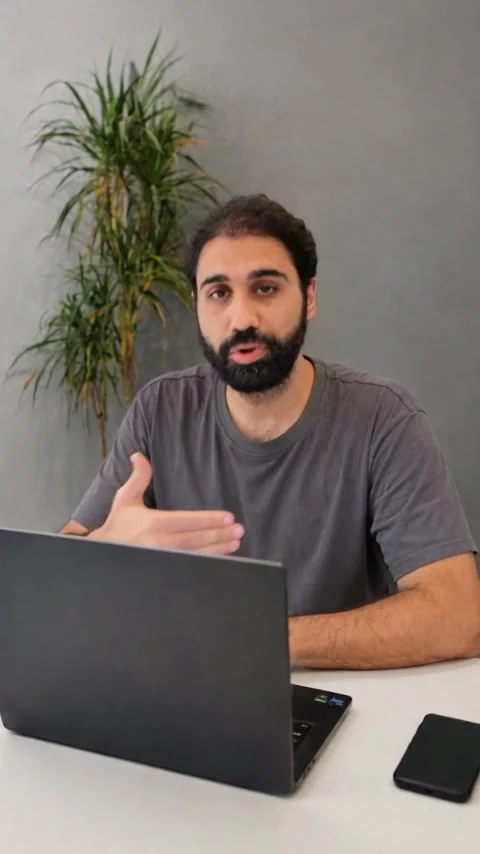
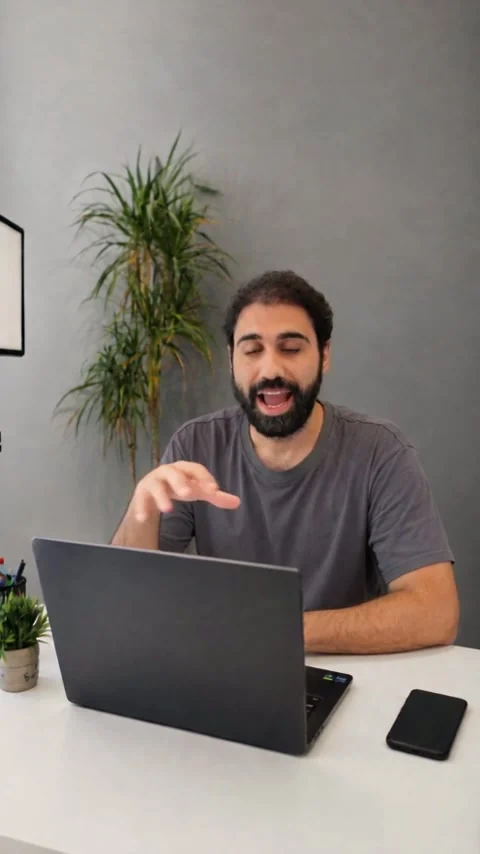
So generate two and keep the better one. Across my other desk prompts without a video reference, the framing came out right 8 times in 12. This long prompt went 0 for 4.
The trick: your real voice back
Remember the voice problem? Five tries, never my accent. Here is why, and the fix.
Seedance does not copy your recording. It listens to it and says it again in its own way. The lab numbers agree: the render's audio barely matches my waveform (a peak cross-correlation of 0.18, where a copy would score 1.0), and in one take it dropped an "uh" that I actually said. It re-performs the words. And its own way is not my accent.
You hear: generated audio
You hear: my real recording
So I never use the audio that comes out of Seedance. I take my real recording and put it back over the video, sentence by sentence, at the moment the render starts each sentence. It works because the clone says the same words at almost the same speed as me:
| Sentence | Me | The render | Render / me |
|---|---|---|---|
| "Break the problem into small pieces." | 1.87 s | 3.29 s | 1.76x |
| "Make the model prove each piece works before you move on." | 3.36 s | 3.03 s | 0.90x |
| "That's the whole method." | 1.14 s | 1.13 s | 0.99x |
| "And beats every prompt trick people post about." | 2.98 s | 3.03 s | 1.02x |
Three of the four sentences needed no stretching at all, just placement. The first one the render drawled, and I left it honest instead of stretching my voice to fit.
The rules I follow:
- Cut only at your own pauses. Each piece is one of your sentences.
- Never time-stretch. Move each sentence, do not change it.
- Fill the gaps with room tone, taken from the quietest half second of your own file. Never the tail of the file, it often holds a click or a breath.
- Loop that room tone forward, then reversed, so the loop has no seam. Never digital silence.
- 12 ms fades on each sentence.
- Copy the video stream. Do not re-encode it.
For a scene with sound, a street or a cafe, dead room tone sounds fake. Keep the render's own soundtrack as the bed, cut the model's voice out of its speech windows, fill those holes with sound from a nearby quiet stretch, and lay your sentences on top. That is what the cafe and street clips above use.
The script does all of this. It needs Python, numpy, soundfile and ffmpeg. Install the two Python packages once, in your terminal:
pip install numpy soundfile
Then run it in the folder with your render and your recording. Each --map is one sentence: where it starts and ends in your recording, and where the render starts saying it. These four are the real ones from the clip above. It writes a new mp4 with your voice on it, and prints where each sentence landed:
python relink_voice.py --video render.mp4 --voice recording.wav --out relinked.mp4 --map 0.112,1.978,0.741 --map 2.750,6.113,4.854 --map 7.013,8.156,8.822 --map 8.863,11.840,10.742
The numbers come from a transcript with word times of both files, from AssemblyAI or Whisper. Same words in the same order, so sentence 3 in your recording is sentence 3 in the render. --auto guesses them from loudness as a first look, but it hears a breath as the start of a sentence, so use transcript times for the version you keep. For a scene with sound, add --ambient and one --patch per speech window. python relink_voice.py --help explains every option.
I tested it on the before and after clips above: every sentence landed on the same audio sample as my original relink.
r"""Put your real recording back on an AI render, sentence by sentence.

Seedance 2.5 does not copy your recording. It listens to it and says the words again in
its own way, so the render's voice has your tone and your words but not your accent. The
picture is fine, and the mouth is already shaped for your words. This script throws the
render's voice away, cuts your real recording at your own pauses, and places each piece
where the render starts saying it. Nothing is time-stretched. The video is copied, not
re-encoded.

USAGE

    python relink_voice.py --video render.mp4 --voice recording.wav --out relinked.mp4 \
        --map 0.112,1.978,0.741 --map 2.750,6.113,4.854 \
        --map 7.013,8.156,8.822 --map 8.863,11.840,10.742

    --map A,B,AT   one sentence: your recording from A to B seconds, placed at AT seconds in
                   the render. Repeat it once per sentence, in order. (Those four maps are
                   the real ones from my test clip: four sentences, re-seated.)

WHERE THE NUMBERS COME FROM

    A and B (your sentence): the first word's start and the last word's end in your
    recording. AT (the render): the moment the render starts saying that sentence's first
    word. Two ways to get them:

    1. A transcript with word times (AssemblyAI, Whisper with word timestamps) of BOTH
       files. Same words in the same order, so sentence N in one is sentence N in the other.
       This is the reliable way.
    2. ffmpeg's silence detector, run on each file:
           ffmpeg -i render.mp4 -af silencedetect=noise=-35dB:d=0.3 -f null -
       Every "silence_end" it prints is a place where speech starts.

    --auto finds the pieces for you from loudness (a threshold set from each file's own
    noise floor, pauses longer than --gap seconds split the pieces) and pairs them in order.
    It is a first look, not the final answer: it hears a breath or a lip smack as the start
    of a sentence, and on a render with background sound (a street, a cafe) it hears the
    ambience as speech. On my test clip it found all four sentences but started the first
    one 0.6 s earlier than the transcript did. Check what it prints, then use --map with
    transcript times for the version you keep.

THE BED UNDER YOUR VOICE

    Default: room tone. The quietest half second of YOUR recording (scanned, never the
    tail, which often holds a click or a breath), looped forward then reversed so the loop
    has no seam. Never digital silence: a clip with dead air between sentences sounds fake.
    --bed A,B      name the silence yourself (for very short files with no clean half second).

    --ambient      keep the render's own soundtrack (the street, the cafe) as the bed.
    --patch A,B,SRC  (with --ambient, repeatable) cut the render's voice out of A..B seconds
                   and fill the hole with ambience copied from SRC seconds, crossfaded over
                   100 ms. Pick a SRC stretch with no voice in it. Then your sentences go on top.

REQUIREMENTS

    Python 3.9+, numpy and soundfile (pip install -r requirements.txt), and ffmpeg + ffprobe
    on your PATH. Works on Windows, macOS and Linux.
"""
from __future__ import annotations

import argparse
import subprocess
import sys
import tempfile
from pathlib import Path

import numpy as np
import soundfile as sf

SR = 48000
FADE = 0.012        # fade on each of your sentences, seconds
XF = 0.10           # crossfade at the edges of an ambience patch, seconds
PEAK = 0.99


def run(cmd: list[str], **kw) -> subprocess.CompletedProcess:
    try:
        return subprocess.run(cmd, check=True, **kw)
    except FileNotFoundError:
        sys.exit(f"{cmd[0]} not found. Install ffmpeg and make sure ffmpeg and ffprobe are on your PATH.")


def duration(path: Path) -> float:
    out = run(["ffprobe", "-v", "error", "-show_entries", "format=duration",
               "-of", "csv=p=0", str(path)], capture_output=True, text=True).stdout
    return float(out.strip())


def load(path: Path) -> np.ndarray:
    """Any audio or video file -> mono float64 at 48 kHz (channels averaged)."""
    with tempfile.TemporaryDirectory() as tmp:
        wav = Path(tmp) / "a.wav"
        run(["ffmpeg", "-nostdin", "-y", "-v", "error", "-i", str(path), "-vn",
             "-ar", str(SR), "-c:a", "pcm_f32le", str(wav)])
        y, _ = sf.read(wav, dtype="float64", always_2d=True)
    return y.mean(axis=1)


def room_tone(y: np.ndarray, win: float = 0.5) -> np.ndarray:
    """The quietest window of the recording, never the last second, as a seamless loop."""
    n = int(win * SR)
    limit = max(n + 1, len(y) - SR)
    best, best_rms = 0, None
    for i in range(0, limit - n, n // 4):
        r = float(np.sqrt(np.mean(y[i:i + n] ** 2)))
        if best_rms is None or r < best_rms:
            best, best_rms = i, r
    print(f"room tone     : {best / SR:.2f}-{(best + n) / SR:.2f}s of your recording")
    seg = y[best:best + n]
    return np.concatenate([seg, seg[::-1]])


def ramp(n: int, up: bool) -> np.ndarray:
    r = np.linspace(0.0, 1.0, n)
    return r if up else r[::-1]


def fade(seg: np.ndarray) -> np.ndarray:
    n = int(FADE * SR)
    if len(seg) < 2 * n:
        return seg
    seg = seg.copy()
    seg[:n] *= ramp(n, True)
    seg[-n:] *= ramp(n, False)
    return seg


def speech_spans(y: np.ndarray, gap: float) -> list[tuple[float, float]]:
    """Loud-enough stretches of audio, split at pauses longer than `gap` seconds.

    A fixed threshold (ffmpeg silencedetect at -35 dB) fails on renders: their generated
    audio often never drops that low. So the threshold comes from the file itself: about a third
    of the way from its quiet floor (10th percentile) to its loud speech (95th).
    """
    hop, win = int(0.01 * SR), int(0.03 * SR)
    n = max(1, (len(y) - win) // hop)
    frames = np.lib.stride_tricks.sliding_window_view(y, win)[::hop][:n]
    db = 20 * np.log10(np.sqrt(np.mean(frames ** 2, axis=1)) + 1e-9)
    floor, top = np.percentile(db, 10), np.percentile(db, 95)
    loud = db > floor + 0.35 * (top - floor)
    spans: list[list[float]] = []
    i = 0
    while i < n:
        if loud[i]:
            j = i
            while j < n and loud[j]:
                j += 1
            a, b = i * 0.01, j * 0.01 + 0.03
            if spans and a - spans[-1][1] < gap:
                spans[-1][1] = b
            else:
                spans.append([a, b])
            i = j
        else:
            i += 1
    return [(a, b) for a, b in spans if b - a >= 0.15]


def auto_map(video_audio: np.ndarray, his: np.ndarray, gap: float) -> list[tuple[float, float, float]]:
    mine = speech_spans(his, gap)
    ren = speech_spans(video_audio, gap)
    print(f"--auto        : {len(mine)} speech pieces in your recording, {len(ren)} in the render")
    print("  yours : " + "  ".join(f"{a:.2f}-{b:.2f}" for a, b in mine))
    print("  render: " + "  ".join(f"{a:.2f}-{b:.2f}" for a, b in ren))
    if len(mine) != len(ren):
        print("  WARNING the counts do not match. Pieces are paired in order and the extras are"
              " dropped. Try another --gap, or use --map with transcript times.")
    return [(a, b, r0) for (a, b), (r0, _r1) in zip(mine, ren)]


def parse_triplets(values: list[str], flag: str) -> list[tuple[float, float, float]]:
    out = []
    for v in values:
        parts = [p.strip() for p in v.split(",")]
        if len(parts) != 3:
            sys.exit(f"{flag} wants three numbers A,B,AT (got {v!r})")
        out.append(tuple(float(p) for p in parts))
    return out


def main() -> int:
    """Build the bed, lay your sentences on it unstretched, then swap the audio into a copy of the video."""
    ap = argparse.ArgumentParser(description=__doc__, formatter_class=argparse.RawDescriptionHelpFormatter)
    ap.add_argument("--video", required=True, type=Path, help="the AI render (mp4)")
    ap.add_argument("--voice", required=True, type=Path, help="your real recording of the same line")
    ap.add_argument("--out", required=True, type=Path, help="where to write the relinked mp4")
    ap.add_argument("--map", action="append", default=[], metavar="A,B,AT",
                    help="one sentence: your recording from A to B s, placed at AT s in the render")
    ap.add_argument("--auto", action="store_true", help="find the pieces from loudness (a first look)")
    ap.add_argument("--gap", type=float, default=0.5,
                    help="with --auto: a pause longer than this many seconds splits two sentences")
    ap.add_argument("--bed", metavar="A,B", help="use A..B seconds of your recording as the room tone")
    ap.add_argument("--ambient", action="store_true", help="keep the render's own soundtrack as the bed")
    ap.add_argument("--patch", action="append", default=[], metavar="A,B,SRC",
                    help="with --ambient: replace A..B with ambience copied from SRC")
    args = ap.parse_args()

    for p in (args.video, args.voice):
        if not p.exists():
            sys.exit(f"not found: {p}")
    if bool(args.map) == args.auto:
        sys.exit("give either --map (one per sentence) or --auto, not both and not neither")
    if args.patch and not args.ambient:
        sys.exit("--patch only makes sense with --ambient")

    dur = duration(args.video)
    his = load(args.voice)
    placements = auto_map(load(args.video), his, args.gap) if args.auto \
        else parse_triplets(args.map, "--map")

    if args.ambient:
        bed = load(args.video)[:int(dur * SR)]
        xf = int(XF * SR)
        for (a, b, src) in parse_triplets(args.patch, "--patch"):
            i, j = int(a * SR), int(b * SR)
            n, s = j - i, int(src * SR)
            if s < j and s + n > i:
                sys.exit(f"--patch {a},{b},{src}: the ambience source overlaps the hole it fills")
            if s + n > len(bed):
                sys.exit(f"--patch {a},{b},{src}: the ambience source runs past the end of the render")
            if n <= 2 * xf:
                sys.exit(f"--patch {a},{b},{src}: the hole is shorter than the two crossfades")
            patch = bed[s:s + n].copy()
            bed[i:i + xf] = bed[i:i + xf] * ramp(xf, False) + patch[:xf] * ramp(xf, True)
            bed[i + xf:j - xf] = patch[xf:n - xf]
            bed[j - xf:j] = patch[n - xf:] * ramp(xf, False) + bed[j - xf:j] * ramp(xf, True)
            print(f"patched       : {a:.2f}-{b:.2f}s with the render's ambience from {src:.2f}s")
        track = bed
    else:
        if args.bed:
            b0, b1 = (float(x) for x in args.bed.split(","))
            seg = his[int(b0 * SR):int(b1 * SR)]
            print(f"room tone     : {b0:.2f}-{b1:.2f}s of your recording (--bed)")
            loop = np.concatenate([seg, seg[::-1]])
        else:
            loop = room_tone(his)
        track = np.tile(loop, int(np.ceil(dur * SR / len(loop))))[:int(dur * SR)].copy()

    print(f"placing {len(placements)} sentences on {args.video.name} ({dur:.2f}s)")
    prev_end = 0.0
    for n, (a, b, at) in enumerate(placements, start=1):
        if b <= a:
            sys.exit(f"sentence {n}: end {b} is not after start {a}")
        seg = fade(his[int(a * SR):int(b * SR)])
        if at < prev_end:
            print(f"  WARNING sentence {n} starts at {at:.2f}s but the previous one ends at {prev_end:.2f}s")
        i = int(at * SR)
        end = min(i + len(seg), len(track))
        if end <= i:
            print(f"  WARNING sentence {n} lands after the end of the render and was skipped")
            continue
        if args.ambient:
            track[i:end] += seg[:end - i]
        else:
            track[i:end] = seg[:end - i]
        if i + len(seg) > len(track):
            print(f"  WARNING sentence {n} runs past the end of the render and was cut")
        prev_end = at + (b - a)
        print(f"  {n}. yours {a:6.2f}-{b:6.2f}s -> render {at:6.2f}s  ({b - a:4.2f}s long, moved {at - a:+5.2f}s)")

    peak = float(np.max(np.abs(track)))
    if peak > PEAK:
        track *= PEAK / peak

    args.out.parent.mkdir(parents=True, exist_ok=True)
    with tempfile.TemporaryDirectory() as tmp:
        wav = Path(tmp) / "relinked.wav"
        sf.write(wav, track, SR, subtype="PCM_24")
        run(["ffmpeg", "-nostdin", "-y", "-v", "error", "-i", str(args.video), "-i", str(wav),
             "-map", "0:v:0", "-map", "1:a:0", "-c:v", "copy", "-c:a", "aac", "-b:a", "192k",
             "-shortest", "-movflags", "+faststart", str(args.out)])
    print(f"\nwrote {args.out}  (video copied untouched, audio replaced, nothing time-stretched)")
    return 0


if __name__ == "__main__":
    raise SystemExit(main())
In HeyGen you do not need this step. Your audio is already the input.
Test without wasting money
This is where I lost most of mine. What renders cost me on ModelArk, billed in tokens at $10.67 per million:
- Test at 4 seconds and 480p first. About 40 cents. If it looks right, then pay for the real one.
- One sentence per clip, and set the exact duration you need. Anything from 4 to 30 seconds works. I rendered 4, 5, 6, 7, 9, 10, 12, 14, 16, 18, 24, 28 and 30.
- If a render gets stuck, never submit it again. You pay twice. Resume the same task by its id. The script saves the id before it starts waiting, because one of my connections dropped in the middle of a render. On your machine, in the same folder:
python modelark_seedance.py poll YOUR-TASK-ID --out take-1.mp4
- A refused request costs $0.
- Without a video reference, generate two and keep the better one. The framing landed 8 times in 12 in my tests.
- An upscale is optional. Topaz at 1.5x cost me about $0.24 for 12 seconds. My texture measurement got worse after it, because an upscaler invents fine detail on a plain wall. My eye said it looked good. I went with my eye. Try one clip and judge for yourself.
What I did not test
I tested the room recipe on one clip: one room, one shot, 14 seconds, sitting down. I do not know yet how it holds in other rooms, with movement, or on longer takes.
- Other rooms, other light, other framing. Unknown. My shot was daylight, a static camera, medium framing.
- Movement. I sat still. Nothing here tests a moving camera or a moving person.
- Longer takes. Every take was 14 seconds, and there are signs it drifts with length: when I pinned the first frame to a photo, the pin decayed within 4 seconds, and frame similarity already fell a little across the 14 seconds (0.678 to 0.664).
- A video reference shorter than 14 seconds. Never tried, so I cannot tell you if a shorter one saves money without losing the room.
- 1080p. Never rendered.
- HeyGen past 67 seconds. Never rendered.
- Arabic. Not a working route. I tried my own Lebanese Arabic. The voice was mine, the words drifted, and the accent was not ours.
- Dreamina. Not tested.
Everything you need, in one place
ai-clone-recipe.zip
- The six prompts, byte for byte the files I ran: the short talking-head prompt, the long version for comparison, the talking head with timed beats, the cafe, the street and the food hall
relink_voice.py, the script that puts your real voice backmodelark_seedance.py, submit, wait and download on ModelArk, with resume by task id- Four checklists: recording the line, the photos and the video reference, the HeyGen footage, and testing cheap
Or copy each prompt from its section: the short talking-head prompt, the cafe, the street, the food hall, and the talking head with timed beats.
FAQ
Can the clone speak in my accent?
Not in any video tool I tested. Five voices failed the same way: HeyGen's voice clone, Synthesia's voice clone, Google Omni, Seedance's own voice, and Seedance driven by my own recording. They got my tone, never my accent. So record the line yourself. Upload it to HeyGen, and put it back over the video for Seedance with the relink script.
HeyGen or Seedance 2.5: which one do I need?
HeyGen if you talk to camera: $4 a minute, and longer videos in one render (67 seconds was my longest test). Seedance 2.5 if you want yourself in a real scene or a Short: about $14 a minute at 720p, 30 seconds per clip, and more setup. If talking to camera is all you do, you do not need Seedance.
Why did Seedance refuse my photos?
Real faces are moderated. On fal, Seedance 2.5 refused my face with content_policy_violation and partner_validation_failed. That happened once and I did not retry. On ModelArk, images of my face came back with InputImageSensitiveContentDetected.PrivacyInformation and my video with InputVideoSensitiveContentDetected.PrivacyInformation. The fix on ModelArk is to register each photo and video as a likeness asset in the console and send its asset:// id. Verifying my account (KYC) did not fix it. A refused request costs $0.
Do I need the video reference?
Only if you want your real room and your real framing back. Scenes work from photos, your recording and a prompt. With the reference, all 7 of my takes framed within 1.5% of my real camera. Without it, generate two and keep the better one. It doubles the price of a 14 second clip.
Can I just type the script instead of recording it?
You can, but the words come back garbled and in the wrong accent. When I asked the model to say new words in my voice, 'Break the problem into small pieces' came back as 'Break the problem in intencel, we mothold ices'. With a recording of the line, the transcript matched my line word for word. Record it.
Is 1080p or an upscale worth it?
For 1080p I cannot tell you: I never rendered it. It is on the price list at $0.569 a second against $0.231 for 720p, about 2.5 times more. For the upscale, Topaz at 1.5x cost me about $0.24 per 12 seconds. My texture measurement got worse, and my eye liked the result. Try one clip before you upscale a batch.
How long can one clip be?
HeyGen: I rendered 67 seconds in one go, and that is the longest I tested. Seedance 2.5: 4 to 30 seconds per clip, any length in between. With a 14 second video reference your line gets about 16 seconds, because the audio and video references are capped at 30.2 seconds together.
Can I make a clone of someone else?
You should not try. ModelArk ties each registered photo and video to a likeness authorization. Synthesia made me record a consent line with a passcode they generate before it cloned my voice. Google Omni ties the avatar to a consent step on your own Google account. I did not test what HeyGen asks, so check their help center. Not every tool checks: some models on fal took images of my face with no questions asked. So the rule is on you: clone yourself, or someone who clearly agreed to it.
Related

Get the free Vibe Engineering Blocks guide
The exact building blocks I use to ship real products with AI — yours as a free PDF.
Questions & Discussion
Ask a question about this guide →Have a question? Ask it in the community — it's tagged #guide and linked back here. Reading is open to everyone; posting needs a free account.
Loading questions…