How to Build an AI Second Brain (Private, Free, and Self Hosted)
 Hasan Aboul Hasan
Published 2026-08-05
Hasan Aboul Hasan
Published 2026-08-05
An AI second brain is a folder of markdown files in a git repo that your AI tools read over MCP. Not a vector database you rent. You build the free local half in about 10 minutes with Claude Code, and if you want it reachable from claude.ai, your phone, or any AI agent, you self-host the open-source app.
A private git repo that holds who you are, how you write, and what you know. Claude Code that feeds it and answers from it locally. Optionally: a self-hosted app that puts the same repo behind MCP and REST with visibility tiers, an approval queue for every write, and a 6-second sync loop. Plus the side-by-side proof of what changes: the same prompt answered with and without the brain.
What is an AI second brain?
An AI second brain is a folder of markdown files in a git repo that your AI tools read over MCP or API, or directly from local files if you go the local version. That is the whole definition. Your identity in three files. One card per project. Dated notes for what you know: takes, stories, lessons, facts. A raw archive for provenance.
Most pages that rank for this term mean something else: upload your documents to a SaaS, let it embed them into a vector database, chat with the blob. That version has three problems. You cannot read what it stored. You cannot leave with it. And when the AI answers wrong, you cannot see why.
Files fix all three. You can open any note. You can git log every change ever made. And when an answer cites fact-2026-08-plausible-upgrade-16-seconds, you know exactly where the number came from, because you approved it going in. (That note is real, by the way: the 16 seconds is my published Plausible analytics upgrade measurement, and it shows up again later on this page.)
The system in this guide is BrainOutside: a free MIT template repo for the brain itself, and a free MIT app you self-host when you want the online half. I built it, I run my own brain on it, and every screenshot below is from a fresh install I timed for this page.
Why your AI needs one
Ask any AI to write as you, and it writes as everyone. Generic replies, invented numbers, positions you never held. Not because the model is weak. Because it knows nothing about you, and it fills the gap with plausible.
Later in this page there is a side-by-side test. The short version: without the brain, the model wrote a confident reply that stated the opposite of my actual position. With the brain connected, the same prompt came back with my measured numbers and my actual take. The difference is not intelligence. It is access.
There is a second effect I did not expect to value this much. When the brain cannot ground an answer, it says so. The assemble-context tool returns a gaps field, and in my test it literally answered: "cannot answer the task's specific question. Answering would require inventing a position not backed by the mind." That sentence is a leash on hallucination, and it is worth more than most retrieval tricks.
Step 1: Create your brain from the template
Open the template repo and click Use this template, then Create a new repository. Name it whatever you like. Make it private. Your voice file and your unpublished takes will live here.
The template repo: github.com/hassancs91/brainoutside-template
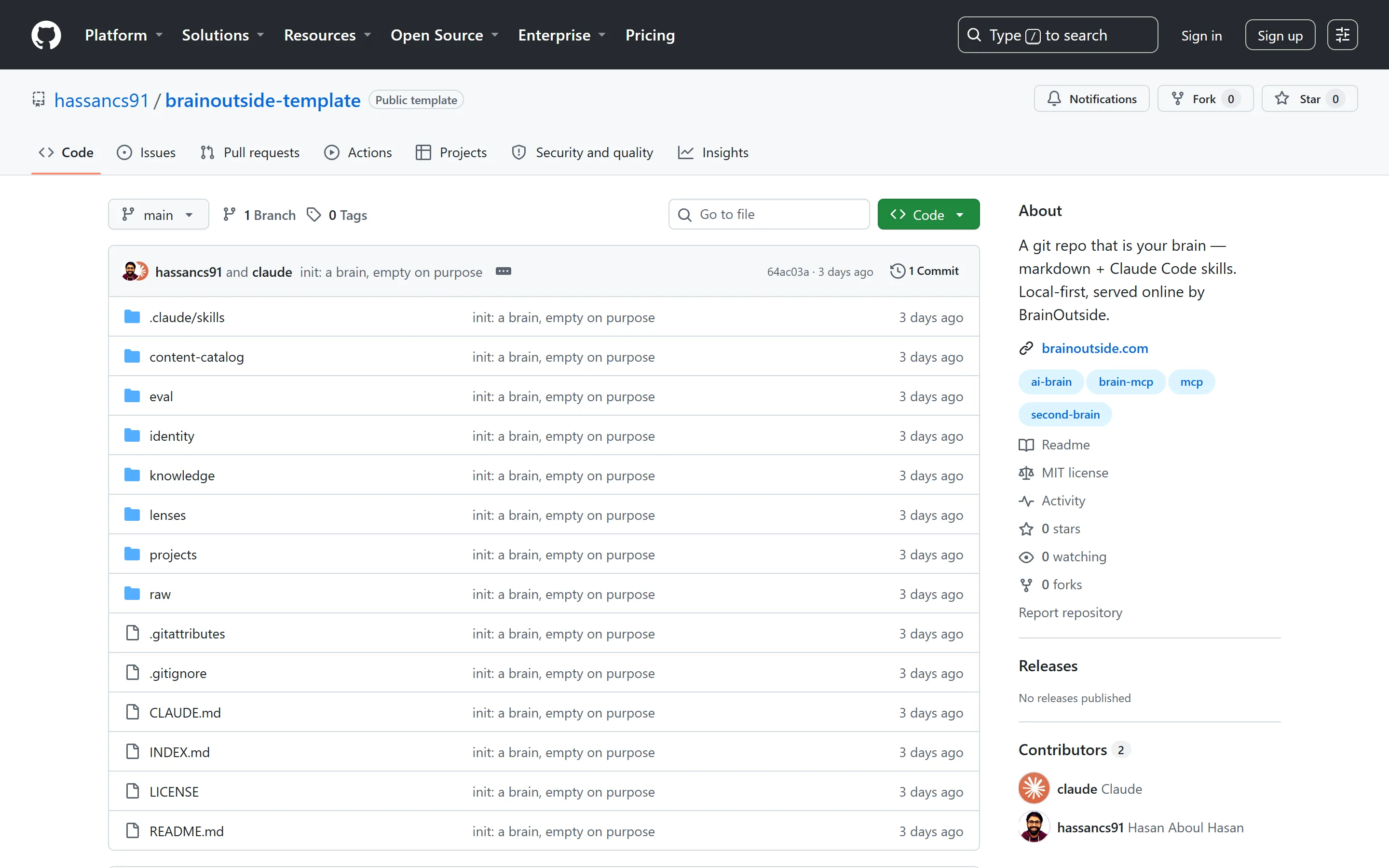
What you get is a brain that is empty on purpose: a CLAUDE.md contract that tells any Claude Code session how the brain works, folder skeletons for identity, projects, knowledge and lenses, note templates with frontmatter, and two skills. mind-feeder is the only thing that writes. mind-reader is how anything reads. That contract is why this works with zero apps installed: the repo itself is the interface.
Step 2: Fill the three identity files
Clone your new repo, open the folder in Claude Code, and write three files by hand. This is the one manual part, and these twenty minutes pay for everything that follows.
identity/core.md: who you are, what you do, who you serve. Positioning, not biography.identity/voice.md: how you write. Sentence length, words you use, words you ban, per-platform rules.identity/beliefs.md: the positions you would defend in any reply.
Nearly every retrieval loads these three files first. A weak identity layer makes everything downstream sound like a polite assistant. Write the version of you that argues back.
Step 3: Feed it and read it
Now feed it something real. In Claude Code, in your brain folder, type a plain sentence:
feed this into my brain: I've been paying managed cloud bills for years. Then I added it all up. A Vercel hobby project, a managed Postgres on one provider, a managed Redis on another. About $8,400 a year, roughly $700 a month.
The feeder does not save your text as a blob. It proposes structure, and it does not write until you approve. Here is what my first feed actually produced:
> feed this into my brain: I've been paying managed cloud bills for years. Then I
added it all up. A Vercel hobby project, a managed Postgres on one provider, a
managed Redis on another... About $8,400 a year, roughly $700 a month.

Fed. Files written:

Created
- knowledge/stories/story-2026-08-managed-cloud-bills-added-up.md
  VERBATIM: "I've been paying managed cloud bills for years. Then I added it all up."
- knowledge/takes/take-2026-08-managed-cloud-looks-cheap-apart.md
- knowledge/facts/fact-2026-08-managed-stack-8400-a-year.md
- raw/thought-2026-08-managed-cloud-vs-vps.md   (provenance archive)

Changed
- INDEX.md — three lines added under ## knowledge

Decisions worth knowing:
- Visibility: agents-only on all three — unpublished thinking with personal
  spend figures. Flip to public if you plan to publish this.
- I did NOT assert a VPS price. The source never states what the VPS costs,
  so the fact note explicitly says not to cite one.
Three things in that output are the whole philosophy. It split one thought into a story, a take, and a citable fact. It preserved my exact words as a VERBATIM quote. And it refused to invent the one number I did not give it. Feeds took 82 to 123 seconds each in my runs, 106 on average.
Reading is the same, in reverse:
using my brain, someone on X says self-hosting always turns into a maintenance nightmare. what is my honest take?
> using my brain, someone on X says self-hosting always turns into a
maintenance nightmare. what is my honest take, and which notes did you use?

Pulled through the building-in-public lens (public ceiling).

Reply (primary):
people kept telling me self-hosting means becoming your own ops team. so i
timed it. upgrading plausible v3.2.0 to v3.2.1 was a one line image tag
change: 16 seconds of downtime, and CE ships about two releases a year. the
honest cost is attention and backups, not upgrade pain.

Notes used: story-2026-08-timed-the-plausible-upgrade,
take-2026-08-self-hosting-cost-is-attention-not-upgrades,
fact-2026-08-plausible-upgrade-16-seconds + identity core/voice/beliefs.

Two things I deliberately did not do: no VPS price, because the fact note
says the source never recorded one.
The local brain is complete and useful with nothing installed beyond Claude Code. Everything from Step 4 on adds one thing: the same repo, reachable from claude.ai, your phone, and any MCP client, with tiers and an approval queue. If that is not your problem yet, bookmark this and come back.
Step 4: Get a VPS and install Coolify
The online half is one Docker Compose stack on one small VPS. I ran the whole build on a 2 vCPU, 4GB machine at $0.036 an hour, and I timed every segment on a stopwatch. 4GB is genuinely enough: across the entire day, including builds and AI indexing, host memory peaked at 2,067MB.
Any provider with Ubuntu images works. The budget pick I keep coming back to is Contabo: their entry plan costs about a third of the $14 a month I paid for this run's box, and it carries 8GB of RAM, nearly four times what the whole build peaked at.
| Contabo plan | Specs | Price |
|---|---|---|
| Cloud VPS 10 | 4 vCPU · 8GB RAM · 75GB NVMe | €4.50/mo + one-time setup fee |
| Cloud VPS 20 | 6 vCPU · 12GB RAM · 100GB NVMe | €7.95/mo, no setup fee |
| Cloud VPS 30 | 8 vCPU · 24GB RAM · 200GB NVMe | €14.95/mo, no setup fee |
Those are Contabo's EUR list prices, verified April 2026, and the advertised rate is also the renewal rate, which is rare at this end of the market. If you would rather shop around, the VPS Providers library is my audited comparison: real prices, refund policies, and the gotchas the marketing pages skip.
Create the VPS with Ubuntu 24.04, SSH in as root, and run Coolify's installer:
curl -fsSL https://cdn.coollabs.io/coolify/install.sh | bash
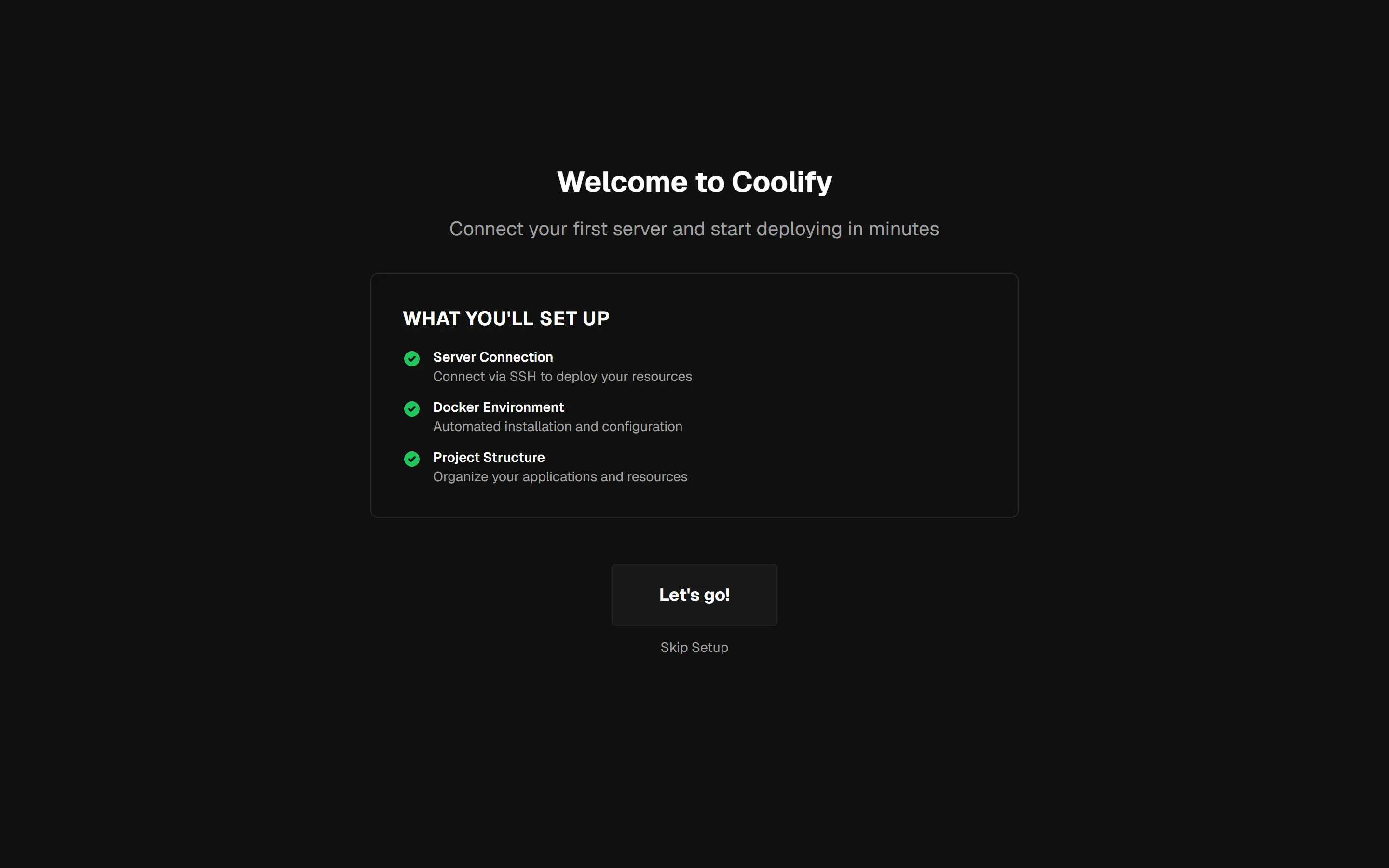
On my fresh box that took 2 minutes 51 seconds, and it installs Docker itself as part of the run. The dashboard was answering on port 8000 the moment the script finished. That one command is deliberately the whole install story on this page; DNS records, the firewall, and hardening the box without locking Coolify out get the full treatment in my Coolify install guide, the deep version of this step.
A fresh Coolify serves its registration page to whoever opens the URL first, and the first account owns the server. Register before you do anything else. While you are at it: Coolify's password rules want a symbol, which my first generated password did not have.
And this step scales past the brain. This exact VPS-plus-Coolify workflow is how I stopped paying about $700 a month in managed cloud bills: once the box exists, every extra app is just another Compose stack on hardware you already pay for. The full system, from choosing a VPS to backups, updates, and not breaking a running box, is what my Self Hosting 2.0 course covers.
Step 5: Deploy the app
In Coolify: your project, then New Resource, then Public Repository. Paste the app's repo URL and pick build pack Docker Compose:
https://github.com/hassancs91/brainoutside
Two things will try to trip you here. Both took me real minutes, so they get their own warnings.
Coolify defaults its Docker Compose Location to /docker-compose.yaml. The repo ships docker-compose.yml. You get a red "Docker Compose file not found" the moment you continue. Fix: set the location to /docker-compose.yml, save, and click Load Compose File.
Once the compose parses, Coolify shows the five services and offers domains. Set your domain on the web service only (for example https://brain.yourdomain.com; the DNS A record should already point at the box). Then open Environment Variables and set exactly two values:
POSTGRES_PASSWORD=one-long-random-string
ALLOWED_HOSTS=brain.yourdomain.com,localhost,127.0.0.1
The container's healthcheck probes http://127.0.0.1:8000/healthz. If ALLOWED_HOSTS holds only your domain, Django answers that probe with 400, the container reports unhealthy forever, and Coolify's proxy never routes your domain to it. From outside it looks like the deploy failed. It did not: it is one env var. Domain, then localhost, then 127.0.0.1, comma-separated, no spaces.
Click Deploy. Coolify clones the public repo and builds the image on your box: 2 minutes 45 seconds to running containers in my run, about 4 minutes to healthy with the TLS certificate issued. When the padlock shows on your domain, the hard part is over.
POSTGRES_PASSWORD=one-long-random-string
ALLOWED_HOSTS=brain.yourdomain.com,localhost,127.0.0.1
SERVICE_URL_WEB=https://brain.yourdomain.com
SERVICE_FQDN_WEB=brain.yourdomain.com
Step 6: The six-step wizard
Visit your domain. The server has zero users, so every route redirects to /setup. No login box, no docker exec. The wizard's own copy tells you the important thing: this page is open to anyone who can reach the server until the account exists, so create it first.
- Create the operator account. The only account this server will have.
- Point at your brain repo. Paste
your-name/your-brain-repo. - Let the server read it. It generated an ed25519 keypair at boot and shows you the public half. Add it on GitHub as a deploy key, read-only, and click Verify. Verify does a real clone: mine came back with "The server can read your brain. HEAD 9c58ffc".
- Let the server write back. A fine-grained PAT, scoped to your brain repo only, Contents: Read and write. The wizard's Verify asks GitHub whether the token can push without pushing. Mine failed here first, with a 403, because I had scoped the token to the wrong repo. That check exists because read access is not evidence of write access. If you skip this step, know exactly what you lose: my test feed later errored with "the key you are authenticating with has been marked as read only" instead of committing, so treat the PAT as required for the write-back loop.
- Connect Claude. An API key from the Anthropic console (set a spend limit), or a subscription token from
claude setup-token. The Test connection button does a real round-trip: 1,586 ms on my run. - Build. Clone, index every note's frontmatter, materialize one snapshot per visibility tier. Mine finished in about 16 seconds: "Your brain is online. 17 entities."
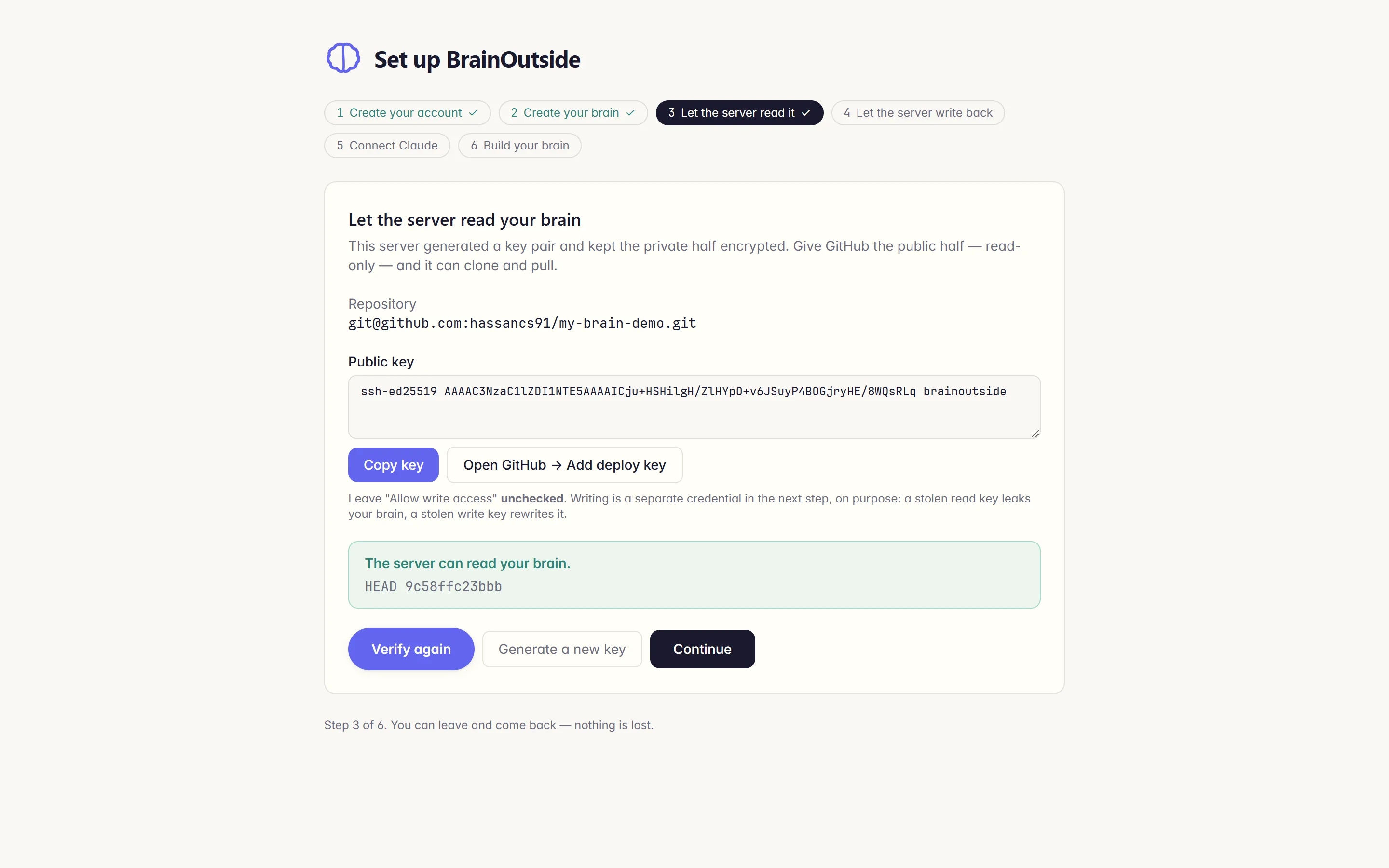
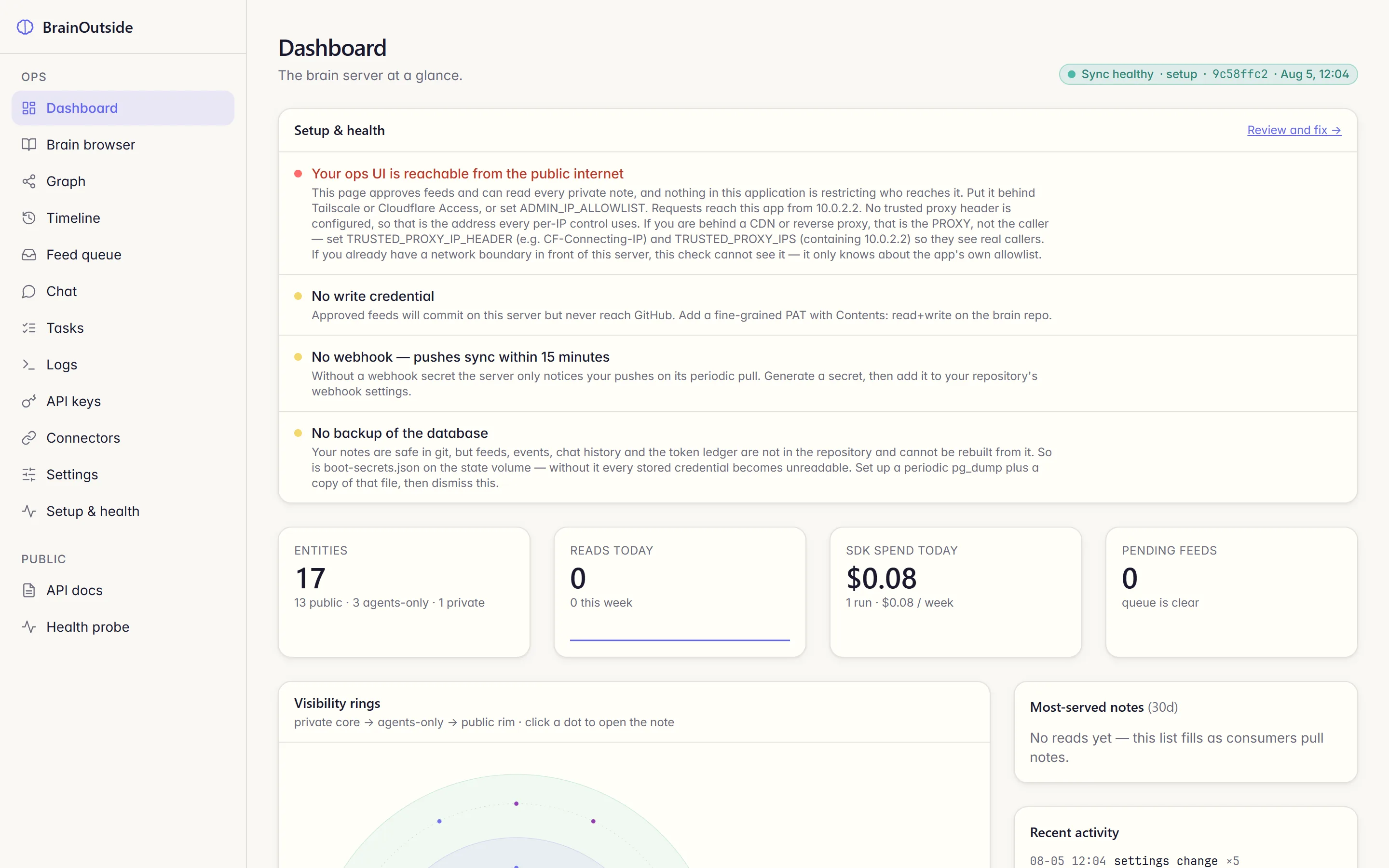
Add up the stopwatch: 56 seconds for the VPS, 2:51 for Coolify, 4:12 for the deploy, 4:45 for the wizard. 12 minutes 44 seconds from nothing to a brain online, including my failed PAT attempt.
Step 7: Connect Claude Code
On the ops page, open API keys and mint one. Keys are tier-pinned: public, agents-only, or private. For your own assistant, agents-only is the normal choice: it can read your voice file and unpublished notes, but not the private core. The secret is shown once and stored as a hash.
Then drop this into any project as .mcp.json:
{
  "mcpServers": {
    "brainoutside": {
      "type": "http",
      "url": "https://brain.yourdomain.com/mcp/",
      "headers": {
        "Authorization": "Bearer mcpsk_your-key-from-the-ops-page"
      }
    }
  }
}
That is the whole client setup. Claude Code now sees nine tools: ping, get-index, list-notes, get-note, get-lens, get-identity, get-raw, assemble-context, and propose-feed. In my timing runs, get-index answered in 380 to 424 ms over the public internet.
The tool that earns the setup is assemble-context. Hand it a task and an agent on the server reads the tier-filtered index, opens the right notes, and returns a context pack, the list of entity ids it used, and the gaps. It is not instant: 17 to 40 seconds in my three runs, because it is a real agent reading real files. Here is the half-covered case, verbatim:
"entity_ids_used": [
  "identity-core", "identity-voice", "identity-beliefs",
  "project-claude-youtube-editor",
  "fact-2026-08-claude-youtube-editor-6-step-pipeline",
  "take-2026-08-transcription-caps-the-pipeline"
],
"gaps": [
  "No figure exists in the mind for what a finished claude-youtube-editor
   video costs to produce (no AssemblyAI rate, no Claude/token spend, no
   total dollar-per-video number). The task cannot be fully completed
   without this — either ask Hasan for the number or write the intro
   without a cost claim and flag the gap for follow-up capture."
]
Step 8: Connect claude.ai
claude.ai's custom-connector dialog has nowhere to put an API key, so the credential rides in the URL path instead. The server treats that as a different, more dangerous kind of secret, and ships the whole surface off by default: without the flag, /mcp/k/<token>/ answers 404, not 401, so the address does not even admit it exists.
Turn it on deliberately. In Coolify, add one variable and redeploy (an env change means a rebuild; mine took about 6 minutes):
MCP_URL_AUTH_ENABLED=true
Then open Connectors on the ops page and mint a connector URL. It is tier-pinned like any key, rate-limited, and it expires on its own; a URL you paste and forget should age out. Paste it into claude.ai under Settings, Connectors, Add custom connector. Now your brain answers on your phone.
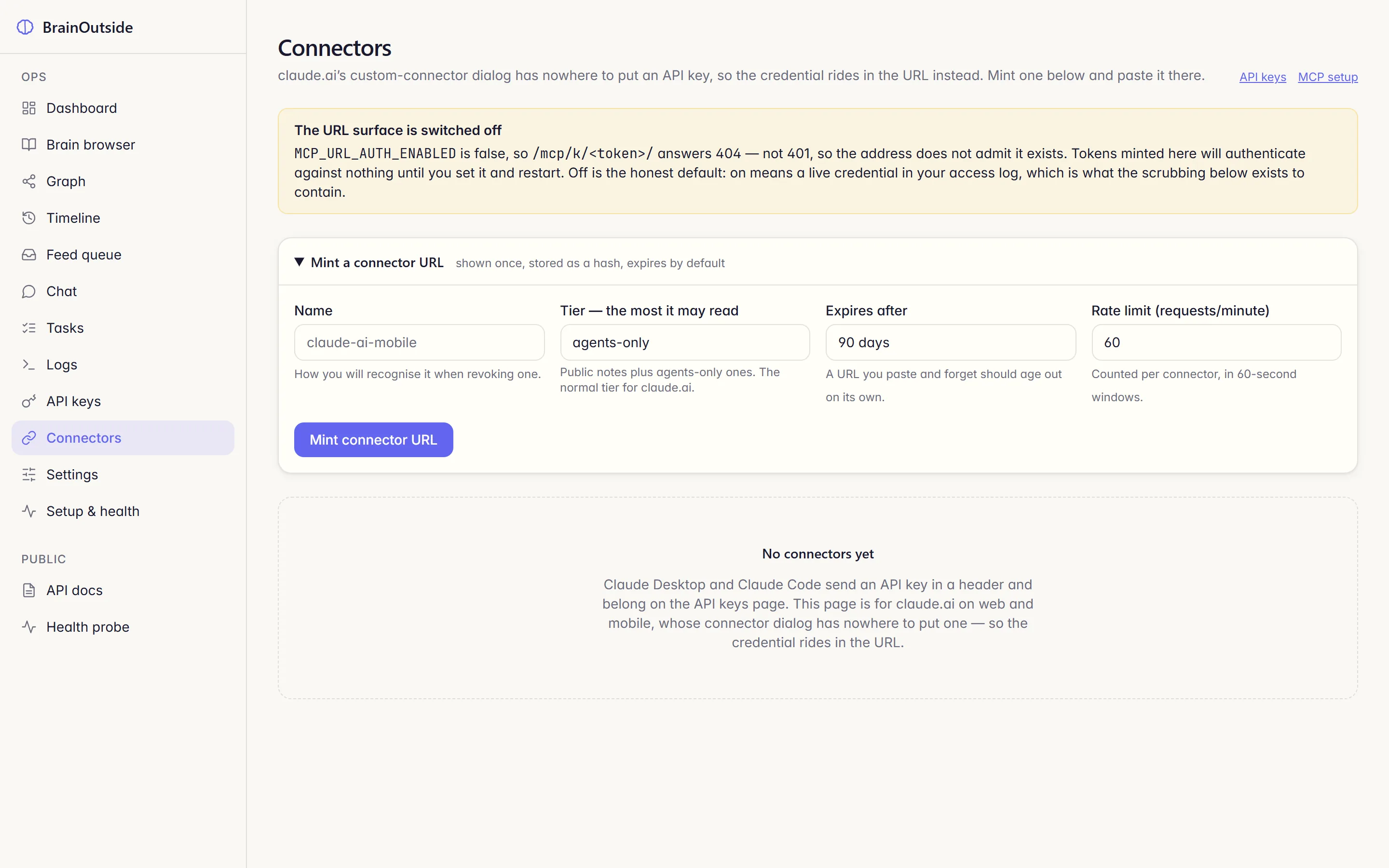
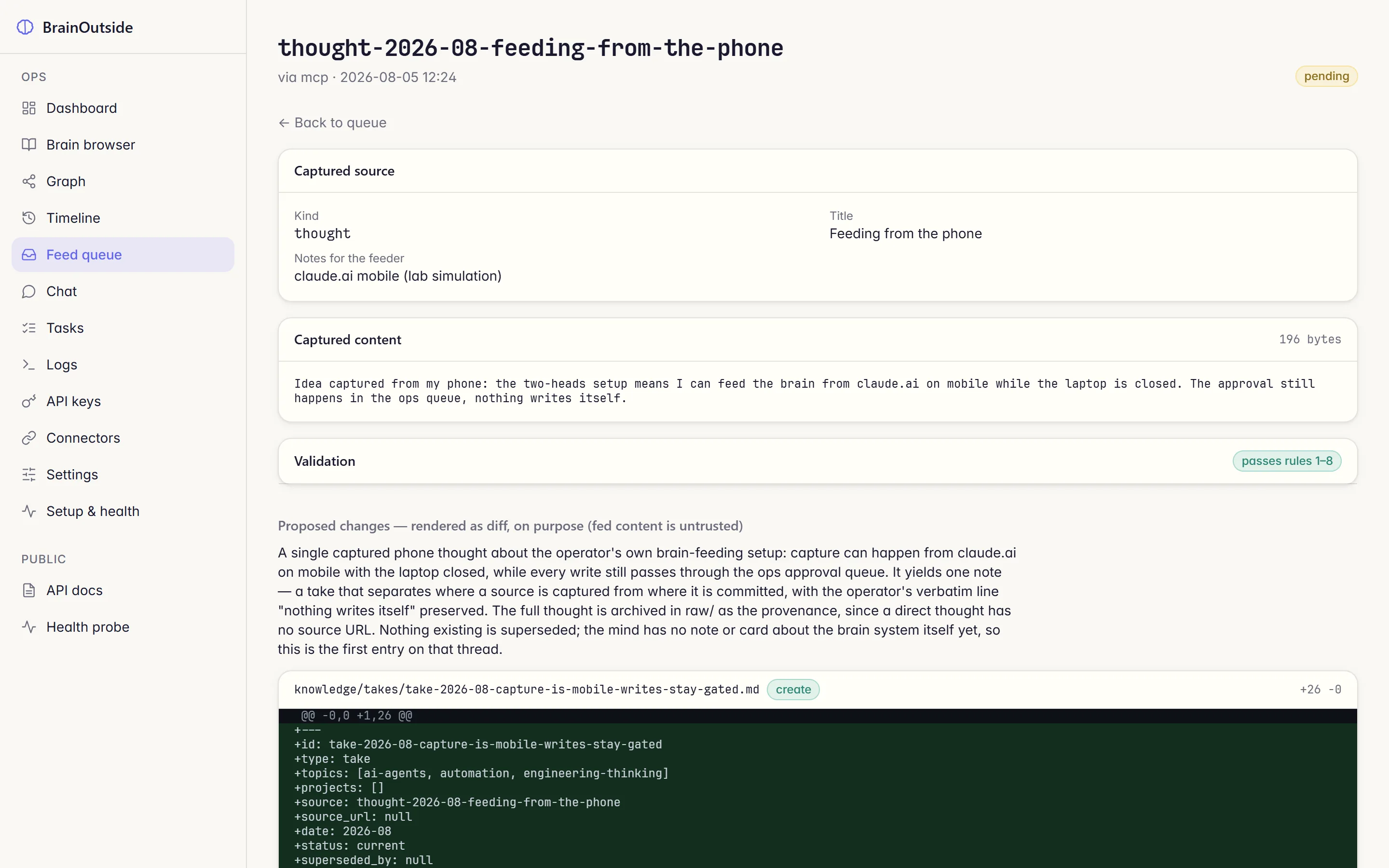
Feeding works from there too. I sent a propose-feed through the connector URL and it landed in the queue in 1.1 seconds, where it waited like every other write. Which brings us to the part that makes remote feeding safe at all.
Step 9: Add the webhook
The server never watches your repo. It pulls when GitHub tells it to. Set a webhook secret in the ops Settings page, then add a webhook on your brain repo: payload URL https://brain.yourdomain.com/webhooks/github, content type JSON, the same secret, push events only.
I measured the loop three times: commit locally, git push, poll the server. 6 seconds, all three runs, from push to the new note being served. Before I added the webhook, I pushed a commit and watched the server stay on the old HEAD: without the webhook you wait for the periodic pull, up to 15 minutes. The dashboard tells you this state honestly.
Privacy tiers and the approval queue
Two mechanisms carry the whole trust story, and both are enforced by the server, not by a prompt.
Tiers are structural. The server materializes one snapshot of the repo per tier, and a key physically reads its own snapshot. My demo brain held 17 entities: 13 public, 3 agents-only, 1 private. The agents-only key saw 16. The public key saw 13, and its identity payload had no voice file at all. And the private note? Both keys got "unknown entity", the same answer a nonexistent note gets. I verified all of it twice, over MCP and over REST: same counts, both doors.
tier: agents-only · HEAD 9c58ffc23bbb

Identity ......... 3  (incl. identity-voice)
Projects ......... 2
Knowledge ....... 10
Lenses ........... 1
visible entities: 16

> get-note take-2026-08-price-against-
  savings-not-hours   (private)
unknown entity
tier: public · HEAD 9c58ffc23bbb

Identity ......... 2  (voice file absent)
Projects ......... 2
Knowledge ........ 9
Lenses ........... 0
visible entities: 13

> get-note take-2026-08-price-against-
  savings-not-hours   (private)
unknown entity
Writes wait for you. Every write, from every door, lands in the same queue: pending, extracted into a proposed diff, and going nowhere until you click Approve. The proposal is rendered as a diff on purpose, because fed content is untrusted input. This is the "agents propose, you approve" rule with a UI around it.
The honest caveat, straight from the product's own landing page: on the self-hosted server, private notes are only as private as your VPS. Put the ops UI behind an IP allowlist or Tailscale, keep the repo private, and back up the state volume. The dashboard's health panel nags you about exactly this, and it is right to.
A memory MCP server vs a second brain
If you searched "memory MCP server", you found the other family: the official knowledge-graph memory server, Mem0, and a directory of 775 more. They solve session amnesia: an agent stores entities and observations as it works, so the next session remembers your project. For coding context, they are great, and I use that pattern too.
A second brain is a different animal on five axes. Files you can read instead of graph triples. Your identity and voice, not just facts about code. Human-approved writes instead of silent accumulation. Tier-filtered access instead of one pool. And git history instead of a database you hope is fine. The trade is real: a memory server writes itself, and a brain makes you the editor. For the thing that speaks as you in public, I want the editor's chair.
The proof: same prompt, with and without
Two tests. Same Claude CLI, same model, same prompt, single run each, outputs unedited. The only difference: one directory had the .mcp.json from Step 7 and an instruction to ground through assemble-context.
Test 1: an X reply. The post being answered: "Self-hosting sounds nice until you become the unpaid sysadmin of your own life. I'll pay the $20/mo, thanks."
Read the left one again. It is fluent, reasonable, and it states a position I do not hold: that I pay for anything with auth attached. I moved all of it, auth included, onto one VPS. That is the quiet failure mode of ungrounded AI: not nonsense, but a confident stranger wearing your name. The right one cites 16 seconds, twice a year, $700 a month, and closes on my actual take. Every claim traces to a note I approved.
Test 2: a book chapter. The prompt asks for chapter 9's opening paragraph, calling back to "chapter 2's exact numbers" on self-hosting economics.
Without the brain, the model did the honest thing available to it: it refused to invent and handed back a form with five blanks. With the brain, chapter 9 opens with the same $8,400, the same 8GB comparison, the same 16 seconds that "chapter 2" holds, because both chapters draw from the same notes. Consistency is not a writing skill. It is a storage decision.
The cost of grounding: 49 and 70 seconds instead of a few. You are trading seconds for output you do not have to fact-check against your own life.
What else to plug it into
Everything below works today with the same two doors. I have not run controlled side-by-sides on these the way I did above, so they are listed as uses, not proofs:
- Newsletter and article intros. "Using my brain, draft the intro about X": your stories and numbers, not filler.
- Video descriptions and titles. Feed each published video as a content-catalog entry, and descriptions stop contradicting old ones.
- Course outlines. Your analogies and your lesson order come from your lessons notes, not from the average of the internet's courses.
- AI coding sessions. A project card per repo means "read my brain's card for this project" replaces re-explaining your stack every session.
- Email and reply drafting. The x-reply pattern generalizes: value first, your voice, no invented facts.
What this actually costs
- The local half: $0. Two free MIT repos plus whatever Claude plan you already have.
- The VPS: about $14/mo at the 4GB tier I tested ($0.036/hr). Measured peak memory across the whole build day: 2,067MB of 3,915MB, so there is no need to buy bigger to start.
- Claude on the server: my entire lab day, including the index build, feed extractions, chat, and every assemble-context run on this page, totaled $1.03 in API spend. The settings page shows a per-day figure and a daily cost cap you can set.
- Your time: 12 minutes 44 seconds of setup, measured, plus the twenty minutes of identity writing that actually makes it yours.
FAQ
What is an AI second brain?
A folder of markdown files in a git repo that your AI tools read over MCP: your identity, your voice, your projects, and dated notes of what you know. Not a vector database you rent, and not a SaaS you upload your life to. You can read every file, edit any of them, and leave with the folder at any time.
How is this different from Claude's built-in memory?
Claude's memory lives inside one product, on Anthropic's side, and you mostly cannot read it as files. A second brain is the inverse: files you own, readable by any client over MCP or REST, with git history, human-approved writes, and visibility tiers. Use both; they do different jobs.
Do I need a vector database or embeddings?
No. The brain is small, structured, and indexed by frontmatter. Retrieval is an agent reading a tier-filtered index and opening the notes it needs, and assemble-context tells you which entities it used and what was missing. At personal scale, honest structure beats similarity search.
Is my data private?
The repo is private, every key is tier-pinned, and a note above a key's tier answers "unknown entity", the same as one that never existed. I verified that over both MCP and REST. The honest part: on the self-hosted server, your private notes are only as private as your VPS, so lock the ops UI down and treat backups as part of the deal.
What does it cost to run?
The local half costs nothing beyond your Claude plan. The online half ran on a $0.036/hr 4GB VPS with 2.2GB of RAM to spare, plus Claude usage on the server: my whole lab day cost $1.03 in API spend.
Is it open source?
Yes. Both repos are free and MIT licensed: the brain template and the app. There is no hosted version and no account with anyone. You deploy from the public repo, and your brain never leaves machines you control.
Related
- Install Coolify on a fresh VPS: the 2026 starter: the deep version of Step 4, including DNS, firewall, and the $8,400/yr story this guide's demo notes came from.
- How to edit videos with Claude Code: the same build-with-skills pattern, pointed at video instead of memory.
- Self-host Plausible Analytics: where the 16-seconds-of-downtime measurement comes from.


Get the free Vibe Engineering Blocks guide
The exact building blocks I use to ship real products with AI — yours as a free PDF.
Questions & Discussion
Ask a question about this guide →Have a question? Ask it in the community — it's tagged #guide and linked back here. Reading is open to everyone; posting needs a free account.
Loading questions…