
Getting started
Ten minutes to a brain that answers in your own words. You need Claude Code, nothing else. The server is a separate decision and you can make it later. Later costs nothing, because it reads the same repo.
What you get at the end
The local loop
10 minutesA private git repo of markdown that is your brain. An agent that proposes notes into it, and answers from it. No server, no account, no infrastructure.
The online head
optional, 5 more minutesThe same repo, served over REST to every agent you run. A first run wizard, and an approval queue you review in the browser.
Step 1. Create your brain
Open
brainoutside-template
and press Use this template. Name it what you like.
my-brain is fine.
Make it private. This repo will hold your unpublished thinking. Private is not a recommendation.
One thing worth knowing: GitHub creates the repo before it finishes
copying the files in. It was empty for 0.8 seconds. If you move fast,
refresh until you see CLAUDE.md in the file list.
Then clone it:
git clone https://github.com/<you>/my-brain.git
cd my-brain
What you get is a skeleton, not a demo. Folders, templates, a contract, two skills, and zero notes. That is on purpose. An empty brain that is really yours beats a seeded one you have to clean out.
Step 2. Open it with Claude Code
Open the folder in Claude Code. Nothing to install into the repo, nothing to configure. The two things that matter are already there:
-
CLAUDE.mdis the contract. It is what makes an agent's retrieval trustworthy: the note schema, the visibility rules, the taxonomy, and the rule that nothing is ever deleted, only superseded. -
Two skills are the only interfaces.
mind-feederwrites, and only after you approve.mind-readerreads.
Step 3. Feed it something
Say it in plain language. A link, a transcript, or just a thought:
feed this into my brain: I have come to think that documentation
written without running the commands is worse than no documentation,
because it is confidently wrong.
The feeder reads your contract, classifies the source, checks what is already in the brain, then comes back with a proposal. Which notes it would write, of what kind, at what visibility, with the exact quote it would keep.
Then it stops. Not as a formality. After the proposal
comes back, knowledge/ still holds zero notes and
git status is clean. Nothing is written until you say so.
Say approved and it writes the files and commits them.
Step 4. Ask it something
Start a fresh session, so nothing carries over, and ask:
using my brain, what is my take on writing documentation?What comes back is not a summary of the internet. It is your note, your words, and where they came from:
Your mind has exactly one note on this, and it's current:
take-2026-08-docs-from-real-sessions(2026-08,agents-only) ...Provenance: fed as a direct thought ... Full version in
raw/thought-2026-08-docs-from-real-sessions.md.
It also names what is missing. With the identity files still blank,
anything written as you has the position but not the
voice. Fill in identity/core.md,
beliefs.md and voice.md when you have twenty
minutes. They get loaded on nearly every retrieval, so they matter more
than any single note.
That is the whole local loop, and you can stop here. Feed, approve, ask. The three turns above took about two minutes of agent time. Everything below is optional.
Adding the online head
The local loop serves one tool on one machine. The server serves the same repo to every agent you run. It adds an approval queue you review in a browser, and it enforces visibility tiers on the way out.
Every note carries one of three visibilities:
public, agents-only, or
private. That is its tier. Each caller gets a tier too,
and the server filters on the way out, so a caller never receives a
note above its own.
You need somewhere to run Docker, and a Claude credential. Clone the server repo, which is a different repo from your brain, and give it two environment variables:
POSTGRES_PASSWORD=<any long random string>
ALLOWED_HOSTS=localhost,127.0.0.1
Everything else generates itself on first boot. The
SECRET_KEY, the encryption key for stored credentials, and
the admin path get created once and written to a volume.
Trying it on your own machine over plain http?
Add SECURE_SSL_REDIRECT_ENABLED=0. It defaults on, which
is correct behind a TLS proxy and fatal on localhost. Every request
redirects to https, including the setup page that would
let you fix it. On a real deployment with TLS, leave it alone.
docker compose up -d --buildThe first build takes about two minutes. From there it is another 23 seconds before the setup page answers.
Compose picks a host port for you, so check which one before you open a browser:
docker compose port web 8000Then open that address at /setup/.
The first run wizard
Six steps, all in the browser. There is no terminal work after
up. Clicked by a script, the six steps take 19 seconds. You
will be slower, because you are reading. Most of the wall clock is
waiting on GitHub and Claude, not on the server.
1. Create your account
One operator account. Until you make it, that page is open to anyone, so do this before the server is reachable from the internet.
2. Create your brain
Point it at the repo from step 1. The plain
owner/name form is enough. It works out the clone URL
itself.
3. Let the server read it
The server generates its own SSH keypair and shows you the public half. Paste that into your repo, under Settings → Deploy keys, and leave write access off. Then press Verify. It clones for real and tells you whether it worked. The private half never leaves the server.
4. Let the server write back optional
A GitHub token, so approved notes get pushed to your repo. Skip it and everything else still works. You just approve into the server's own copy.
The permission is Contents: Read and write, and a fine grained token must also list your brain repo under Repository access. Miss either one and the token looks valid but cannot push. Press Verify and the server proves it can really write, before you trust it.
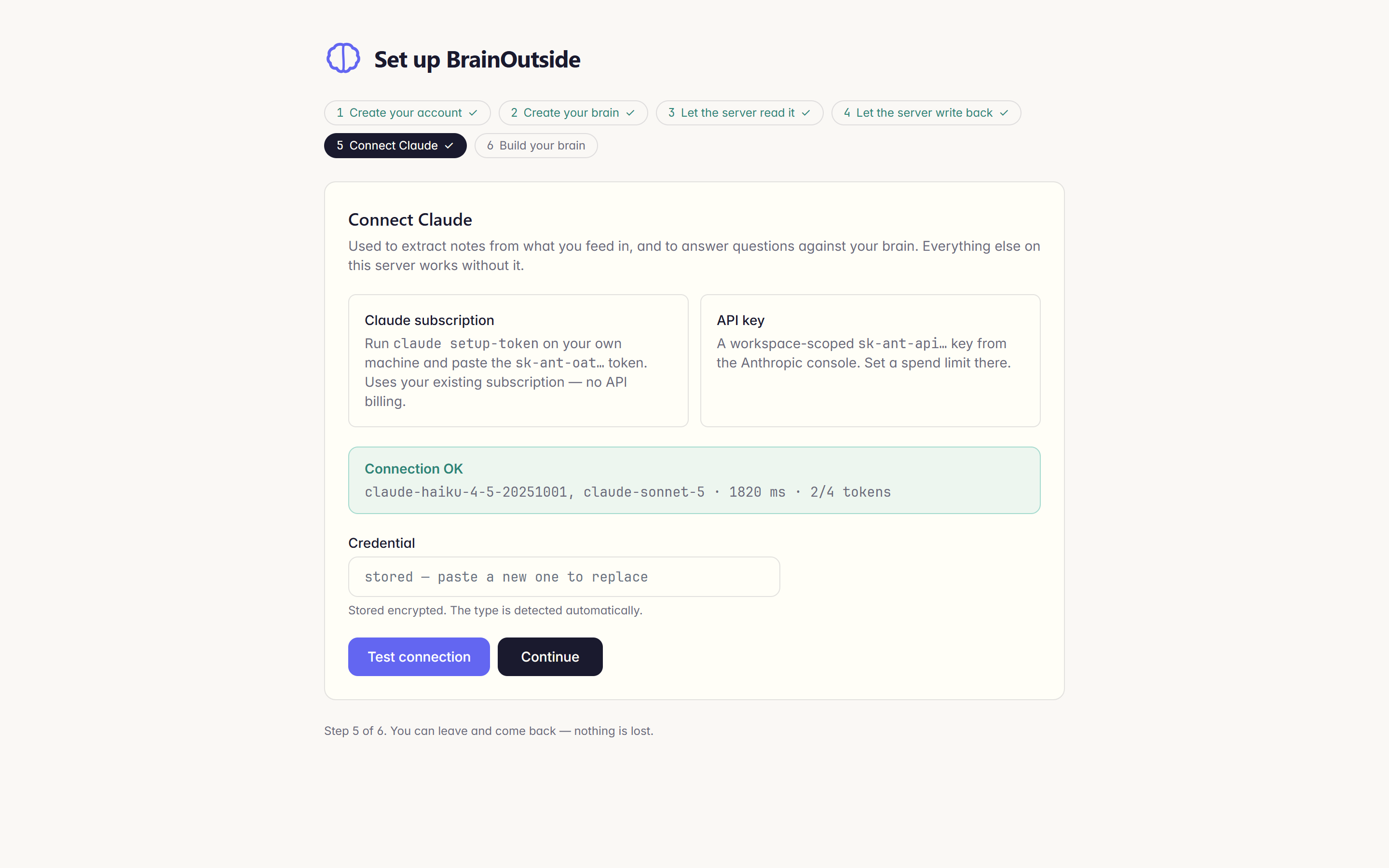
5. Connect Claude
An API key works. So does a token from the Claude subscription you
already pay for, and that is the point. Run
claude setup-token on your own machine and paste the
result. No API billing.
Press Test connection and you find out now, not at your first feed.
6. Build your brain
Clone, index, and build a separate snapshot per visibility tier. On a brain this size it took 3.4 seconds, and it reports what it indexed: 6 entities, and the commit it read them from.
You can leave the wizard and come back. It works out what is already done by looking at the real state of the system, not by remembering where you were. So a half finished setup, or one you redo later, picks up correctly.
Your first feed through the queue
Same idea as the local loop, with the review step moved into a browser. Paste a thought or a URL into the feed queue. Extraction starts on its own, there is no button to press, and a proposal appears when the agent is done. A short source took 50.3 seconds.
What you review is a diff. That is on purpose. What you fed in is untrusted text, and rendering it as a diff means you are reading a change, not being pitched to. You get the agent's reasoning, the validator's verdict, and every file it would touch.
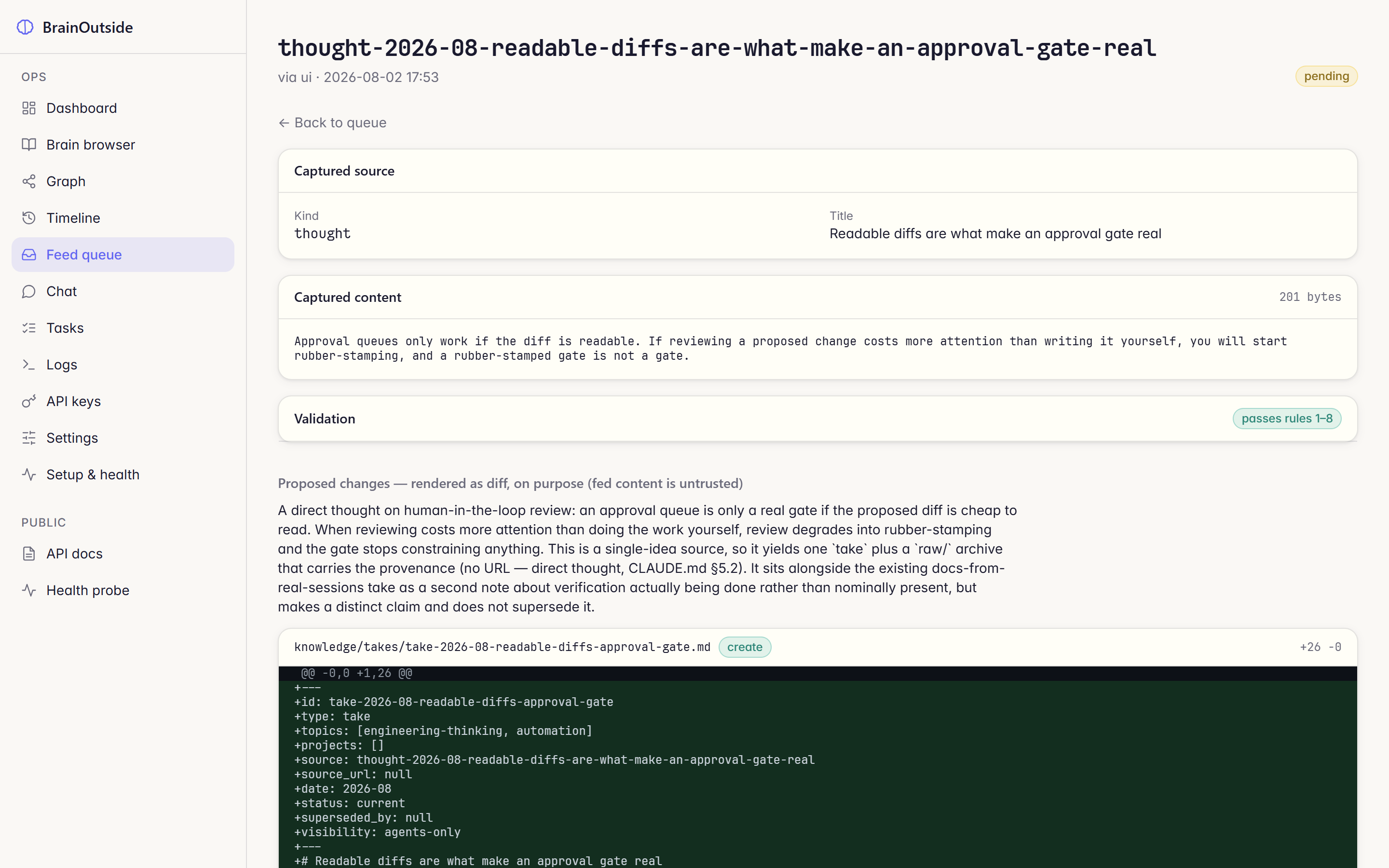
Approve, and it becomes one commit in your repo, authored by the server, so its writes stay distinguishable from yours. Reject with a reason and nothing is written at all.
Point your agents at it
This is the part the local loop cannot do. Any agent you run, on any machine, can now read your brain.
In the ops UI, open API keys and mint one. Give it a
name you will recognise later, and a tier. agents-only is
the right default for your own tools: it reads your notes and your
identity files, and never your private ones. The key is shown once.
Then point Claude Code at it with an .mcp.json:
{
  "mcpServers": {
    "brain": {
      "type": "http",
      "url": "https://your-domain/mcp/",
      "headers": { "Authorization": "Bearer <your-key>" }
    }
  }
}
Ask it something in a project that has nothing to do with your notes:
using the brain MCP server, what is my take on documentation?It answers from your brain, and cites the note:
Your take on documentation, from note
take-2026-08-docs-from-real-sessions("Docs written without running the commands are worse than none") ...Topics tagged:
teaching,engineering-thinking. Full underlying thought lives atraw/thought-2026-08-docs-from-real-sessions.md.
The tier is enforced on the server, not by the agent. The same
question through a public key, on the same server over the
same transport, comes back:
The brain has no note on documentation. ... So there's nothing to cite. If your documentation take lives in a note above the
publicvisibility tier, this client won't see it ...
Two entities at public, seven at
agents-only, from one brain. The agent never sees what it
is not allowed to see, so it cannot leak it. That is the whole point of
tiers.
Where to go next
Concepts
Note kinds, visibility tiers, lenses, and why nothing is ever deleted. Read this before you feed much.
Feeding
The three ways in, what the extraction agent may and may not do, and the validator's rules in plain language.
Self-hosting
The deployment reference. Coolify, the full environment table, backups, and updating.
Security & privacy
How tiers are enforced, how credentials are split, and the honest limits of self-hosting private notes.